
On this page
The site is half built. Then the client sends a quick message: "Can we add a blog? Should be easy." It isn't easy. It's two weeks of work nobody priced. You can say yes and work late for free, or say no and feel like the bad guy. Or you can have a project change request process that makes the answer boring.
A project change request process is a short, agreed routine for handling anything outside the scope you signed. The client asks in writing, you work out what it costs in time and money, someone on their side decides, and you log the result. This guide walks through the five steps, what a good request includes, how to say "not now" kindly, and a free change log sheet that works out the cost from your own hourly rate.
Why scope changes go wrong#
Change itself is normal. California's project management framework says it plainly: "It is rare for a project to execute exactly as planned throughout its lifecycle without the need for some sort of change" (California Department of Technology, CA-PMF Change Request Form Template with Instructions, accessed 28 October 2026).
So the problem isn't that clients ask for changes. It's how the asks arrive and what happens next:
- They come in sideways. A comment on a call, a line at the end of an email, a Slack message on a Friday. Nobody writes them down.
- Nobody prices them. Small asks feel too small to quote, so they pile up until the project is a week late.
- Nobody decides. The person who asked isn't the person who holds the budget, so you start work that gets undone later.
- Nobody remembers. At the final invoice, the client recalls the blog as "part of the plan" and you have no record that says otherwise.
A project change request process fixes all four with the same move: every change goes through one door, and every change gets a written answer.
The project change request process in five steps#
Most public guides use some version of the same steps. Vermont's state project template, for example, runs from "Generate Change Request" through logging, evaluating, impact, a decision and implementation (State of Vermont Agency of Digital Services, Change Management Plan template, accessed 28 October 2026). For a small agency or a freelancer, five steps are enough:
| Step | Who does it | What happens |
|---|---|---|
| 1. Request | The client | They describe the change in writing, in one place, with a reason and a deadline |
| 2. Assess | You | You estimate the extra hours, the cost at your rate, and the effect on the deadline and on other work |
| 3. Decide | The client's decision maker | They say yes, no or "not now" to your estimate, in writing |
| 4. Update | You | You change the plan, the timeline and the quote, then tell the team |
| 5. Log | You | You record the request and the decision in a change log that both sides can see |
Put your project change request process in the proposal or kickoff deck before work starts. One sentence will do: "Anything outside this scope goes through our change request form, and we'll send you the cost and the timeline effect before we start it." Clients take it far better on day one than in week six. If you send a client onboarding questionnaire at kickoff, the change request form link can go in the same welcome email.
What a good change request includes#
A vague request gets a vague estimate. Ask for enough detail that you could price the change without a call. California's template asks the requester to explain "the problem that is causing the need for change, benefits of making the proposed change, and risks / impacts of not making the change" (CA-PMF, same source). You don't need a form that formal, but the core questions are the same:
- Who is asking, and for which project. Name, email and project, so requests don't get mixed up across clients.
- What they want to change or add. In their words, as precisely as they can.
- Why now. What changed on their side, and what happens if it waits. This often turns a "must have" into a "next phase".
- What it touches. Which agreed deliverables the change replaces or affects.
- How urgent it is. Needed now, within two weeks, before the project ends, or no fixed date.
- Whether the deadline can move. If it can't, ask what they would drop to fit the change in.
- Whether there's budget. Yes, no, or "I need to ask". A "no" tells you to lead with trade-offs, not a price.
- Who signs it off. The person who can say yes to the cost. If that's someone else, get their name, role and email now.
The last question saves the most pain. A change that the marketing lead asks for and the finance lead never agreed to is a dispute waiting to happen.
Assess impact on time, cost and risk#
Vermont's template assesses each request for its impact on "baseline scope (additions or deletions), schedule (impact on milestones), and total project costs" (State of Vermont, same source). For a small team, the baseline is the brief the client signed, and our project brief template gives you one to measure each change against. The rest becomes three quick questions.
Time. How many extra hours does the change need, including design, build, testing and the extra round of feedback? Estimate it honestly. A one-line request can hide a day of testing.
Cost. Multiply the hours by your hourly rate. If you price by the project, use the rate you used to build the original quote, so the numbers line up. The change log sheet below does the sum for you once you type your rate.
Risk. What else moves if you say yes? Check whether the change pushes a milestone, pulls someone off another task, or breaks something already approved. Write it in one sentence: "Adding the blog moves launch from 9 to 16 January unless we drop the careers page."
Send the estimate back in writing within a day or two, even when the answer is "this one is small and free". Free changes still go in the log. They add up, and the log shows the client how much you've absorbed.
Good to know: your contract decides how changes are priced and agreed. This guide is general advice for running the process, not legal advice, so check your own agreement or ask a qualified adviser if a change turns into a dispute.
Say yes, no or "not now" without the drama#
Once the client has your estimate, the decision step of the project change request process starts. They make the call. You need a clear answer, in writing, from the person who signs it off. Vermont's template is blunt about it: "Every documented change request needs to be either approved or rejected by the Project Sponsor and Project Manager" (State of Vermont, same source).
There's a useful third answer too. California's change control board can send a request back for rework, decline it, defer it "until later in the project", approve it, or record that the requester withdrew it (CA-PMF, same source). For an agency, "not now" is the friendliest word on that list. Here's how to frame each answer:
- Yes. "Great. The blog adds 14 hours, so 1,400 at our rate, and launch moves one week. Reply yes and we'll start on Monday."
- No. "That's a bigger piece than this project can carry without moving launch. We'd suggest quoting it as a separate phase after go-live."
- Not now. "Let's park the hero video until after launch. It's in the change log, so it won't get lost."
Keep the tone flat and friendly. You're not refusing the client, you're showing them the price tag, which is exactly what they'd want from any other supplier. If the change means more money up front, our guide on how to ask a client for a deposit has wording for that part, and the quote request form guide covers pricing new work in the first place.
Keep a change log the client can see#
The change log is the last step of the project change request process, and the one people skip. It's one row per request: what was asked, when, by whom, the extra hours, the cost, the decision and the date. It's the record you'll be glad of at the final invoice, and it's the best answer to "I thought that was included".
Share it at every check-in. When the client sees five small changes adding up to 15 hours, the next "quick tweak" gets a second thought. When they see you said yes to most of them, they trust the process.
The free change log (Excel) has everything above. Type your hourly rate once, then log each request with its hours. The sheet works out each cost. Then pick a decision from Approved, Declined, Not now or Pending. A request with no decision yet counts as Pending. The Summary tab shows requests, hours and cost for each decision, plus two totals: what's approved so far and what's still waiting. It ships with five EXAMPLE rows from a website project, so you can see a filled-in log before you clear it.
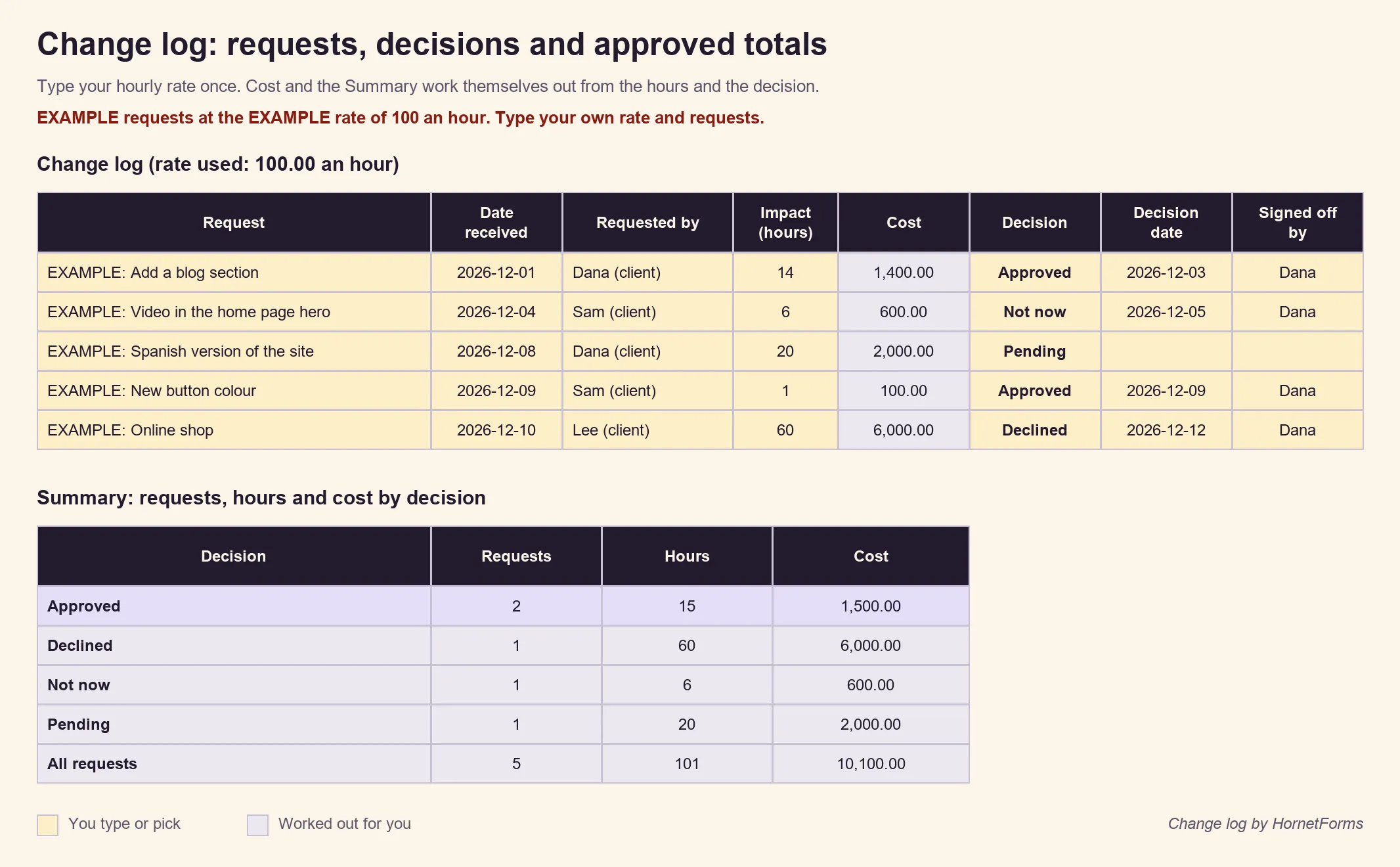
Example data only. Swap in your own rate and requests.
Prefer another tool? The change log as a CSV has the same columns and the example rows, ready to import into whatever you already use.
Collect change requests with one form#
Step one of any project change request process works best when the client has one place to ask. HornetForms has a free scope change request template with 13 questions on one page, covering every item from the list above: name, email, project, the change, why now, what it affects, urgency, the deadline, budget and who signs it off.
Three pieces of logic keep it short:
- Answer "No, the deadline can't move" and a question appears asking what could be dropped to fit the change in.
- Answer "No" to extra budget and a note appears: you'll send a revised quote before any work on the change starts.
- Pick "Someone else on my side" for sign-off and the form asks for that person's name, role and email.
The thank-you screen tells the client you'll come back with the cost and the timeline effect before starting anything, which sets the right expectation from the first click. If you want the client to sign the request itself, add a signature question, one of the 20+ question types, as a sign-off field. The decision still happens between you and the client, and your change log records it.
Each response can go where you already work, on every plan:
- An email to you for each new request, once you turn on notifications for the form. They're off until you switch them on.
- A Google Sheets row for each request, ready to copy into your change log.
- A Slack message to your project channel, so the team sees a change before anyone starts on it.
- A PDF of the response, which you can download and keep with the quote.
Our guide to where your form responses can go shows each option, and the integrations page has the full list. Responses are unlimited within fair use on every plan, so a demanding client never hits a response limit halfway through the project.
Three ways to use it:
- Open it in HornetForms. See the change request form template page, or preview it live and click Use this template to sign up and open your own copy. Add your project name and send the link to your client at kickoff.
- Print it. Download the PDF, US Letter, the PDF, A4 or the Word (DOCX) version.
- Change the questions. Add your own, like a file upload for mock-ups, and keep the ones that matter to you.
Set up your change request process this week#
You don't need a project management system to run a calm change request process. A project change request process for a small team is four things: one sentence in the proposal, one form for requests, one written estimate per change and one log. Set them up before your next kickoff and the "can we just add..." message turns into a routine.
HornetForms is free forever on the Free plan, and the features page has the wider tour. Sign up for free and send your next client the change request form with the welcome email.