
On this page
A new lead says they "just need a simple website." You quote for five pages. Three weeks later the simple website has a booking system, a members area and 40 blog posts to move from the old site. The quote was wrong because the questions came too late.
A web design questionnaire fixes the order. The client answers the questions that change the price before you write a number down. This guide gives you 35 questions in six groups, explains why each group matters, and shows how to turn the answers into a scope. At the end there's a free printable version and a scope worksheet that adds up your hours from your own rates.
Questionnaire, brief or call#
These three get mixed up, and each one does a different job.
- A questionnaire comes first. The client fills it in on their own time, before you quote. It asks about goals, pages, features, access and budget.
- A call comes next. You read the answers, then use 20 minutes to dig into the gaps. "You ticked online payments. What are people paying for?"
- A brief comes after the client says yes. It's the signed-off document the project runs on.
Skip the questionnaire and the call turns into a slow interview. Skip the call and you quote from answers you never checked. Use both, in that order.
It's also not the short form on a client's website: our quote request form template covers that. If the client has already signed and you need logins, brand files and contacts, that's a different form. Our client onboarding questionnaire covers the after-yes part. This one is only for the before-quote part, and only for websites.
You and the project#
Start easy. These five questions take a minute and tell you what kind of job it is.
- Business or organisation name, and your current website address (if any)
- In one or two sentences, what does your business do?
- Is this a new website or a redesign?
- Why now? What prompted the project?
- Who is the main contact, and who else has a say in decisions?
Question 4 is the sleeper. "Our old developer vanished" and "We're launching a new service in March" lead to very different projects. Question 5 saves you from the classic surprise: the business partner who appears at the design review with opinions.
Goals and audience#
A site without a goal gets judged on taste. Taste is hard to sign off.
- What are the top three things the new site must do? (For example: bring in quote requests, take bookings, answer common questions.)
- How will you know the site is working six months after launch?
- Who are your main customers or visitors?
- What do they most need to find or do on the site?
- Name two or three competitors. What do you like or dislike about their sites?
- What should a visitor do first when they land on the home page?
Question 7 turns a vague goal into something you can measure. "More enquiries" becomes "about 10 quote requests a month instead of two." That number shapes the forms, the calls to action and the home page.
Pages, features and content#
This is where quotes go wrong, so ask in detail. Tick boxes work better than open questions here, because clients rarely know the names for what they want.
- Which pages do you need? (Home, About, Services, Pricing, Portfolio or case studies, Blog, Contact, FAQ, Careers, Other)
- Which features do you need? (Contact form, Quote request form, Booking or scheduling, Newsletter sign-up, Online payments, Blog, Search, More than one language, Member or client login, Other)
- If you need payments or bookings, what are they for?
- Roughly how many pages, products or posts will the site launch with?
- Who will write the words for each page?
- Do you have a logo, photos or video ready, or do they need to be made?
- What content from your current site should move across?
- Which tools must the site connect to? (For example email marketing, a CRM, a booking tool, analytics.)
Questions 16 and 18 hide the most work. Copywriting and content moves eat hours, and clients often assume they're included. If the answer to 16 is "you will," price it. If the answer to 18 is "everything," ask how many pages "everything" is.
| If they tick... | Ask on the call |
|---|---|
| Online payments | What do people pay for, how often, and in which currency? |
| Booking or scheduling | Which tool do they use today, and who manages the calendar? |
| More than one language | Who translates, and do all pages need every language? |
| Member or client login | What do members see that visitors don't? |
Look and feel#
Design feedback gets easier when you agree on the words first.
- Do you have brand guidelines (logo, colours, fonts)? Please attach them.
- Share links to two or three sites you like, and say what you like about each.
- Any sites, colours or styles you don't want?
- Three words that describe how the site should feel
- Does your audience or sector expect any accessibility standard, or need larger text, captions or other help?
Question 22 is underrated. A client who hates dark backgrounds will tell you after the first draft unless you ask before it. Question 21 works best with the "say what you like" part. Without it, you get three links and a guessing game.
Domain, hosting and access#
Launch days stall on access. The client doesn't know who registered the domain in 2014, and the person who did left the company.
- Do you own a domain name? Which company is it registered with, and who has the login?
- Where is the current site hosted, and who manages it?
- Which content management system do you use or prefer, if any?
- Who should get admin access after launch?
- Who will look after updates and backups after launch?
Good to know: never ask for passwords in a questionnaire. Ask who holds each account, then send an invite or ask the client to add you as a user. Passwords in a form end up in exports, inboxes and spreadsheets, where they don't belong.
Budget, timeline and sign-off#
Ask about money in ranges. People skip a blank "What's your budget?" box. They'll tick a range.
- What budget range have you set aside? (Under $2,000, $2,000 to $5,000, $5,000 to $10,000, $10,000 to $25,000, $25,000+, Not sure yet)
- Is there a fixed launch date? What's driving it?
- Who signs off the design and the finished site?
- How do you prefer to give feedback? (Calls, email, comments on a preview link, a mix)
- Do you want ongoing support or maintenance after launch?
- Anything else we should know before we quote?
Change the budget ranges to fit your own prices. If your smallest site starts at $3,000, a client who ticks "Under $2,000" deserves a kind, quick answer instead of a full proposal.
Send your web design questionnaire as a form that branches by project type#
Thirty-five questions sounds like a lot. On paper it is. In an online form, nobody sees all 35, because the form only shows the questions that apply.
Here's how that looks in HornetForms:
- Branch on the project type. Question 3 asks "New site or redesign?" A show rule displays questions 18 and 26 (content to move, current hosting) only for a redesign.
- Follow up on ticked features. When someone ticks Online payments or Booking in question 13, a show rule reveals question 14. Nobody else sees it.
- Split it into pages. One page per group, with a progress bar, so it feels like six short steps.
- Take files in the same form. A file upload question on question 20 takes brand guidelines and logos, up to 10 MB a file on the Free plan, with no plan cap on Pro and Business. The client doesn't need an account to answer or upload.
Show rules and multi-page forms work on every plan, Free included. There's more on rules in our logic, piping and calculations guide, and our guide to every question type covers which type suits each question.
When the answers arrive, you can turn on an email to yourself for each new response. Download any response as a PDF on every plan, so the client's answers sit in the project folder. On Pro and Business, the notification email can carry that PDF as an attachment. Prefer a shorter first step? Send our client intake form template to new enquiries, then the full questionnaire to the ones worth a quote.
Turn answers into a scope#
Answers are only useful if they change the quote. Go through them in this order:
- Pages (question 12). Count them. Note which ones need custom design and which reuse a layout.
- Features (question 13). Each ticked feature gets its own line and its own hours.
- Content (questions 16 to 18). Add copywriting hours if you write it, and migration hours if old content moves.
- Access and launch (questions 25 to 29). Add setup time. A domain nobody can log into costs an afternoon.
- Budget and date (questions 30 and 31). Compare your total with their range before you send anything.
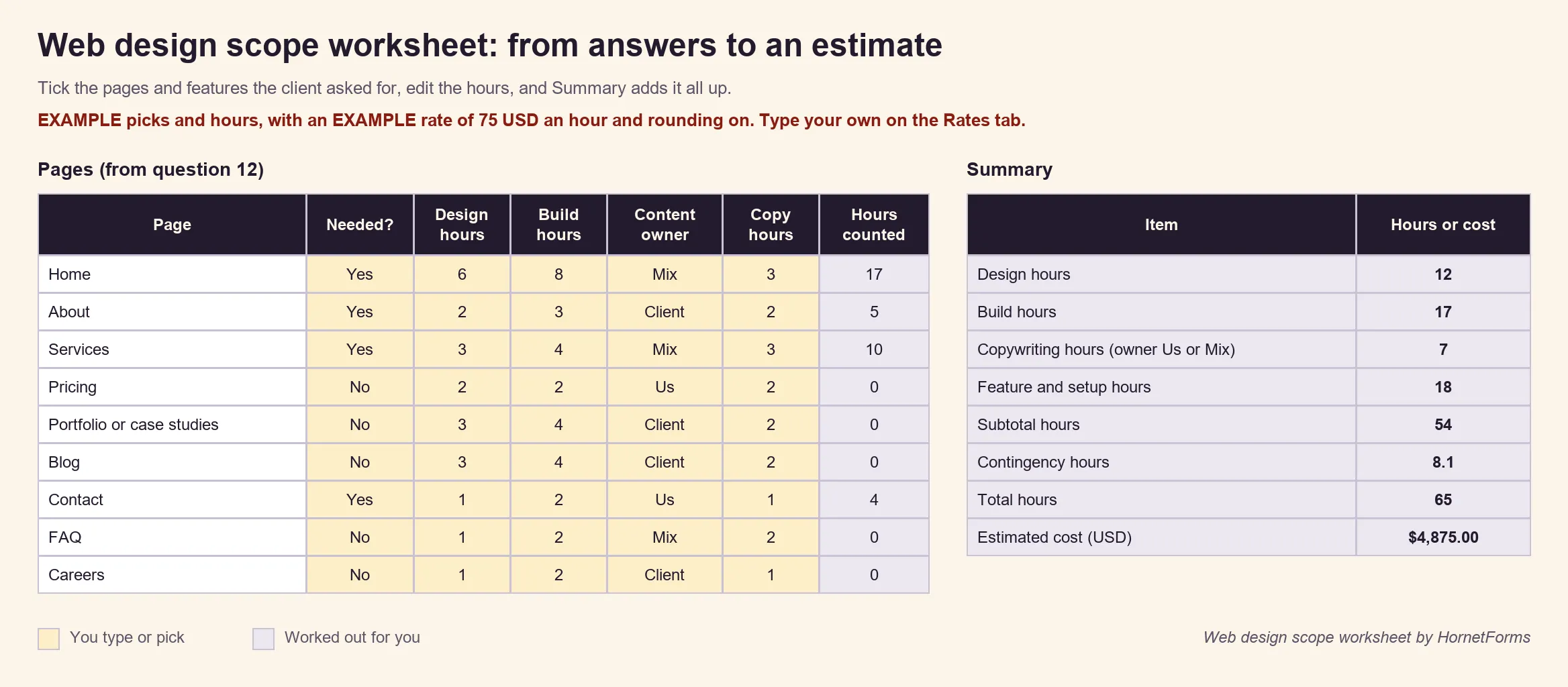
The free web design scope worksheet (Excel) does the adding up. Type your hourly rate and check the contingency on the Rates tab. Mark each page and feature from the client's answers as needed, adjust the example hours, and the Summary tab gives you total hours and an estimated cost. The hours in it are starting points, so change every one to match how you work. There's also a CSV of the page and feature rows if you'd rather build your own sheet.
A free web design questionnaire template#
Pick the version that fits how you work:
- Print it or send it as a file. The web design questionnaire (PDF, US Letter) has all 35 questions with space to write. It also comes as an A4 PDF and a Word file you can edit and put your logo on.
- Build it online. The project brief template in HornetForms is a good base. Find it in the template gallery, or open
forms.hornetforms.com/templates/project-briefand click Use this template. It's written for a signed project, so swap its questions for the ones above, then add the show rules from the branching section.
Forms and responses are unlimited on every plan, within fair use, so sending one questionnaire per lead adds no cost.
Try it on your next lead#
Take the next "simple website" enquiry and send the questionnaire before you quote. Read the answers, book a short call, then fill in the scope worksheet. Sign up for free and build your web design questionnaire today.