
On this page
"Add dark mode pls." That's the whole request. No name, no plan, and no clue what the person was doing when they wished for it. Get 40 of those and you have the inbox most founders call a backlog.
A good feature request form fixes this before the request lands. It asks for the problem instead of the feature. It stamps each request with who asked, without asking them. And it hands you a pile you can sort in 20 minutes a week.
This guide covers all three: the questions to ask, the hidden fields that do the stamping, and a free triage sheet that turns the pile into a ranked list. There's a free template too, so you can copy the form instead of building it.
What a feature request form should ask#
The questions decide what you learn. Ask for a feature and you get a wish list. Ask about the work and you get reasons.
Ask for the problem, not the feature#
People are great at describing pain and shaky at designing fixes. "Dark mode" might mean the screen hurts at night. It might mean their screenshots look wrong in a slide deck. Each reason points to a different fix.
So lead with the job: "What are you trying to get done?" Then ask what they'd like to be able to do. The first answer is the gold. The second is a hint, not a spec.
Then ask how much it hurts and how they cope today. A clumsy workaround is the best signal you'll get. Someone who copies data into a spreadsheet every Friday is telling you what to build and how often they need it.
Keep it under a minute#
People ask for features in the middle of their own work. One site owner on Hacker News said feedback should be "a 5-seconds-or-less kind of experience" (Hacker News comment, May 2024). A feature request takes a bit longer, but the spirit holds.
Aim for six or seven questions that everyone sees, with only two typed answers required. Logic keeps it short: ask about today's workaround only when someone rates the pain 4 or 5. A small annoyance stays a quick form, and a real blocker gets the extra question.
Here's the set we'd put on a new feature request form:
| Question | Type | Why it is there |
|---|---|---|
| What are you trying to get done? | Long text, required | The real problem, in their words |
| What would you like to be able to do? | Long text, required | Their idea of the fix: a hint, not a spec |
| Which part of the product is this about? | Dropdown, required | A rough first sort before you read a word |
| How much does this get in your way? | Scale from 1 to 5, required | The pain score you'll use for ranking |
| How do you handle it today? | Long text, shown only at 4 or 5 | A workaround shows how badly they need it |
| How often does this come up? | Multiple choice | Every day beats rarely |
| Add a screenshot | File upload, optional | One picture saves three emails back and forth |
| Your email (so we can tell you when it ships) | Email, optional | Lets you reply when you ship it |
Not sure whether a scale beats a rating, or a dropdown beats multiple choice? Our guide on which question type to pick walks through every option.
Stamp every request with who asked#
Your users answer questions about the problem. The form should answer the questions about the user by itself. On a feature request form, that's the job of hidden fields: the link fills them in, respondents never see them, and every response carries them.
The template has three:
user_id: your own ID for the person, so five requests from one power user count as one person, not five.plan: the plan they're on, so you can see what paying customers want.source: where they clicked, likesettingsorhelp-page, so you know which button brings requests in.
Build the link behind your app's "Send feedback" button. Your app already knows who's signed in, so add the values when you render the button:
https://forms.hornetforms.com/f/<your-slug>?user_id=u_8f3k&plan=pro&source=settings
In JavaScript that's four lines, and searchParams encodes the values for you:
const link = new URL("https://forms.hornetforms.com/f/<your-slug>");
link.searchParams.set("user_id", currentUser.id);
link.searchParams.set("plan", currentUser.plan);
link.searchParams.set("source", "settings");
Hidden fields behave like any other answer once they arrive. You can filter your responses by them or pipe them into text. Our logic, piping and calculations guide shows more of what they can do.
Good to know: the values sit in the URL, so anyone can change them before they send the form. Treat them as labels that help you sort, not as proof of who someone is or what they pay. Use an opaque ID like
u_8f3k, never an email address: links end up in browser history, screenshots and server logs.
A free feature request form template you can copy#
You don't have to build any of this from scratch. HornetForms has a feature request template with the questions, the hidden fields and the logic already in place.
What's in the feature request template#
- The eight questions from the table above, in that order.
- Three hidden fields:
user_id,planandsource. - One logic rule: "How do you handle it today?" shows up only when the answer to "How much does this get in your way?" is 4 or 5.
- A thank-you screen that says "Thanks. We read every request." Keep that promise and you'll keep getting requests.
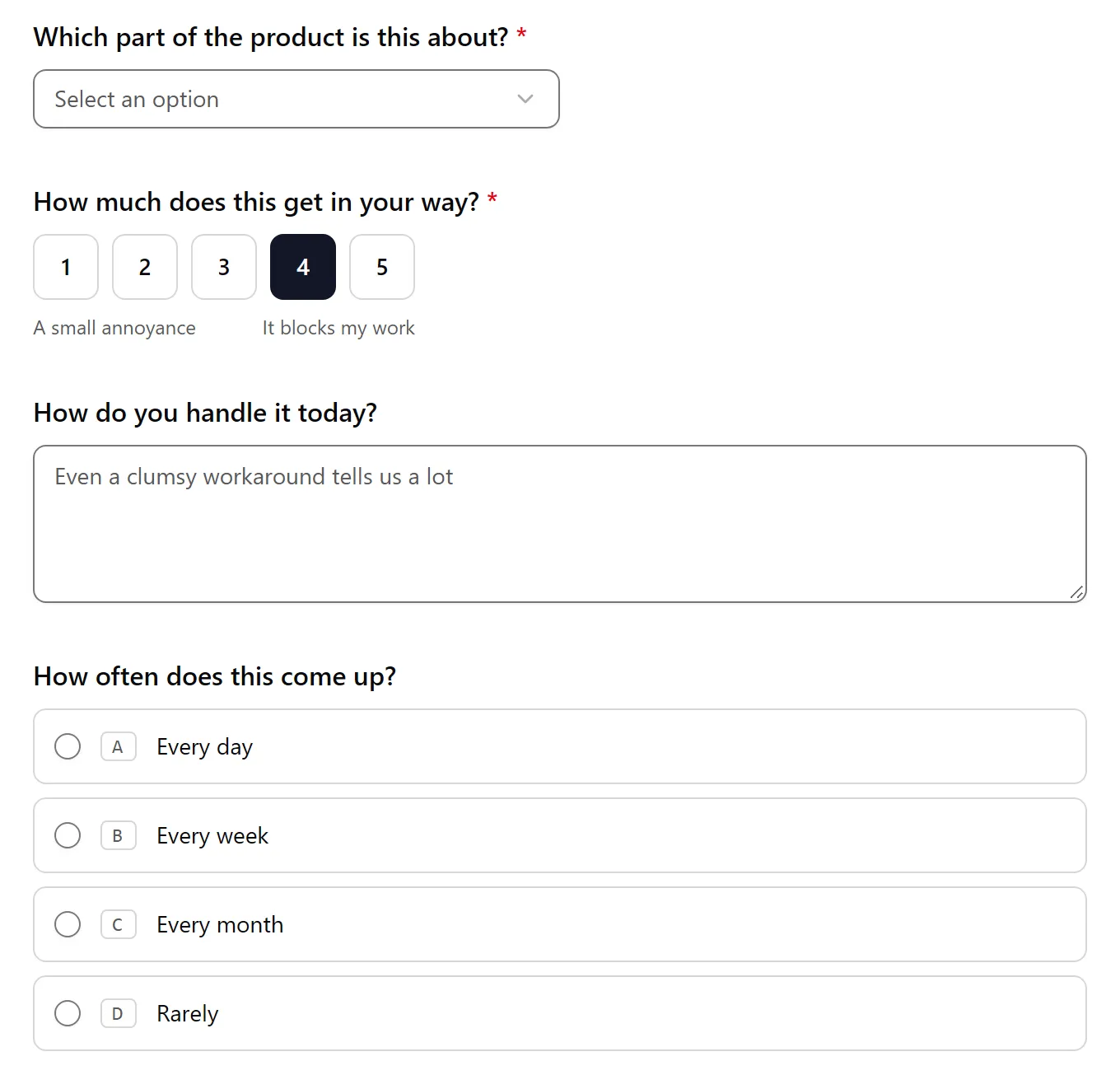
Pick 4 or 5 on the scale and the workaround question appears. Pick 1 to 3 and it stays hidden.
The screenshot question takes one image of up to 10 MB, and the email question is optional, so people who just want to vent can skip it.
How to get it into your account#
- Open the public template page at
forms.hornetforms.com/templates/feature-requestand try the preview. - Click Use this template. New to HornetForms? You sign up first (free, no card), and the template opens for you right after.
- Swap the dropdown options for the parts of your own product, then publish.
Already have an account? You'll find it in the template gallery under Feedback.
Send requests where you already look#
A request nobody reads is worse than no form at all, because the person who sent it now expects an answer. So point your feature request form at a place your team already checks:
- Slack or Discord: a message in a channel for every new request, with the answers and the three hidden fields, so someone sees it the same day.
- Google Sheets: a row for every request, with each question and each hidden field in its own column. This is the pile you'll sort in the next section.
- Notion: a page in a database for every request, if your roadmap already lives in Notion.
- Signed webhooks: every request as JSON to your own server or automation tool.
- Email notifications: an email to you for each request. Set its Reply-To to the person's email answer, and replying takes one click.
All of these are on every plan, Free included. Our tour of how to send form responses to Google Sheets, Slack or Notion covers the setup for each, and the integrations page lists them all.
A busy month won't cost you extra either. HornetForms has unlimited responses on every plan, which is the whole point of pricing that doesn't count responses.
Sort the pile without a feedback tool#
You don't need a dedicated feedback tool to decide what to build next. A spreadsheet and a 20-minute pass once a week will do.
Grab the free feature request triage sheet. It opens in Excel and Google Sheets, and its columns match the CSV export of the feature request form template. There's also a CSV with just the column headers if you'd rather build your own sheet around them.
Group requests into themes#
Once a week, paste your latest CSV export into the Requests tab. If you use the Google Sheets integration, the sheet's "Start here" tab shows how to pull those rows in instead.
Then read each new request and give it a theme in the yellow Theme column. Name themes after the problem, not the fix: "Exports and reports", not "PDF button". Five to 15 themes is plenty. Set a status while you're there, such as New, Planned or Not now.
Count who asked, not how loud#
One person who sends five requests is still one person. The sheet counts the different people per theme, using user_id first, then the email answer, then the response ID.
It also counts how many of those people are on a paid plan, from the plan field. That tells you whether paying customers feel the problem. If you want them to count for more, raise the "extra points for each paid-plan person" box.
Score with a simple formula#
Product teams often rank work with RICE: Reach times Impact times Confidence, divided by Effort. Sean McBride described it for Intercom in RICE: Simple prioritization for product managers, published on January 5, 2018.
The triage sheet uses a lighter version:
score = people asking x average pain / effort points
People asking is your reach, counted from real IDs. Average pain is the 1 to 5 answer to "How much does this get in your way?". Effort is your own guess, tagged S, M or L and worth 1, 2 or 4 points. We leave Confidence out because reach and pain come from real answers, so your effort guess is the only estimate left.
Here's how the sheet's 10 example requests come out:
| Theme (example data) | People asking | Paid-plan people | Average pain | Effort | Score |
|---|---|---|---|---|---|
| Team access | 2 | 1 | 4.5 | S (1) | 9.0 |
| Exports and reports | 2 | 1 | 4.0 | M (2) | 4.0 |
| Speed | 1 | 1 | 3.0 | S (1) | 3.0 |
| Integrations | 3 | 2 | 3.7 | L (4) | 2.75 |
| Faster setup | 1 | 0 | 2.0 | L (4) | 0.5 |
Integrations has the most people, but it's a big job, so it drops to fourth. Exports and reports got three requests, yet two came from the same person, so it counts two people. Team access wins: two people feel it badly, and it's small. Treat the score as the start of a conversation, not a verdict.
Close the loop#
When you ship something, filter the Requests tab by its theme and reply to everyone who left an email. Mark them as replied, and the Themes tab's "Still to reply" column drops to zero.
Your thank-you screen promised "We read every request." The reply is how you keep that promise. A short, honest note works for "Not now" themes too. People keep asking when they know someone reads.
Ship the form today#
Copy the feature request form template, swap the dropdown for your product's areas, and wire the link behind your feedback button. Then connect Google Sheets and drop the triage sheet next to it. The features page has the wider tour if you want to see what else the form can do.
Sign up for free and ship your first form in five minutes.