
On this page
You have an idea for a book club, a volunteer crew or a Saturday class. Before you book a room or print a schedule, you want to know who'd actually come. An interest form template gets you that answer: a short form where people raise a hand and tell you what caught their eye.
The form takes ten minutes to build. The part that matters comes after. Most interest lists die in a spreadsheet nobody opens, and the people who were keen in September have moved on by October.
This guide covers what to ask, four real examples, and how to follow up while people still care. You also get a free printable interest form template for fairs and sign-up tables, plus a tracker that tells you who to contact next.
What an interest form is for#
An interest form collects a name, a way to reach someone and what they'd like to do. It doesn't commit anyone to anything. That low bar is the point: people sign up in a minute because nothing is at stake yet.
You get three things back:
- A head count. Twelve people want a walking group and two want pottery. Now you know which one to run first.
- A contact list. Everyone on it asked to hear from you, which makes your first email welcome instead of random.
- Timing. "When are you usually free?" tells you whether to pick Tuesday evenings or Saturday mornings before you announce anything.
Interest form, sign-up or waitlist#
People mix up these three forms, and the difference changes what you ask.
| Form | When you use it | What the person is saying |
|---|---|---|
| Interest form | Before you schedule anything | "Tell me more when it happens" |
| Sign-up or registration form | You've set the dates and details | "Count me in for this one" |
| Waitlist form | Something is full, or opens later to a limited group | "Let me in when there's room" |
An interest form comes first. Once you've picked a date, you send the people on it a proper sign-up form. If you're launching a product rather than a club or class, you want a waitlist. Our waitlist form template guide covers that, from tagged launch links to capping your first round.
What to ask, and what to skip#
Keep it short. Every extra question costs you a few names at a busy table. These eight cover almost every case:
| Question | Type | Why it's there |
|---|---|---|
| Your name | Short answer, required | So your follow-up doesn't start with "Hi there" |
| Email, required | How you reach them, and how the tracker matches follow-ups | |
| Phone | Phone number, optional | For people who never check email |
| What are you interested in? | Checkboxes, required | Your head count for each option |
| How involved would you like to be? | Multiple choice | Separates "keep me posted" from "I'll be there every week" |
| When are you usually free? | Checkboxes | Picks your first date for you |
| Questions, or anything we should know? | Long answer | Catches what your options missed |
| Can we contact you about this? | Multiple choice, required: "Yes, contact me about this" or "No, I'll check back myself" | Their yes is your green light to follow up |
Not sure whether checkboxes beat a dropdown for the interest question? Our guide to every question type and when to use it walks through the trade-offs.
What to leave out#
Skip anything you only need once someone actually joins: a home address, an emergency contact, dietary needs, a T-shirt size. Those belong on the sign-up form. An interest form that asks for them reads like paperwork, and people walk past the table.
Interest form template examples: club, volunteer, class and event#
The questions stay the same. Only the options under "What are you interested in?" change.
- Club interest form. List your groups or activities: book club, chess, a walking group. At a school or campus club fair, add a question for year or grade so you can plan meeting times. If your club welcomes under-18s, a parent or guardian contact question helps you reach the right person.
- Volunteer interest form. List the kinds of help you need: setting up events, greeting guests, fundraising, social media. "How involved would you like to be?" matters most here, because a one-off helper and a weekly regular need different emails. When you're ready to schedule people, move them to a volunteer sign-up form. For roles that need a full screen and references, our volunteer application form guide covers the longer version.
- Class interest form. List the classes you might run, each with a level: beginner pottery, intermediate pottery, watercolor. "When are you usually free?" decides your first slot. Once you set dates, a workshop registration form takes the actual bookings.
- Event interest form. For an event without a date, list the formats you're weighing (a talk, a hands-on session, a social) and ask which month suits people. The answers tell you whether the event is worth planning at all.
Build your online interest form#
HornetForms doesn't have an interest form template by that name, so start from the closest one: Newsletter sign-up, in the template gallery under Lead generation (its page is forms.hornetforms.com/templates/newsletter-signup). It has three questions:
- Email (required)
- First name
- Topics you care about, a checkbox question with four options
Rename "Topics you care about" to "What are you interested in?" and swap its options for your own. Then add the rest from the table above: phone, how involved, when free, a long-answer question and the contact question. Change the thank-you screen too, because "You're subscribed!" doesn't fit. Something like "Thanks! We'll be in touch with dates soon." works. Keep the question labels from the table and the free tracker below reads your export as it comes. Prefer to start fresh? A blank form with those eight questions takes about the same time.
Tag your links with a hidden field#
Add one hidden field called source. Visitors never see it. The link fills it in, and every response keeps it:
https://forms.hornetforms.com/f/<your-slug>?source=newsletter
https://forms.hornetforms.com/f/<your-slug>?source=instagram
https://forms.hornetforms.com/f/<your-slug>?source=paper
Then add a "How did you hear about us?" question and show it only when source is empty. People on a tagged link skip it. Everyone else still tells you where they came from. Our guide to capturing UTM parameters in forms shows the same trick with full UTM tags.
Put a QR code on the table#
Publish the form first, since links and QR codes only work once it's live. Then open the form's Share tab and find the QR code card. Download PNG gives you a 512 by 512 pixel image for a sign or a slide. Download SVG gives you a vector file that stays sharp at any print size. Every plan includes QR codes.
The QR code opens the plain form link, so scans arrive with no source. That's fine: those people get the "How did you hear about us?" question, and one of its options can be "At a fair or sign-up table".
Send each answer to the right person#
One interest form often feeds several people: the book club lead, the garden coordinator, whoever runs the pottery class. Here's how to get each answer where it's useful, all on every plan:
- Google Sheets. Each response lands as a new row, with the
sourcehidden field in its own column. Share the sheet with your leads. - Slack or Discord. A message for each response in a channel your team already reads.
- Email. On the form's Integrations tab, the Email notifications card lets you turn on an email to yourself for each new response. The same card can send each person a confirmation email: turn on Send respondents a confirmation email and pick the Email question.
- Filters and exports. On the Responses page, filter on the interest question, then download that list as a CSV for the lead who runs that group.
The integrations page lists every destination, and where your form responses can go compares them side by side.
Follow up before interest cools#
Someone who ticks "Walking group" on a Saturday is keen on Saturday. Wait three weeks and that same person barely remembers the table. So set yourself a deadline, a few days at most, and keep a list of who you've reached.
That's what the free interest tracker does. It opens in Excel and Google Sheets, and its columns match the CSV export of the form above. There's also a CSV with just the column headers if you'd rather build your own.
- Responses: paste your CSV export here.
- People: one row per person, with their interests, source and "OK to contact" (yes when their answer starts with Yes). It adds a follow-up date, three days after the date of interest to start, and you can change the number. The Next step column says Overdue, Due soon, To do, Waiting on reply, Done or Do not contact.
- Follow-ups: pick a person's email, pick a status (New, Contacted, Signed up or Not now) and type the date. The tracker matches statuses by email, so pasting a newer export never scrambles them.
- Counts: for each interest option, the people interested, how many said yes to contact, how many are still to contact and how many signed up. Plus counts by status and by source.
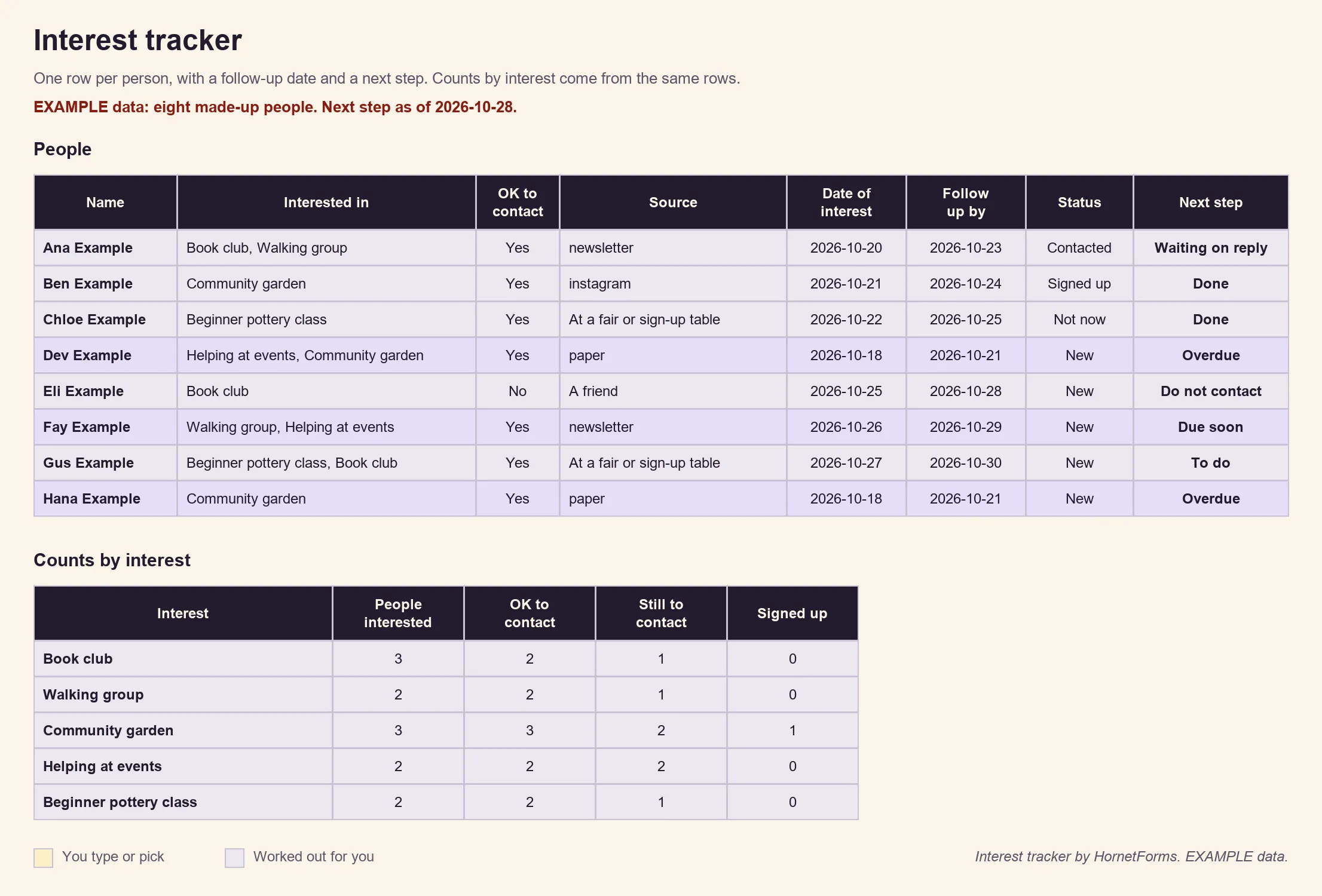
EXAMPLE data: eight made-up people. Delete them and paste your own export.
Paper forms count too#
Not everyone at a fair wants to scan a code. Print the free interest form template: PDF, US Letter, PDF, A4 or Word (DOCX). It has three pages:
- The interest form: the same eight questions, with six blank tick-box options under "What are you interested in?" for you to fill in before you copy it.
- An interest sign-up sheet: 20 rows for name, email or phone, interest, best time and "OK to contact? (Y or N)", for people in a hurry.
- Before you print: short notes for whoever runs the table.
After the event, type each paper form into your online form using the ?source=paper link. Then add the date from the paper on the tracker's Follow-ups tab, so the follow-up clock starts on the day they signed, not the day you typed it in.
Open sign-ups for the people who raised a hand#
Once you've set a date, your interest list becomes your first audience:
- Build the real sign-up form. Use a workshop registration form for a class, or a volunteer sign-up form for helpers.
- Email everyone who said yes first. Filter the tracker to "OK to contact" and send the sign-up link before you post it anywhere else. It's a small thank-you for raising a hand early.
- Close the interest form. Under Settings, then Responses, set Close on a date, and write a Closed form message such as "Sign-ups for the spring session are open. Ask us at the front desk for the link." The message is plain text, so spell out where to go.
If one post brings a rush of names, HornetForms has unlimited responses on every plan. Here's what happens when your form hits a response limit on tools that cap them, and why it bites on your busiest day.
Try it on a real form#
Copy the Newsletter sign-up template, turn it into an interest form, add the source hidden field and print the QR code for your next fair. Drop the tracker next to it and give yourself three days to follow up. The features page shows what else the form can do.
The Free plan is free forever. Sign up for free and have your interest form live before the next meeting.