
On this page
You ran the workshop, gave the talk or finished the job, and now you want to know how it went. So you open a blank form and type "Any feedback?" Most people skip it. The few who answer write "Great, thanks!", which is nice to read and useless to act on.
Good feedback form questions fix that. They ask about one thing at a time, they're quick to answer on a phone, and every answer points to something you could change. This guide gives you 70 feedback form questions examples, grouped by where you'll use them: training and workshops, events and seminars, presentations, courses, services and websites. It also covers which rating scales to use, how to cut your list to five to 10 questions, and a free question bank you can filter and copy.
What a good feedback question does#
Before you pick feedback form questions, decide what you'll do with the answers. "Should we run this workshop again, and what should change?" is a decision. "Get feedback" is not. Every question on the form should help with that decision, or it goes.
A good feedback question does four things:
- It asks about one thing. "How were the speaker and the venue?" can't be answered by someone who loved one and hated the other. Split it.
- It's easy to answer. A tap on a scale or a pick from a short list takes seconds. Save typing for the questions where you need the why.
- It doesn't lean. "How much did you enjoy the session?" assumes they did. "How would you rate the session?" doesn't.
- It leads to an action. If every possible answer would leave your plans the same, cut the question.
For the wording rules in full, with before and after examples, see our guide on how to write survey questions.
Training and workshop feedback form questions#
Training is where most feedback forms go wrong, because they only ask whether people liked it. Liking matters, but it's only the first step. Many trainers use the Kirkpatrick model, which has four levels: reaction, learning, behavior and results. A teaching guide from Hostos Community College (CUNY) puts the first level simply: "The idea behind Level 1: Reaction is to gain insight into how the learners perceived the learning experience." It adds that "Although the model is widely used in organizational training, it can be applied to higher education" (Hostos Community College, Kirkpatrick's Model, accessed 28 October 2026).
A feedback form handed out at the end of a session mostly measures that first level. But a few well-chosen training feedback form questions can also hint at the next two: what people learned and what they plan to do with it. These 15 workshop feedback form questions cover all three:
| Question | Type and scale |
|---|---|
| How would you rate the training overall? | Rating, 1 to 5 stars |
| How relevant was the training to your work? | Linear scale, 1 to 5: Not relevant to Very relevant |
| Before today, how would you rate your knowledge of [topic]? | Linear scale, 1 to 5: Beginner to Expert |
| After today, how would you rate your knowledge of [topic]? | Linear scale, 1 to 5: Beginner to Expert |
| How confident do you feel using what you learned? | Linear scale, 1 to 5: Not confident to Very confident |
| Which part of the training was most useful? | Long answer |
| Which part was least useful, or could be cut? | Long answer |
| How was the pace? | Multiple choice: Too slow, About right, Too fast |
| How would you rate the trainer on each of these? | Matrix: Knew the subject, Explained clearly, Answered questions, Kept it practical |
| Did the hands-on exercises help you learn? | Multiple choice: Yes, a lot; Somewhat; Not really; There were no exercises |
| How was the length of the session? | Multiple choice: Too short, About right, Too long |
| What is one thing you will do differently at work after this training? | Long answer |
| What could get in the way of using what you learned? | Checkboxes: Not enough time, Missing tools, Other priorities, More practice needed, Nothing |
| How well did the room or online setup work? | Rating, 1 to 5 stars |
| Which topic should a follow-up session cover? | Short answer |
The before and after pair is a cheap trick worth stealing. Asking both on the same form gives you a self-rated change in knowledge, which is rough but far better than nothing. The "one thing you will do differently" answer is a promise you can check on. Send a two-question form a month later that asks whether they did it.
Event and seminar feedback questions#
For events, keep the form short and send it the same day. The attendee version needs about eight questions:
- Overall, how was the [event or seminar]? (Rating, 1 to 5 stars)
- How likely are you to recommend this event to a friend or colleague? (NPS, 0 to 10)
- Which sessions did you attend? (Checkboxes)
- How useful was the content for you? (Linear scale, 1 to 5)
- How would you rate the venue, food and drinks, schedule and check-in? (Matrix)
- How did you hear about the event? (Dropdown)
- Would you come to the next one? (Yes, Maybe, No)
- What should we change next time? (Long answer)
We cover events in depth elsewhere: timing, follow-up questions that change with the score, and separate questions for speakers, volunteers and sponsors are all in our post-event survey questions guide. If you'd rather start from a finished form, the event feedback form template has 12 questions on two pages.
Presentation and speaker feedback questions#
Feedback form questions for a presentation should help the speaker get better, so keep them about the talk, not the event around it. These eight work for a conference talk, a lunch-and-learn or a class presentation:
- How clear was the presentation? (Linear scale, 1 to 5: Very unclear to Very clear)
- How well did the speaker know the topic? (Rating, 1 to 5 stars)
- Was the length right? (Too short, About right, Too long)
- How useful were the slides or handouts? (Linear scale, 1 to 5)
- Did you get a chance to ask your questions? (Yes, Partly, No, I had no questions)
- What was the main thing you took away? (Long answer)
- What one thing would make this talk better? (Long answer)
- Would you like to hear this speaker again? (Yes, Maybe, No)
"What was the main thing you took away?" is the most useful of the eight. If the answers don't match the point the speaker meant to make, no rating will tell you that.
When several speakers share one event, use one form with a hidden field for the talk. Add a field called talk, then share a link like ?talk=opening-keynote for each session. The value lands on every response, so you can sort the answers by talk later.
Feedback form questions for students and courses#
Feedback form questions for students work best when they ask about learning, not about whether the teacher was nice. Ten questions are plenty:
- How would you rate this course overall? (Rating, 1 to 5 stars)
- How clear were the course goals from the start? (Linear scale, 1 to 5)
- How much did this course help you learn [subject]? (Linear scale, 1 to 5: Not at all to A great deal)
- How was the workload? (Too light, About right, Too heavy)
- How many hours a week did you spend on this course outside class? (Under 2, 2 to 4, 5 to 7, 8 or more)
- How helpful was the feedback on your work? (Linear scale, 1 to 5)
- How easy was it to get help when you were stuck? (Linear scale, 1 to 5)
- Which activity helped you learn the most? (Lectures, Group work, Readings, Labs or practice, Quizzes, Other)
- What should the teacher keep doing? (Long answer)
- What should change for the next class? (Long answer)
Tell students up front who will read their answers and when, so they know what to expect. For an end-of-term evaluation with a matrix of agree and disagree statements, start from our course evaluation form template. It has 11 questions over two pages, and our Likert scale survey guide shows how to score the statements. To hear from families as well, borrow from our parent survey questions.
Service and client feedback questions#
Service businesses need two numbers and one reason. The numbers tell you whether things are getting better. The reason tells you what to do about it. These 11 client feedback form questions work for cleaners, coaches, agencies, salons and repair shops:
- How satisfied are you with our service? (CSAT, five faces)
- How likely are you to recommend [business] to a friend? (NPS, 0 to 10)
- What is the main reason for your score? (Long answer)
- Which service did you use? (Dropdown)
- How easy was it to book or reach us? (Linear scale, 1 to 5: Very hard to Very easy)
- Did we finish on time? (Yes, A little late, Very late)
- Did the result match what you asked for? (Yes, fully; Mostly; No)
- How would you rate us on quality, communication, value for money and friendliness? (Matrix)
- How quickly did we reply to your messages? (Same day, Within two days, It took longer, I did not message you)
- Would you hire us again? (Yes, Maybe, No)
- May we quote your comments on our website? (Yes, with my first name; Yes, with my initials; No)
Put the main reason question right after the score. Better still, use logic to change the follow-up: show "What went wrong?" to people who pick an unhappy face, and "May we quote your comments?" only to the happy ones. Our customer satisfaction survey template is set up this way, with the CSAT question, a follow-up for unhappy customers and the NPS question. For the maths behind the second number, see how to calculate NPS. For a longer customer survey, see our customer satisfaction survey questions.
If a client wants to raise a formal complaint, a customer complaint form keeps it out of your feedback data.
Website and product feedback questions#
Website feedback forms usually pop up mid-visit, so they need to be the shortest of all. Three questions is often enough. Pick from these 10:
- What brought you here today? (Multiple choice, with your top reasons and Other)
- Did you find what you were looking for? (Yes, Partly, No)
- How easy was it to find? (Linear scale, 1 to 5)
- What almost stopped you from signing up or buying today? (Long answer)
- Which device are you using? (Phone, Tablet, Laptop or desktop)
- How often do you use [product]? (Every day, Every week, Every month, Less often)
- Which feature do you use most? (Dropdown)
- Rank these ideas from most to least useful to you. (Ranking, up to six ideas)
- How would you feel if you could no longer use [product]? (Very, Somewhat or Not disappointed)
- What is one thing we should fix first? (Long answer)
"Did you find what you were looking for?" does most of the work on a website. Follow a "Partly" or "No" with "What were you looking for?" and you have a to-do list. The website feedback survey template does exactly that. The "no longer use" question is the core of a product-market fit survey, if you want to go deeper on a product. Still testing an idea before you build it? Start with market research survey questions.
A last set of eight works on any feedback form: "What did you like most?", "What one thing would you change?", "How did it compare with what you expected?", "How much effort did it take to get what you needed?", "Which best describes you?", "Is there anything we didn't ask that you'd like to tell us?", "May we contact you about your answers?" and an optional email for people who want a reply. That's the full 70.
Rating scales to use#
Most feedback form questions end in a scale, and the scale you pick shapes the answers. Five scales cover nearly every case:
| Scale | Use it for | In HornetForms |
|---|---|---|
| 1 to 5 stars | A quick overall rating of a session, a talk or a venue | Rating question (1 to 5 by default) |
| Five faces | Customer satisfaction you want to track as a score | Rating with the CSAT preset |
| 0 to 10 | How likely people are to recommend you | Linear scale with the NPS preset |
| 1 to 5 with labelled ends | Ease, clarity, usefulness, confidence | Linear scale with end labels |
| Too little, About right, Too much | Pace, length, workload | Multiple choice |
Three rules keep scales honest:
- Label both ends. A bare 1 to 5 means different things to different people. In HornetForms you can label the ends of a linear scale (up to 100 characters each), for example "Very hard" and "Very easy".
- Keep one direction. If 5 is good on one question, make 5 good on every question. Flipping scales trips people up.
- Use the presets for the classic scores. The NPS (0 to 10) and CSAT (five faces) presets are scored for you, in the built-in analytics and on the Summary tab. You don't need a spreadsheet to get either number.
The Summary tab also shows each matrix as a table, with the count and share for every cell. Our guide to every question type covers the rest of the 20+ types, from ranking to file upload.
Keep it short: pick 5-10 feedback form questions#
Seventy feedback form questions is a menu, not a form. Most feedback forms need five to 10. More than that, and people start tapping the middle of every scale just to get to the end.
To pick yours:
- Write your decision at the top. "Do we run the Saturday workshop again, and what should change?"
- Pick one overall score. A star rating, CSAT or NPS. One, not three.
- Add two to four specific questions that feed the decision: pace, relevance, the venue, whatever you could actually change.
- Add one or two open questions. "What should we change?" and "What did you like most?" carry the most detail.
- Make the rest optional, and put any contact question last.
On a longer form, use logic so people only see questions that apply to them. Someone who says they attended online never needs the venue questions. Our guide to logic, piping and calculations walks through rules like these.
Running feedback for every class or every client? HornetForms has unlimited responses within fair use on every plan, so a busy term won't run into a plan's response cap. You can turn on an email to yourself for each new response, or send answers to Google Sheets as they arrive. When the answers are in, how to analyze survey data shows how to count, chart and report them. And if you're still deciding what to ask about in the first place, try our survey ideas.
Free feedback form questions bank#
All 70 feedback form questions are in a free feedback question bank (Excel) that also opens in Google Sheets. Each row has the context, the question, a question type, the answer options or scale labels, and a short note on why it's worth asking.
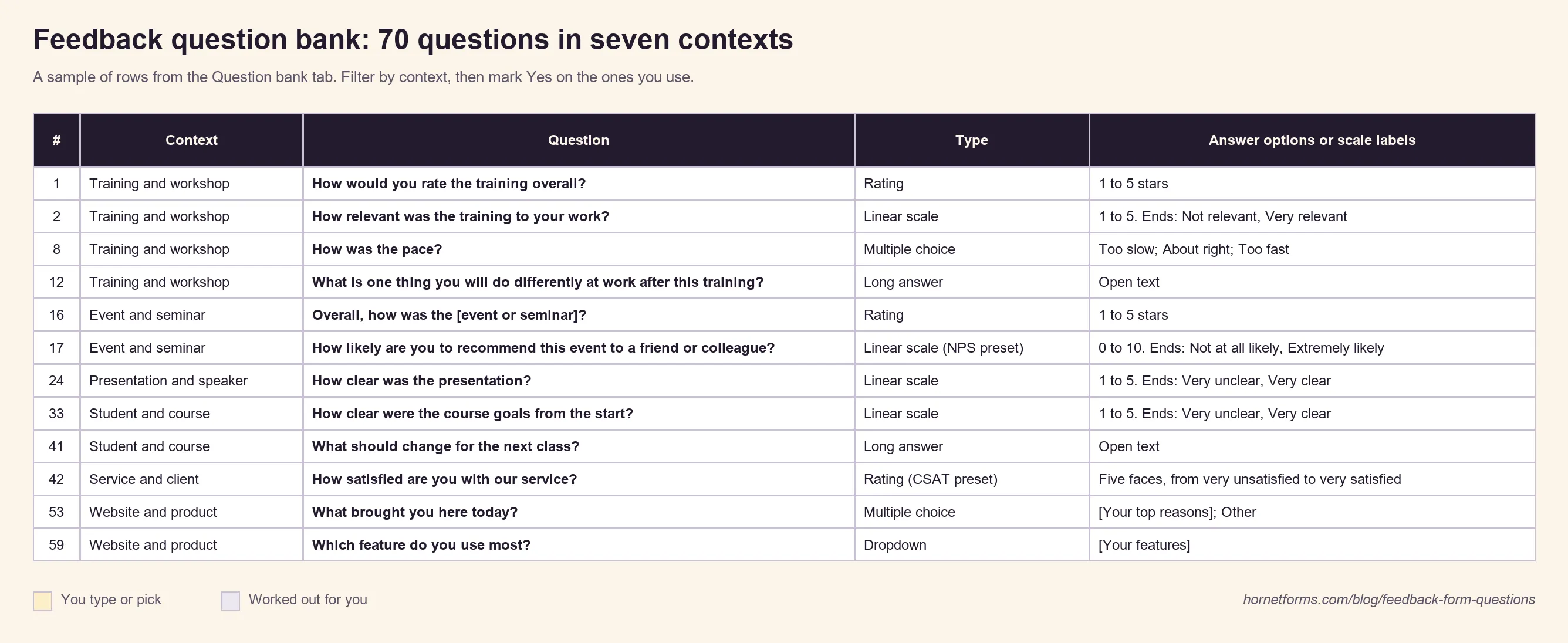
How to use it:
- Filter the Context column to training, events, presentations, courses, services, websites or the general set.
- Mark Yes in the Use it? column for each question you want. The Read me tab counts your picks by context and tells you when you've gone past 10.
- Swap the [square bracket] text for your own topic, product or service names.
The Read me tab also lists the question types and the rating scales from this guide. Prefer plain text? There's a CSV copy with the same 70 rows.
Then build the form. Start from one of the templates above, or start blank and add your picks. Sign up for free and send your first feedback form before the room empties out.
Net Promoter®, NPS® and Net Promoter System® are registered trademarks of Bain & Company, Inc., NICE Systems, Inc., and Fred Reichheld. Net Promoter Score℠ is a service mark of Bain & Company, Inc., NICE Systems, Inc., and Fred Reichheld.