
On this page
You need answers from real people: customers, members, parents or a class. Any free survey maker can put questions on a page. The differences show up later, when the survey starts working. Does the free plan count your responses and stop at a cap? Can you export every answer? Can people answer without signing in?
This guide covers what a free survey maker should give you, the one limit to check before anything else, and a short build you can copy. It ends with a free checklist (Letter and A4) and a starter customer survey you can import as a CSV file.
What a free survey maker should give you#
Most free survey tools look alike on their home page. Check these six things instead of the feature grid:
| What to check | Why it matters |
|---|---|
| Response limits | A cap decides whether your survey keeps working in its best week |
| Question types | You want ratings, a 0 to 10 scale, multiple choice, checkboxes, a grid and a long answer (comment) box |
| Logic | Showing a follow-up only to people who need it keeps the survey short |
| Sharing | A link, a QR code and an embed reach people where they are, without a sign-in |
| Results | A summary with charts saves you a spreadsheet for the first look |
| Exports | A CSV of every answer means your data is never stuck in one tool |
If you're still writing the questions, start with how to write survey questions. The tool matters less than the wording.
The catch to check first: response caps#
The most common catch in a free survey maker is a response cap. It stays invisible while the survey is quiet and shows up the day it takes off. Three questions tell you how a cap will treat you:
- How many responses, and over what period? Per month is common.
- Per survey or per account? Some tools count every form in your account against one shared number, so a busy survey can close your contact form too.
- What happens at the cap? Does the survey stop taking answers? Can you still read and export the ones you have?
Answer these from the tool's own pricing and help pages, and write down the date. Plans change. We wrote up what happened when one of us hit a cap halfway through a hiring round in when your form hits the response limit. For two worked examples with real numbers, see Jotform free plan limits and Typeform pricing.
Build it in HornetForms#
HornetForms is a free survey maker and form builder. Here's what the Free plan gives you, from the same list:
- Free forever, no card. The Free plan is not a trial, and you don't need a card to sign up.
- Unlimited forms and unlimited responses within fair use. Fair use means you use HornetForms the way people use a form builder: to build forms and collect answers from real people. We don't count or cap your forms or responses on any plan, and we never charge for volume.
- 20+ question types, including rating, linear scale, matrix (grid), ranking, file upload and signature, plus short and long text.
- NPS and CSAT presets. Type "/" and pick NPS (0 to 10) or CSAT (five faces). HornetForms works out the score for you.
- Conditional logic and answer piping. Show, hide, require or jump based on earlier answers, and repeat an answer in a later question.
- Share it your way. A link with a custom slug, QR codes as PNG and SVG, or an embed (inline, popup, slider or full page). Respondents never need an account or a sign-in.
- Results and exports. A Summary tab with a breakdown for each question, filters and a CSV export.
Free forms show a "Made with HornetForms" badge; Pro and Business can remove it. The pricing page has the full split.
Free survey maker with unlimited responses (within fair use)#
This is the one most people look for after a cap bites. HornetForms doesn't count or cap how many responses your survey collects. If you want a cap (say, 60 seats in a room), you set your own response limit or close date in the form's settings, and the form closes itself.
Free survey makers you probably know#
You've likely heard of these. Here is one line each from the company's own pages, checked on November 2, 2026. We don't rank them: use the checklist to test each one against your own survey.
| Tool | What its own page says | Source |
|---|---|---|
| Google Forms | "You can use Google Forms to create online surveys, quizzes, and forms, send them to others to fill out and then analyze their responses in real time." | Google Docs Editors Help |
| Microsoft Forms | For a personal Microsoft account, "the number of responses a form/quiz can receive is up to 200 for free accounts" | Microsoft Support |
| Typeform | "The number of responses you can collect every month depends on your plan." and "Response limits apply across all forms in your account." | Typeform Help Center |
| Jotform | "The submission limit refers to the total number of form responses from all forms that your account can support on a monthly basis." | Jotform pricing |
| Tally | "Tally gives you unlimited forms and submissions, completely free, as long as you stay within our fair usage guidelines" | Tally pricing |
Jotform calls its free plan Starter. Microsoft's same page lists higher numbers for its business and education accounts, so check the row for the account you have. Our Google Forms compare page puts the two side by side, and there's one for each tool above.
Build a survey in 10 minutes#
Here's a short customer survey, built two ways. Both work on the Free plan.
From the starter CSV#
Download the starter customer survey (CSV) and import it. Each column becomes a question, and HornetForms guesses the type from the example rows. This file makes 10 questions:
- Two 1 to 5 ratings ("Overall, how satisfied are you with us?" and value for money)
- A 0 to 10 "How likely are you to recommend us" scale
- Two long answer boxes, for the reason behind the score and any other feedback
- Two multiple choice questions (how often, and what to work on first) and one checkbox question (which of these have you used)
- A yes or no question asking if you may contact them, then an email question
The 12 example rows only guide the type guesses. They never become responses. The form takes its title from the file name, so rename it after the import.
A CSV import creates the questions only, all optional, with no logic or endings. Three quick edits finish the job:
- Swap in the scored presets. Replace the 0 to 10 question with the NPS entry from the "/" menu, and the first rating with CSAT. Now the Summary tab and the built-in analytics score them for you.
- Add one show rule. Show the email question only when "May we contact you about your answers?" is Yes.
- Mark what's required. Questions are optional by default. Switch on "Required" for the two or three you can't do without.
From a sentence, with AI#
Prefer to start from a description? Type something like "a 10-question customer feedback survey for a cafe, with NPS and a comment box" and AI builds a draft for you to edit. Drafts can include logic and endings. Free includes 3 AI generations a month.
Then open the preview. It has a desktop view and a mobile view, and preview answers aren't saved, so test freely.
Share it#
A survey only works if people see it. Use more than one route:
- Link. Copy it from the Share tab and set a custom slug that reads well in a message.
- QR code. Download a PNG or SVG for a counter card, a receipt or a poster. Our guide to a QR code for a form covers where to put it and how to test it.
- Embed. Put it on your website inline, as a popup, a slider or a full page.
- Email. Paste the link into your newsletter or a one-to-one message. Our email survey guide covers what to write.
Nobody needs an account to answer. If response numbers worry you, our guide to survey response rate has 12 ways to raise it.
Read the results#
Open the Summary tab first. Choice questions show counts and shares, scales get charts, and you see responses by day. NPS is promoters (9 and 10) minus detractors (0 to 6) as a share of all answers, and CSAT is the share of 4 and 5 answers, both worked out for you. Our guide on how to calculate NPS explains what the number means.
To dig deeper:
- Filter the responses table with up to 10 conditions, for example everyone who rated you 1 or 2.
- Export a CSV. It starts with Response ID, Submitted at and Started at, then one column per question.
- Check the built-in analytics for views, starts and completions, so you know whether people open the survey but stop.
You can also turn on an email to yourself for each new response. For coding open answers and cross-tabs, see how to analyze survey data.
Get the free survey maker checklist#
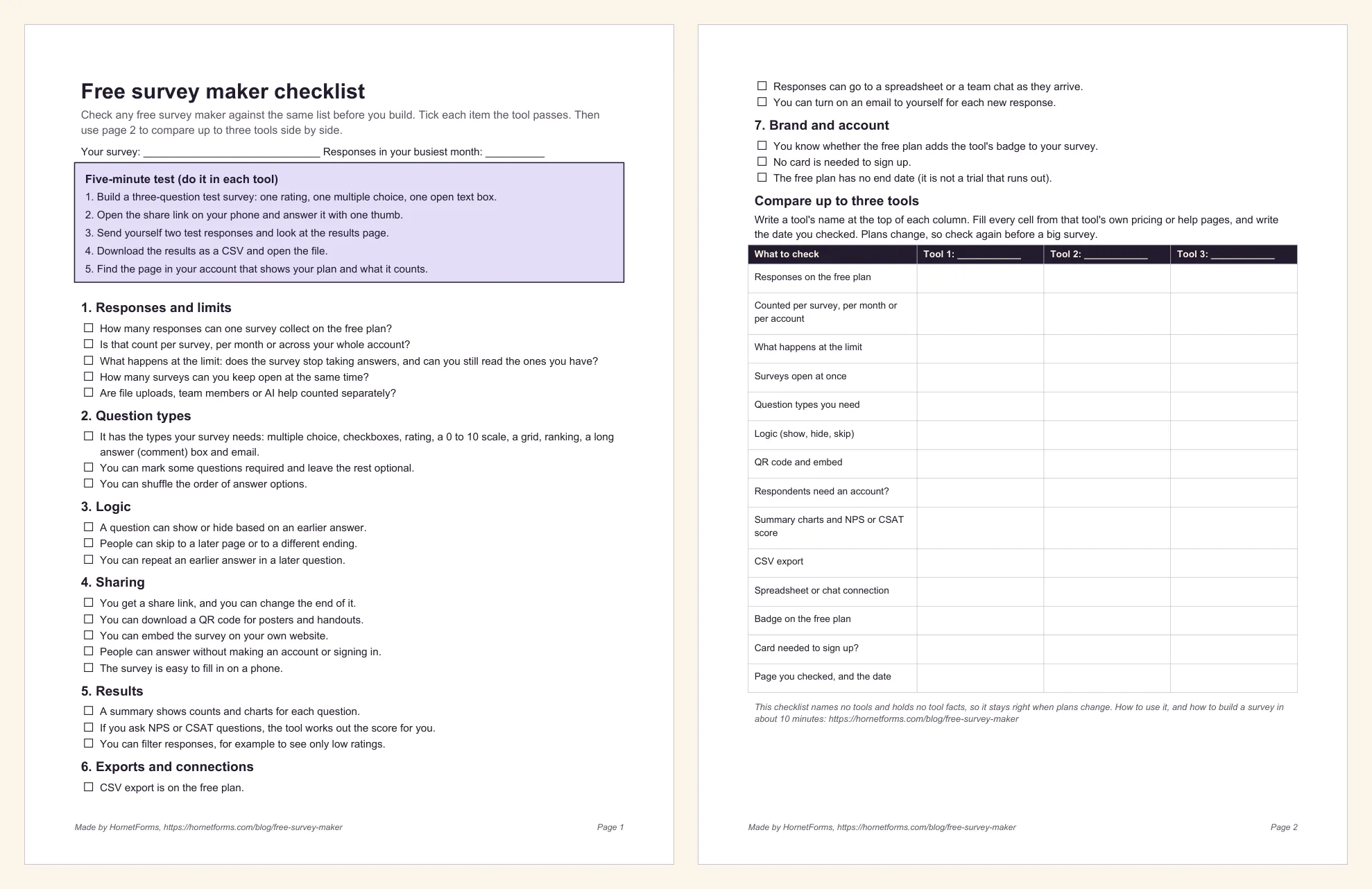
The checklist is two pages:
- Page 1: a five-minute test to run in each tool, then most of the 25 tick-box checks, in seven areas: responses and limits, question types, logic, sharing, results, exports and connections, and brand and account.
- Page 2: the last few checks, then a comparison table with 14 rows and three blank tool columns. Write a tool's name at the top of each column and fill each cell from that tool's own pages, with the date. It holds no tool facts, so it stays right when plans change.
Downloads:
- Free survey maker checklist (Letter PDF)
- Free survey maker checklist (A4 PDF)
- Starter customer survey (CSV import file)
Comparing more than surveys? Our guide to picking an online form builder covers order forms, sign-ups and the rest.
The small print#
Google Forms is a trademark of Google LLC. Microsoft Forms is a trademark of the Microsoft group of companies. Typeform, Jotform and Tally are trademarks of their owners. Net Promoter, NPS and Net Promoter Score are trademarks of Bain & Company, Inc., NICE Systems, Inc. and Fred Reichheld. HornetForms is not affiliated with, endorsed by or sponsored by any of them. Every quote above comes from that company's own page, checked on November 2, 2026. Plans change, so check each tool's page on the day you decide.
Try it on your next customer survey#
Import the starter CSV, swap in NPS and CSAT, and send the link to your last 20 customers. Sign up for free to build your customer survey in about 10 minutes, no card needed.