
On this page
Jotform is a big, capable tool, and its free plan lets you try nearly all of it. The catch is in the numbers. The Jotform free plan, called Starter, has monthly limits on submissions, form views and payments, and a cap on how many submissions your account can hold.
None of that matters for a form that gets ten answers a month. It matters a lot for a form that suddenly gets 200. This post lays out what Starter includes, the limits that matter, how quickly a real form reaches them and what happens when it does. Every Jotform fact here comes from Jotform's own pricing and help pages, checked on October 28, 2026. Jotform changes its plans from time to time, so check its pricing page before you decide.
What the Jotform free plan includes#
Jotform's own description is generous. Its pricing FAQ says: "The Starter plan includes all standard features, such as form templates, payment integrations, and widgets." You get Jotform's drag-and-drop builder, its templates, widgets and payment integrations, all for $0.
Two things come with it. First, branding: "Keep in mind that your forms and signed documents will include Jotform branding, which can be removed once you have a paid subscription." Second, the limits, which Jotform explains plainly: "You'll need to switch to a paid plan to increase your limits."
Jotform's FAQ calls Enterprise "the only multiuser Jotform plan," so a Starter account has one login. For the rest of the product beyond the free plan, see our Jotform review.
Jotform free plan limits (as of October 28, 2026)#
Here are the Starter numbers from Jotform's pricing page, checked October 28, 2026:
| Limit | Starter (free) | What it counts |
|---|---|---|
| Active forms | 5 | Forms that can be live at once |
| Monthly submissions | 100 | Completed responses, across all your forms |
| Monthly form views | 10,000 | Times anyone opens any of your forms |
| Total submission storage | 500 | Responses your account can hold at once |
| Upload space | 100 MB | Files people attach to your forms |
| Payment submissions | 10 a month | Responses that include a payment |
| Signed documents | 10 a month | Documents signed through Jotform Sign |
| Fields per form | 100 | Questions and widgets on one form |
The words that matter most are "across all your forms." Jotform's FAQ defines the submission limit as "the total number of form responses from all forms that your account can support on a monthly basis." So five forms share one pool of 100 a month. The form view limit works the same way: "the total number of times your forms can be viewed account-wide on a monthly basis."
How fast a real form hits the limits#
Averages hide the problem. Most forms are quiet most of the month, then busy for a week. Here's a small business with three forms on Starter:
- A contact form brings in about 40 enquiries a month.
- A newsletter sign-up adds about 25.
- An event sign-up gets 30 in a normal month, but 250 in the month of the event.
In a normal month that's 95 submissions. Close to the line, but under it. In the event month it's 315, so the 100 cap can arrive early in registrations, and the contact form stops with it.
Payments hit sooner. Starter counts 10 payment submissions a month, so a class or ticket form that takes payments reaches its cap after 10 paid responses that month.
Storage is the slow one. At 95 submissions a month, the 500 total fills in a little over five months. Jotform's FAQ says what happens then: "Please note that if you exceed your total submission storage, the system will delete the oldest form response to make room for new submissions." Its advice is to "delete and purge your form submissions to free up space," so download them first. Jotform's help center explains how to download submissions as Excel, CSV or PDF files (Jotform help, last updated May 11, 2026).
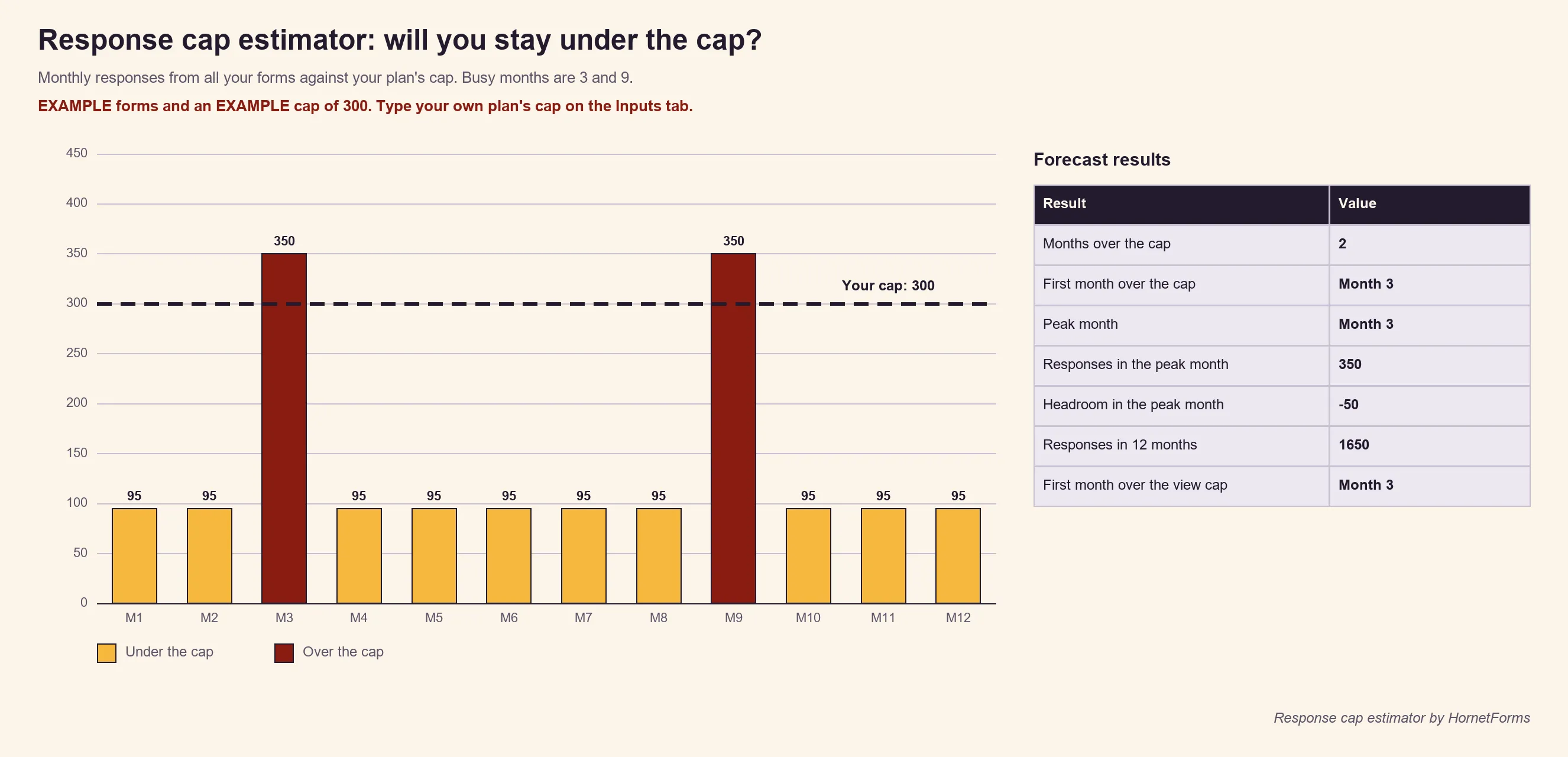
The chart uses the file's own example numbers. Want to run yours? The free response-cap estimator (Excel) does it for any form tool. Type the monthly cap from your plan's pricing page, list your forms with a typical and a busy month, mark which months are busy, and the Forecast tab shows your headroom each month and the first month you'd go over. It has no tool's numbers built in, so it stays right when plans change. There's a CSV of the Forms tab too.
What happens when you reach the cap#
Jotform's FAQ says: "When you reach a usage limit, the system will send you a notification email and warn you on your dashboard."
For the person filling in your form, the help article on the Form Over Quota error explains what they see. The error page shows "This Form Has Exceeded Its Allocated Quota." The article says the error "usually means your account has reached a limit for submissions" (Jotform help: How to Resolve the Form Over Quota Error, last updated July 6, 2026).
You then have a few choices, all from that same article:
- Wait. "One option is to wait for your limit to reset, which happens on the same day each month."
- Upgrade. "The other option is to Upgrade Your Account to a Bronze, Silver, or Gold plan to increase your limits."
- Earn more. For the monthly submission limit, Jotform's "Increase Limits" program raises the limit for free when you complete set tasks.
Good to know: the reset date is the same day each month, but not always the 1st. Jotform's article points you to the Usage tab in your account settings to find yours. Note it down before a big event or campaign.
What Jotform's paid plans cost (as of October 28, 2026)#
Moving up a plan raises the limits. Our full guide to Jotform pricing goes deeper on each tier. Prices from Jotform's pricing page, in US dollars, checked October 28, 2026:
| Plan | Price | Monthly submissions | Active forms |
|---|---|---|---|
| Bronze | $39 a month, or $408 a year | 1,000 | 25 |
| Silver | $49 a month, or $468 a year | 2,500 | 50 |
| Gold | $129 a month, or $1,188 a year | 10,000 | 100 |
| Enterprise | Custom pricing | Ask Jotform | Ask Jotform |
Jotform also says it offers "exclusive 50% discounts on Bronze, Silver, and Gold plans" for educational institutions and nonprofits, after an application. Our Jotform compare page has a side-by-side of plans, if you want the wider view.
Free plans that don't cap responses#
Not every free plan counts responses. Two examples, checked the same day:
- Google Forms doesn't state a response limit on Google's own pages. You can set your own: a January 2026 update lets owners "set a certain number of responses that will trigger the form to close automatically" (Google Workspace Updates). File uploads need respondents to sign in to a Google account, so check that fits your audience. Our Google Forms vs HornetForms post covers the trade-offs.
- HornetForms has unlimited forms and unlimited responses on every plan, Free included, within fair use. Fair use means using it like a form builder: real forms, answered by real people. The Free plan is free forever, and nobody needs a card to sign up.
We care about this one for a personal reason. Our founder once hit a response cap on another tool in the middle of a hiring round. The full story is in when your form hits the response limit. HornetForms charges for features instead: Pro and Business add things like a custom domain and badge removal, and the pricing page lists the rest.
How to move a form#
Moving a form takes two parts: the questions, and the answers you've already collected.
Keep your old answers first. Download your submissions from Jotform as CSV or Excel files before you switch. Jotform's help article above shows how. Keep them somewhere safe, because you'll want them if anyone asks about a past response.
Then rebuild the questions. In HornetForms there are two quick ways:
- From a CSV. Drop in a CSV of your responses, and HornetForms turns its columns into questions, free on every plan. The file stays in your browser. "Improve with AI" is there if you want help with question types, and it's optional.
- From a PDF or Word copy. Upload a PDF or Word copy of the form, up to 10 MB, and AI rebuilds it as a draft for you to check. Each file uses one AI generation from your monthly allowance: 3 on Free, 30 on Pro and 100 on Business.
Either way, go through the draft before you share it. Check the question types, add your logic rules again and send yourself a test response. Then swap the new link into your website, emails and QR codes.
Try it before your next busy month#
Run your forms through the estimator first. If your busiest month sits close to a cap, move the form that matters most before that month starts. Sign up for free and rebuild it in a few minutes.
The small print#
Jotform is a trademark of Jotform Inc. HornetForms is not affiliated with, endorsed by or sponsored by Jotform.