
On this page
You want to know how a customer felt about their order, or which date suits your members for the next meetup. Email is the obvious place to ask, because that's where you already talk to them. The hard part is getting people from "I'll do it later" to an actual answer.
This guide shows how to send an email survey that people answer. You'll see the three ways to put a survey in an email and how answer links work: the person taps a number in the email, and the form opens with that rating already picked. Then you'll write the email and learn how to tell which email brought in each answer. At the end there's a free kit with five email survey templates and an answer-link builder for Excel or Google Sheets.
Three ways to send a survey by email#
Every email survey is a form on the web plus an email that points to it. What changes is how much of the survey shows in the email itself.
| Way | What the person sees in the email | Best for |
|---|---|---|
| A plain link | A sentence with a link, like "Take the survey" | Any survey, any email tool |
| A button | A large, clickable button or a linked image | Surveys of 3 to 10 questions |
| Answer links | The first question, with each answer as its own link | One rating question, an NPS question or a quick poll |
A plain link works everywhere and takes a minute. A button is the same link in a bigger, easier target, which helps on a phone. Answer links take 10 minutes more, and they're the closest thing to a survey in the email: the question is right there, and one tap starts the answer.
Answer links: put the first question in the email#
People search for ways to "embed a survey in an email". What looks like a survey inside an email is, in practice, a row of links. Each number or option links to the same form, with the answer added to the end of the address. Here is what the email survey looks like for a 0 to 10 question:
How likely are you to recommend us to a friend?
0  1  2  3  4  5  6  7  8  9  10
Behind each number sits a link like this one, for the number 9:
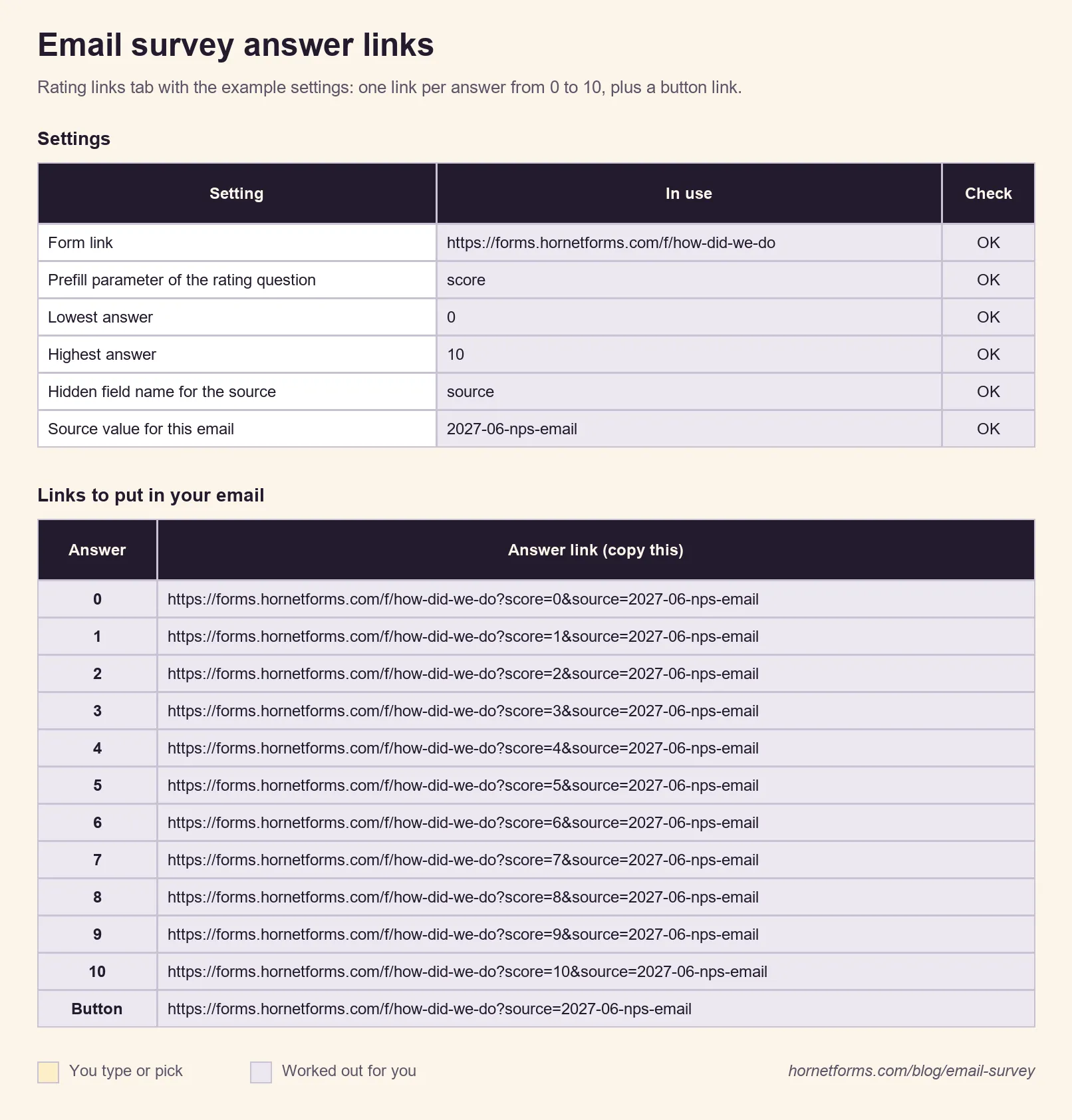
https://forms.hornetforms.com/f/how-did-we-do?score=9&source=2027-06-nps-email
The score=9 part is a prefilled answer. When the person taps 9, the form opens with 9 already picked. They press Submit to send it, or change their mind first. The source part is a tag that tells you which email the answer came from (more on that below).
Set up the form for answer links#
In HornetForms, URL prefill works for visible questions, including rating, linear scale, multiple choice and dropdown questions. Here's the setup for an NPS email survey:
- Add the question. Type
/in the editor and pick NPS ("Net Promoter Score, 0 to 10"). For a five-step satisfaction rating, pick CSAT ("Customer satisfaction, 5 faces") instead. Or start from the Net Promoter Score template atforms.hornetforms.com/templates/nps-survey. - Name the prefill parameter. Open the question's settings and type a short name in the Prefill parameter box, like
score. The editor's own hint reads: "Fill this question from the link, e.g. ?email=ann@example.com. Choices match option labels." - Add a follow-up question. Use a show rule so "What could we do better?" appears for low scores. The rule reads the prefilled score like any other answer, so someone who taps 3 gets the follow-up and someone who taps 10 doesn't.
- Add a hidden field named
source. More on this in the tracking section. - Publish the form and copy its link from the Share tab.
Then build one link per answer: the form link, a ?, the parameter, = and the number. The free builder in the downloads does this for 0 to 10 or 1 to 5 and checks each part for mistakes.
Good to know: a prefilled answer is a starting value, not a response. HornetForms stores nothing until the person presses Submit, and they can change the rating before they do. If you turn on partial responses (Pro and Business, off by default), HornetForms saves answers when the person moves to the next page, never when they first land on the form. So a tap on a number in your email survey is not a vote until they submit it.
What the links check#
The app checks every prefilled value against the question. A rating link only works with a whole number inside the question's own range, so the app ignores ?score=11 on a 0 to 10 scale and the form opens with nothing picked. Choice questions match the option's label and ignore upper and lower case, so ?day=tuesday%20evening picks "Tuesday evening". (%20 is how a link writes a space.) An invalid value never shows an error to the person. The app simply skips it.
We tested this before writing it. The builder's sample links (0 to 10 for NPS, 1 to 5 for a rating and three poll options) went through a copy of the app's prefill rules. Each one picked the intended answer and source, and the out-of-range links picked nothing.
Email polls work the same way#
An email poll is a one-question survey with options instead of numbers. Add a multiple choice question with its own prefill parameter, like day, and link each option:
https://forms.hornetforms.com/f/meetup-vote?day=Tuesday%20evening&source=2027-06-poll
https://forms.hornetforms.com/f/meetup-vote?day=Thursday%20morning&source=2027-06-poll
Keep option labels free of &, #, ?, +, % and =, because those characters change what a link means. The builder's Poll links tab flags them.
How to embed a survey in an email (Gmail, Outlook and newsletter tools)#
You send the email survey from the tool you already use: Gmail, Outlook, or a newsletter tool for a big list. Your sender name and your list stay the same. The steps are the same in every tool:
- Write the question as plain text. Put it near the top, so it shows without scrolling.
- Type the answers in a row. For NPS, the numbers 0 to 10 with spaces between them. Add a line underneath: "0 = not likely, 10 = very likely".
- Link each answer. Select the number, use your email tool's insert-link option and paste that number's answer link.
- For a button, most newsletter tools have a button block. In a regular email, a bold text link or a linked image does the same job.
- Send yourself a test and tap every link on your phone.
Small targets are hard to hit on a phone, so give each number a little space. For a five-step rating, you can write the labels out instead: "Very unhappy (1)" to "Very happy (5)".
Write an email people will answer#
The email decides whether anyone opens the form at all. Survey researchers say email can work well when it's how you already reach people. The American Association for Public Opinion Research (AAPOR) puts it this way: "Online surveys may work well when the primary way you contact respondents is via email" (AAPOR, Best Practices for Survey Research, read 28 October 2026). Pew Research Center says the same for lists of email addresses: "If most members in the population of interest have internet access, and email addresses are available for contacting them, the web often provides a convenient and inexpensive way to survey experts or other industry-based populations" (Pew Research Center, U.S. Survey Methodology, read 28 October 2026).
AAPOR's advice on length applies to the email and the form: "Keep respondent burden low by keeping questionnaires and individual questions short and limiting the number of difficult, sensitive, or open-ended questions." One question in the email, plus one optional follow-up, is about as short as it gets.
Every survey email should say:
- Who it's from: your name and your organization, from an address people know
- Why you're asking: one sentence on what you'll do with the answers
- How long it takes: "one question" or "about three minutes", and mean it
- When it closes: a real date (set the same close date on the form, so it closes on time)
- Who to ask: a reply-to address that a person reads
The subject line names the ask: "One quick question from [your company]" or "How was your order on Tuesday?" Our guide to survey response rates covers how to measure the result and what research says about raising it.
Track which email worked with a source tag#
Send the same email survey to two lists, or send a second note a week later, and you'll want to know which one worked. That's what the source hidden field does.
Add a hidden field to the form and name it source. The hidden field's settings show its URL parameter and a Copy parameter button that copies ?source= for your link. Then give every email its own value, like 2027-06-nps-email for the first send and 2027-06-nps-second for the second. The person answering never sees a hidden field.
When responses come in, the export has a column headed source, the hidden field's name. The value also arrives as its own column if you send responses to Google Sheets. Count the values, and you know which email brought in what.
If your links also carry UTM tags, the built-in analytics show views, completions and conversion for each UTM source, medium and campaign. Our guide to capturing UTM parameters in forms shows the full setup and a link builder for campaigns.
Send a second note from your own inbox#
A second email to people who haven't answered is your own message, sent from your own email tool, just like the first one. AAPOR lists "contacting them multiple times in different ways and at different times of the day, and/or using different persuasive messages" among the ways to get people to take part. Our suggestion: send it once, a few days before the survey closes, with the same answer links and a new source value.
HornetForms can also send the people answering an optional confirmation email after they submit. To send it, add an email question to the form and pick it in the notification settings. You write the subject (up to 200 characters) and the body (up to 5,000 characters), and you can include a link, like a discount code page or a "what we changed" post. You can also turn on an email to yourself for each new response.
Read the results#
The Summary tab scores an NPS question for you: promoters (9 and 10) minus detractors (0 to 6), as a share of all answers. A CSAT rating gets the share of 4 and 5 answers. Our step-by-step guide on how to calculate NPS explains the math and how to read a score. Want more questions to ask after the first one? We also have a guide to customer satisfaction survey questions, with examples by industry.
Every answer counts, too. HornetForms has unlimited responses within fair use on every plan, including Free, so a survey sent to your whole list won't stop at a cap halfway through. Here's what happens when a form hits a response limit on other tools.
Email survey templates and examples#
The kit has five email survey templates, each with a subject line, two more subject ideas, preview text, the body and a note on which links to use:
| Template | Use it for | Links in the email |
|---|---|---|
| 1. One-question NPS email | How likely people are to recommend you | Numbers 0 to 10 |
| 2. Quick rating after an order or a visit | A 1 to 5 satisfaction rating after a purchase, appointment or support chat | Numbers 1 to 5 |
| 3. Short survey with one button | 3 to 10 questions after an event, a course or a trial | One button |
| 4. One-question email poll | Choosing a date, topic or option with a group | One link per option |
| 5. A second note for people who haven't answered | Your own follow-up, a few days before the survey closes | The same links, new source value |
Here's template 1 as one of the email survey examples, ready to copy:
Subject: One quick question from [your company]

Hi [name],

You've been with [your company] for [time]. We'd love to know one
thing: how likely are you to recommend us to a friend or colleague?

Pick a number below. The form opens with your number already picked,
so you just press Submit. If you have a minute more, it asks one
follow-up question.

0  1  2  3  4  5  6  7  8  9  10
0 = not likely, 10 = very likely.

We read every answer. The survey closes on [date].

Thanks,
[your name], [your role]
The kit also has a checklist of what every survey email says and a "before you send" test list.
Free email survey kit and answer-link builder#
- Email survey kit: five email templates, a checklist and example answer links, as a Word (DOCX) file, a PDF for US Letter or a PDF for A4.
- Answer-link builder: the Excel workbook also opens in Google Sheets. Type your form link, the prefill parameter, the lowest and highest answer and a source value, and copy one link per answer. A Check column flags names the app would reject, like a parameter with a space or a name HornetForms keeps for itself. The Poll links tab does the same for options.
- Example links as CSV: the CSV file lists sample links for 0 to 10 and 1 to 5, so you can see the pattern before you build your own.
Send your first email survey this week#
Pick one question you really want answered. Add it to a form with a prefill parameter and a source hidden field, build the links, and send the email survey to a small group first. Tap every link before you hit send. See the features page for the rest of what forms can do. Sign up for free and your first answers can arrive before lunch.
Net Promoter, NPS, NPS Prism and the NPS-related emoticons are registered trademarks of Bain & Company, Inc., NICE Systems, Inc. and Fred Reichheld.