
On this page
Every online form builder promises the same thing: drag, drop, done. Then you find out three weeks later that your plan caps responses, the upload question asks people to sign in, or the badge you hate costs extra to remove.
This guide helps you pick an online form builder before that happens. You get eight things to check, a short test for each, and what the best-known tools say about themselves on their own pages. A free scorecard (Excel and CSV) lets you weight what matters to you and score up to five tools from your own tests.
What an online form builder does#
An online form builder lets you make a web form without writing code. You add questions, choose how the form looks, share a link or embed it on your site, and collect the answers in one place. Some people call the same thing a form maker or a form creator. If you mainly need a survey, our free survey maker guide covers that. If you'd rather write the markup yourself, our guide to HTML form code covers that route.
Most tools let you make a free online form to start, and the basics look alike. The differences hide in four places:
- Limits. How many responses, files and forms a plan allows.
- Logic. Whether the form can skip, show and add things up based on answers.
- Where answers go. Email, spreadsheets, chat tools or only a dashboard.
- Price of the features you need. The free plan is only free if it covers your form.
If you want the step-by-step version of making the form itself, see how to create an online form.
Build your first form in HornetForms#
Here's one worked example to test against the list below. Everything here is on the Free plan unless it says otherwise.
- Start with a draft. Describe the form and the AI builds a draft for you to edit (the Free plan includes three AI generations a month). Or pick a template, or import a PDF or Word (.docx) file and the AI rebuilds it for you to review. A list of questions in a CSV file imports for free.
- Write it like a doc. The editor works like a document, with "/" commands to add questions, and it saves as you go. You get 20+ question types, including signature, ranking, matrix, file upload, scheduling and payment.
- Add logic. Rules can show, hide, require, jump, calculate, hide the submit button or redirect.
- Style it. Pick one of nine theme presets and 21 fonts, set your own colors, and choose corners, form width, input style, button style, size and alignment, and a light or dark look. The Design tab warns you when a color is hard to read. A logo, cover image and custom CSS come with Pro and Business.
- Share it. Copy the link (with a custom slug if you like), download a QR code as PNG or SVG, or embed it inline, as a popup, as a slider or as a full page.
- Send answers where you work. Connect Google Sheets, Slack, Discord or Notion, or use signed webhooks. You can turn on an email to yourself for each new response (it starts switched off). CSV export is on every plan.
HornetForms is free forever on the Free plan, with no credit card to sign up and unlimited forms and unlimited responses within fair use. Fair use means you use it the way people use a form builder: to build forms and collect answers from real people. We don't count or cap your forms or responses on any plan.
Eight things to check in an online form builder#
Open a free account in each online form builder you're considering and build the same real form in each one. Not a demo form: the actual contact form, order form or sign-up you need. Then check these eight things.
1. Response limits#
This is the one that bites. Some free plans cap responses per month, per form or across your whole account. Find the cap for the plan you'd actually pay for, and what happens to your form when it hits it. Does it close, hide or keep going? Our post on what happens when a form hits the response limit walks through why this matters mid-campaign. If you searched for an online form builder free with unlimited responses, this is the line to read twice on any pricing page.
2. Question types#
List every question your form needs before you start. Then build it. If you had to drop a question or bend it into the wrong type (a date as a text box, a ranking as five dropdowns), score the tool down.
3. Conditional logic#
A form with logic feels shorter, because people only see what applies to them. Test three things: an "Other" answer that reveals a "Tell us more" box, a "No" that skips a page, and a total or score if you need one.
4. File uploads without sign-in#
If people upload a CV, a photo or a receipt, test it in a browser where you're logged out of everything. Some upload questions ask the person to sign in to an account first, which loses people. Also check the file size limit per plan and how many files one question accepts.
5. Design and branding#
Match your brand colors and font, then look at it on a phone. Check whether the form shows the tool's name or badge, and which plan removes it. Our form design best practices list what makes a form easy to fill in, whatever tool you use.
6. Sharing and embeds#
Any web form builder should give you a link. Check for a short custom link, a QR code you can print and an embed that fits your site. Paste the embed code into a test page and fill in the form there. The guide to embedding a form on a website explains the inline, popup and full-page options.
7. Where answers go#
Turn on the email to yourself, connect the tool your team already uses (Google Sheets, Slack, Notion) and send a test response. Then download a CSV and open it. If a connection needs a paid plan, write that down.
8. Price of the features you need#
Mark your must-haves, find the cheapest plan that has every one of them, and write down its yearly price on the day you check. Prices change, so date it.
| Thing to check | The quick test |
|---|---|
| Response limits | Find the cap on the plan you'd pay for, and what happens at it |
| Question types | Build your real form; note anything you had to drop |
| Conditional logic | "Other" shows a box, "No" skips a page, a total adds up |
| File uploads | Upload while logged out; try your largest real file |
| Design and branding | Match your colors on a phone; find which plan removes the badge |
| Sharing and embeds | Scan the QR code; paste the embed on a test page |
| Where answers go | Email to yourself, one connection and a CSV export |
| Price | Yearly cost of the cheapest plan with every must-have |
Free form builder with file upload, logic, signature or no badge#
Four searches come up again and again when people look for a free form builder. Here's what to test for each one.
Free form builder with file upload#
Check three things on the free plan: whether respondents must sign in to upload, the size limit per file, and how many files one question takes. In HornetForms, respondents never need an account or a sign-in to answer or upload. A file upload question accepts up to 10 files and can limit the allowed file types. Files can be up to 10 MB each on Free, with no plan cap on Pro and Business.
Free form builder with conditional logic#
Some tools keep logic for paid plans, and some only branch from certain question types. Build one rule of each kind you need and test both paths in the preview. HornetForms logic is on every plan, and a condition can compare two answers, not only an answer and a typed value.
Free form builder with signature#
A signature question lets someone sign right in the form. Test it on a phone with your finger, then check the signature shows in the response. HornetForms includes a signature question on every plan.
Free form builder without branding#
Most free plans show the tool's name somewhere. On HornetForms, Pro and Business remove the "Made with HornetForms" badge, and a custom domain comes with Pro (one) and Business (10). The pricing page lists what each plan includes.
The well-known online form builders, in their own words#
You probably have a few names on your list already. Here's how five well-known tools describe themselves on their own pages, checked on November 2, 2026. For plans and prices, the compare pages keep dated facts in one place.
| Tool | What its own page says | Compare |
|---|---|---|
| Google Forms | "Select from multiple question types, organize them with a drag-and-drop interface, quickly customize each to fit your needs, and then easily share your form via email, social media, or embed it on a website." (Google Workspace) | Google Forms |
| Microsoft Forms | "With Microsoft Forms, you can create surveys, quizzes, and polls, and easily see results as they come in." (Microsoft Support) | Microsoft Forms |
| Typeform | "Build forms that adapt to every respondent and then analyze your data for rich insights." (typeform.com) | Typeform |
| Jotform | "Go from busywork to less work with powerful forms that use conditional logic, accept payments, generate reports, and automate workflows." (jotform.com) | Jotform |
| Tally | "Tally is a new type of online form builder that works like a text document." (tally.so) | Tally |
Pages change, so read them again on the day you decide.
A tagline tells you what an online form builder wants to be known for, not whether your form fits its free plan. The eight tests answer that.
Want a longer look at a few of these? We wrote up Google Forms vs HornetForms and an honest comparison with Typeform and Tally.
Good to know: score each tool from your own test, not from a review or a "best of" list. A list can't know that your form needs 14 file uploads a day or a price calculation.
Compare online form builders side by side: the free scorecard#
The free form builder scorecard (Excel) turns the eight checks into 18 criteria, each with a test to run. It has three tabs: Start here, Scorecard and Lists.
On the Scorecard tab you:
- Name up to five form builders in the top row.
- Set a weight from 0 to 5 for each criterion. Every weight starts at 3; a weight of 0 leaves it out.
- Mark must-haves with Yes or No.
- Score each tool from 0 to 5 from your own test. Leave a cell blank until you've tested it.
- Write your notes per tool: the plan you checked, its yearly price and the date.
The summary works out each tool's weighted score from 0 to 100, its rank, how many criteria you've scored, any must-have scored below 3 and any must-have you haven't tested. Then it names the best fit so far, skipping any tool that misses a must-have. The weighted score leaves out blank scores, so a half-tested tool isn't dragged down by tests you haven't run.
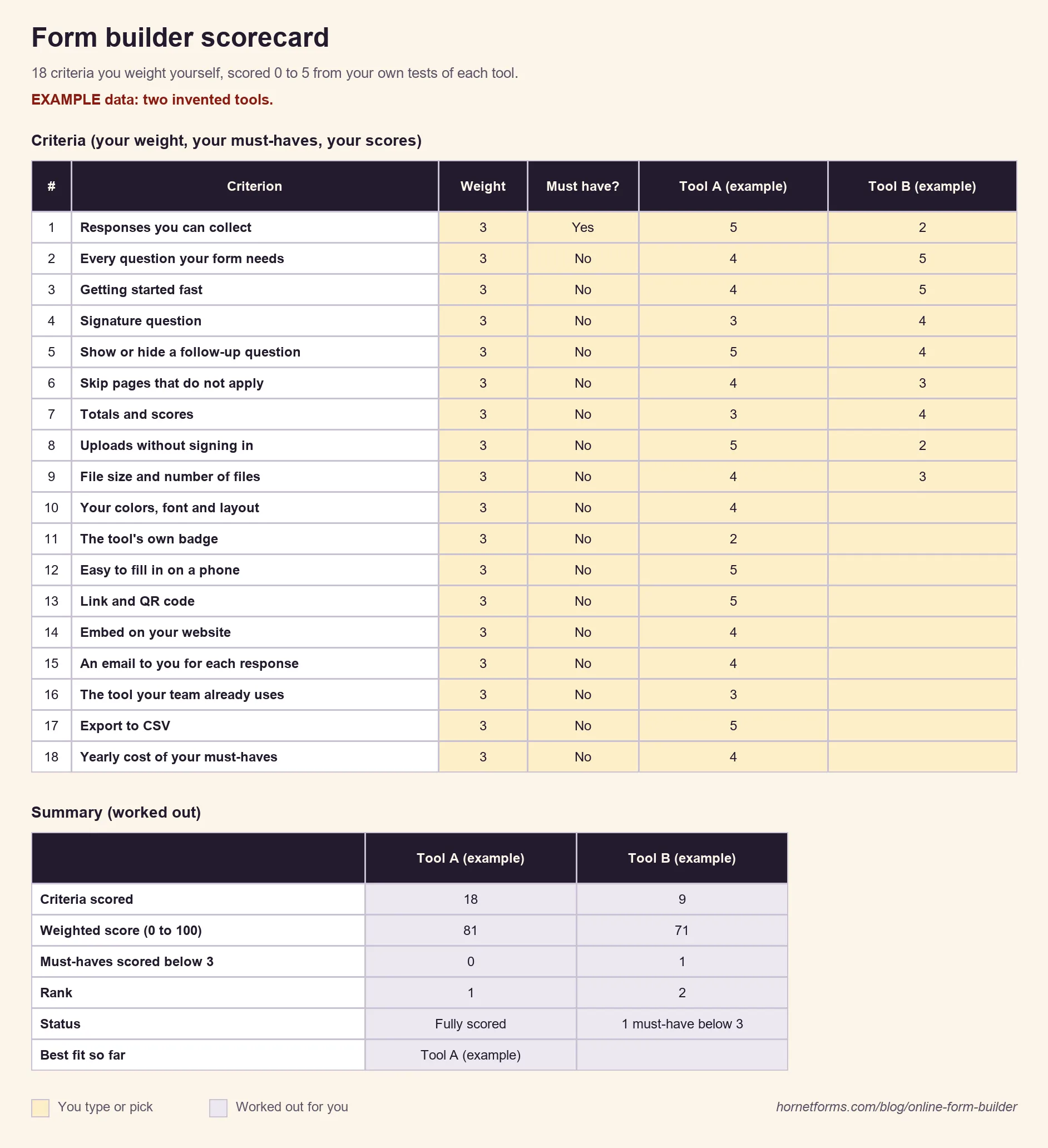
The sheet ships with two invented tools, "Tool A (example)" and "Tool B (example)", so you can see the summary work. Clear them before you start. There are no facts about any real tool in it: every score is yours. Prefer Google Sheets? The scorecard CSV has the same 18 criteria, a weight of 3 and a Must have column of "No" on each row, and five empty score columns.
Small print#
Google Forms, Google Sheets and Google Workspace are trademarks of Google LLC. Microsoft Forms is a trademark of Microsoft Corporation. Jotform is a trademark of Jotform Inc. Typeform and Tally are trademarks of their owners. HornetForms is not affiliated with, endorsed by or sponsored by any of these companies. The quotes above reflect each company's own page as of November 2, 2026; for current details, check their sites.
Try it on a real form#
Pick the form you need this month. Build it in two or three online form builders, run the eight tests and score each one honestly. The scorecard does the math, and the weights keep your must-haves in charge.
If HornetForms is on your list, it's free forever, with unlimited responses within fair use and logic, file uploads and integrations on every plan. Sign up for free and build the contact form, order form or sign-up you need, then score it against the rest. The features page and the integrations page have the full list.