
On this page
Comment cards pile up at the back of the room. Emailed comments land in three different inboxes. The deadline says noon on Monday, but a comment still turns up at 4 p.m., and nobody knows whether it counts. Then someone asks to speak online, and the clerk has no phone number to call.
A good public comment form template fixes most of that with one link per meeting. This guide covers the fields to ask and why each one is there, and the rules worth printing on the form. It also shows how to close comments at your deadline and how to get every comment into the record. At the end you'll find a free template, printable comment cards for the room and a log that tallies support and opposition per agenda item.
It works for anyone who takes public comment: a town or village board, a library board, a school board, an HOA, a neighborhood group or a community council. Change a few words and it fits your meetings. To hear from residents before an issue reaches the agenda, a community needs assessment survey asks the wider questions.
What a public comment form template should ask#
A comment card has a simple job. It ties one comment to one meeting and one agenda item, says where the person stands, and tells the chair whether to call their name. A sample card from the Utah League of Cities and Towns asks for the date, an agenda item number or "Non-agenda item", a name, an address and an email. It ends with four boxes: "I support this agenda item", "I oppose this agenda item", "I wish to speak" and "I do not wish to speak" (Utah League of Cities and Towns, Public Comment Cards, September 2024, accessed 27 October 2026).
Our public comment form template follows the same idea, page by page:
| Field | Type | Why it's there |
|---|---|---|
| Meeting date | Date | Matches the comment to the right meeting |
| Is your comment about an agenda item? | Multiple choice | Splits agenda comments from general comments |
| Agenda item number or title | Short text, shown only after "Yes" | So the comment lands under the right item |
| Your position | Multiple choice | I support it, I oppose it, or neither, so you can count them |
| Your comment | Long text | The comment itself, in the person's own words |
| Attach a letter, photo or document (optional) | File upload | For a letter, a map or a photo of the site |
| Full name, city or neighborhood | Short text | Who commented, as the record usually shows it |
| Email (optional) | Only for people who want updates about the item | |
| Would you also like to speak at the meeting? | Multiple choice | No, in person or online, so the chair knows whom to call |
| Phone number for joining online | Phone, shown only after "Yes, online" | So staff can bring online speakers in |
Two more fields stay hidden, meeting and item. They fill in from the link the person used (more on that below). Not sure which question type fits a field? Here's which question type to pick.
Keep it to one item per response. The Utah card says it plainly: "Please complete one card for each topic." If someone wants to comment on three items, they send the form three times. Your tally stays clean, and each comment goes into the record under the right item.
Rules to put on your public comment form#
Most comment rules come down to four questions: when comments close, how long they can be, how long a speaker gets, and what happens to the comment afterwards. Here's how three real comment forms and cards answer them:
| Source | What it says |
|---|---|
| City of San Diego, Rules Committee comment form | "All webform comments are limited to 200 words." Comments sent at least one hour before the meeting "will be distributed to the Committee and posted online." |
| Seattle City Council, public comment page | The remote sign-up form "will be available one hour before the start of applicable council meetings." Remote speakers "will then have up to 2 minutes to give public comment." |
| Utah League of Cities and Towns, sample comment card | "No public comment cards will be accepted after the agenda item discussed has begun." And: "You will have 3 minutes to voice your opinion." |
Sources: City of San Diego, Rules Committee Public Comment Form, Seattle City Council, Public Comment and the Utah card linked above, all accessed 27 October 2026.
Whatever your rules are, write them into your public comment form template, near the top. People read the form, not the policy page. Our template opens with this line, ready for your own words: "Comments received by [deadline] go to the [council or board] before the meeting. Comments are public records and may be posted or read aloud." The comment box has a hint too: "Keep it short enough to read aloud in [three] minutes."
That last part matters. If you're a public body, comments are usually public records. San Diego's form says so: "Please note that comments and information provided via this form are public records submitted by members of the public." It adds: "Additionally, these comments are posted as submitted." Seattle's sign-up page says: "All information entered into this form is subject to public disclosure."
Good to know: your own open meetings rules, records rules and bylaws decide the deadline, the time limit and what you publish. Private groups like an HOA have their own. Ask your clerk, records officer or attorney for the exact wording before you open comments.
Close comments on time#
A paper deadline depends on someone checking the clock. An online form built from a public comment form template can close by itself.
Set the deadline as the close date#
Every HornetForms form, on every plan, has a close date. Pick the day and the time of your comment deadline, and the form stops taking responses at that moment. Then write your own closed message (up to 500 characters) for anyone who arrives late, like "Written comments for the 12 November meeting have closed. You can still speak in person at the meeting, or email the clerk."
You can also set a scheduled opening date. Post the agenda on Thursday, and the form opens on Thursday. Until then, visitors see a notice instead of the form. A busy hearing won't hit a cap either: every plan has unlimited responses.
One link per meeting and item#
The public comment form template has two hidden fields, meeting and item, that fill in from the link. Put a different link next to each agenda item:
https://forms.hornetforms.com/f/<your-slug>?meeting=2026-11-12&item=7
https://forms.hornetforms.com/f/<your-slug>?meeting=2026-11-12&item=8
The person never sees the hidden fields, but they show up in your responses and your export. Every plan includes QR codes, so you can print one on the agenda, on the notice board or on a sign by the door. The logic, piping and calculations guide covers hidden fields and show and hide rules in more depth.
Speakers, in person or online#
The last question in the public comment form template asks whether the person would also like to speak: "No, please enter my written comment", "Yes, in person" or "Yes, online". Only people who pick "Yes, online" see the phone number question, and the template makes it required for them. That's the number staff call or look for when they bring speakers in. Seattle's remote sign-up asks for the same thing: "Please register with the phone number you will be calling from to ensure you are recognized."
Ask only what you'll publish#
Every field on a public comment form is something that might end up in a meeting packet or on a website. So ask for what the clerk needs and no more.
It's easy to get this wrong. A commenter on Hacker News described a public comment form that "lists first and last name as required fields (with address and phone number optional), then at the bottom includes this warning: 'Do not submit personally identifiable information through this form.'" (Hacker News comment by senderista, 20 November 2025, accessed 27 October 2026.)
Our public comment form template asks for a full name, because the record usually shows who commented. City or neighborhood is optional. So is email, with a note that it's "Only if you'd like updates about this item." There's no home address and no date of birth. If your rules need a street address to confirm residency, add the question, and say on the form that you may publish it.
From the form to the record#
A form collects comments. You still decide what goes into the packet and what the chair reads aloud. Here's how each comment reaches you, on every plan unless it says otherwise:
- An email for every new comment. You can also turn on a confirmation email to the commenter, sent when they leave an address.
- A PDF of any response to download for the meeting packet or your file. Pro and Business can also attach a PDF copy to the notification email.
- A file attachment without a sign-in. Respondents never need an account or a sign-in to answer a form or upload a file. Free allows files up to 10 MB each, and Pro and Business have no plan cap. For the wider picture, here's a fair comparison with Google Forms.
- A Google Sheets row or a Slack message per comment. The hidden
meetinganditemfields get their own columns in Sheets. Here's how to send form responses to Google Sheets, Slack or Notion. - A CSV export of every response, ready for the log below.
- Spam protection with a honeypot, a time check and rate limits, so bots don't flood your comment period. More on that in spam protection that doesn't annoy humans.
The free public comment log opens in Excel and Google Sheets. Paste your CSV export into the Responses tab. The Log tab lists one row per comment, with the time it arrived, the meeting, the item, the position and whether the person wants to speak. The Tally tab counts support, oppose, neither and no position for each agenda item, plus how many asked to speak. Type a meeting date to count one meeting, or leave it empty to count everything. The Speakers tab lists everyone who asked to speak, in the order they sent their comment, with the phone number for people joining online. A yellow column on the Responses tab lets you mark each comment once you've read it into the record or posted it. A CSV with just the column headers is there too.
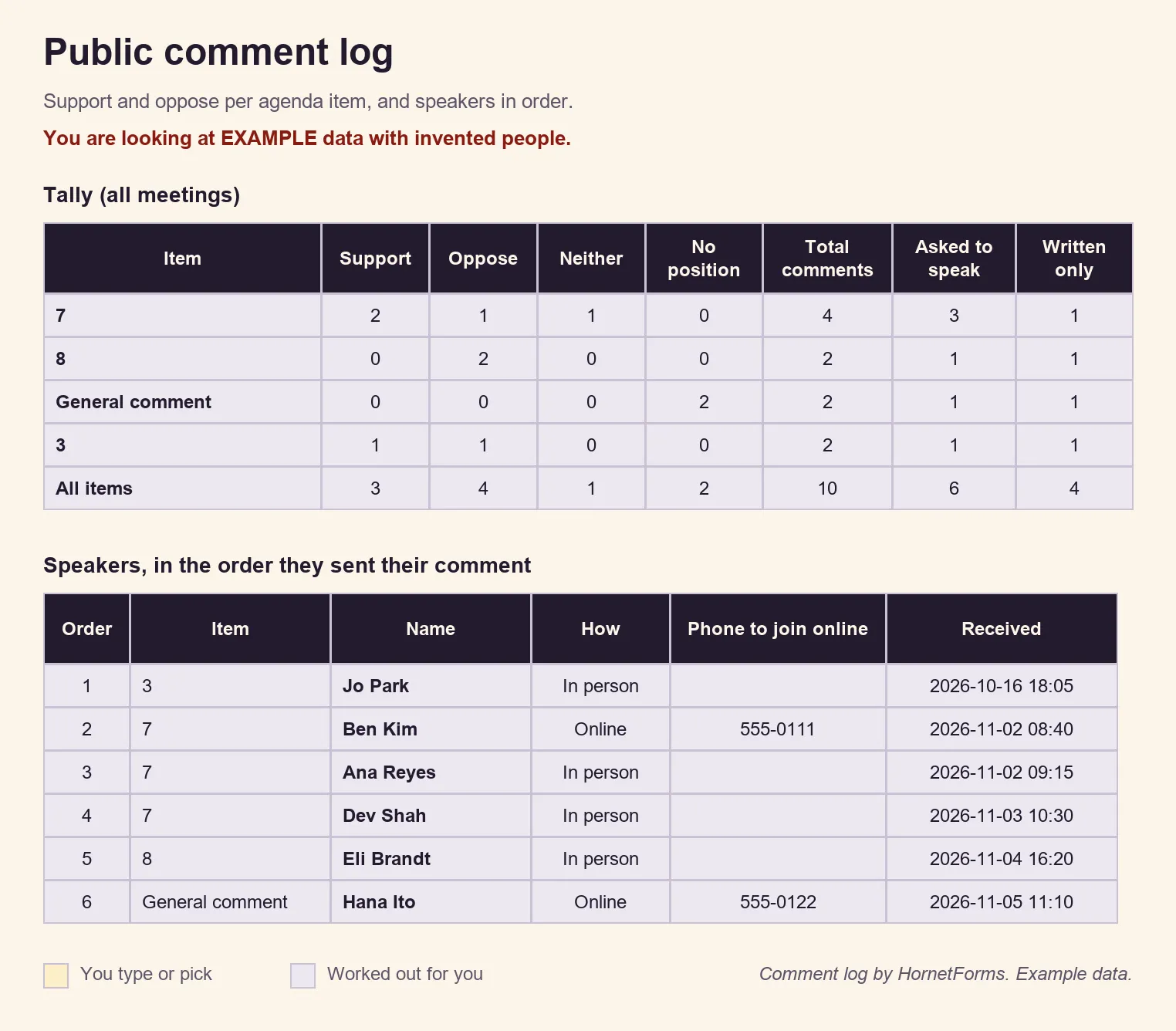
EXAMPLE data: we made up the people, items and comments. Delete the example rows and add your own.
Keep the log and your exports under your own records schedule. Pro has auto-delete rules, but if you're a public body, check with your records officer before you turn one on. Your schedule may require you to keep comments for a set time.
Comments in more than one language#
Not everyone in your community reads English first. The buttons and messages respondents see come in 12 languages on every form, with right-to-left support. With Pro or Business, you can translate your own questions into up to 10 languages, so a resident can comment in theirs. The pricing page shows what each plan includes.
Printable comment cards for the room#
Some people would rather write on paper, and that's fine. Our public comment cards print two to a page, with the same fields as the online public comment form template. Each card carries the public records line and a box for your QR code marked "Comment online". Cut them in half and stack them at the back of the room, next to a meeting sign-in sheet for the door.
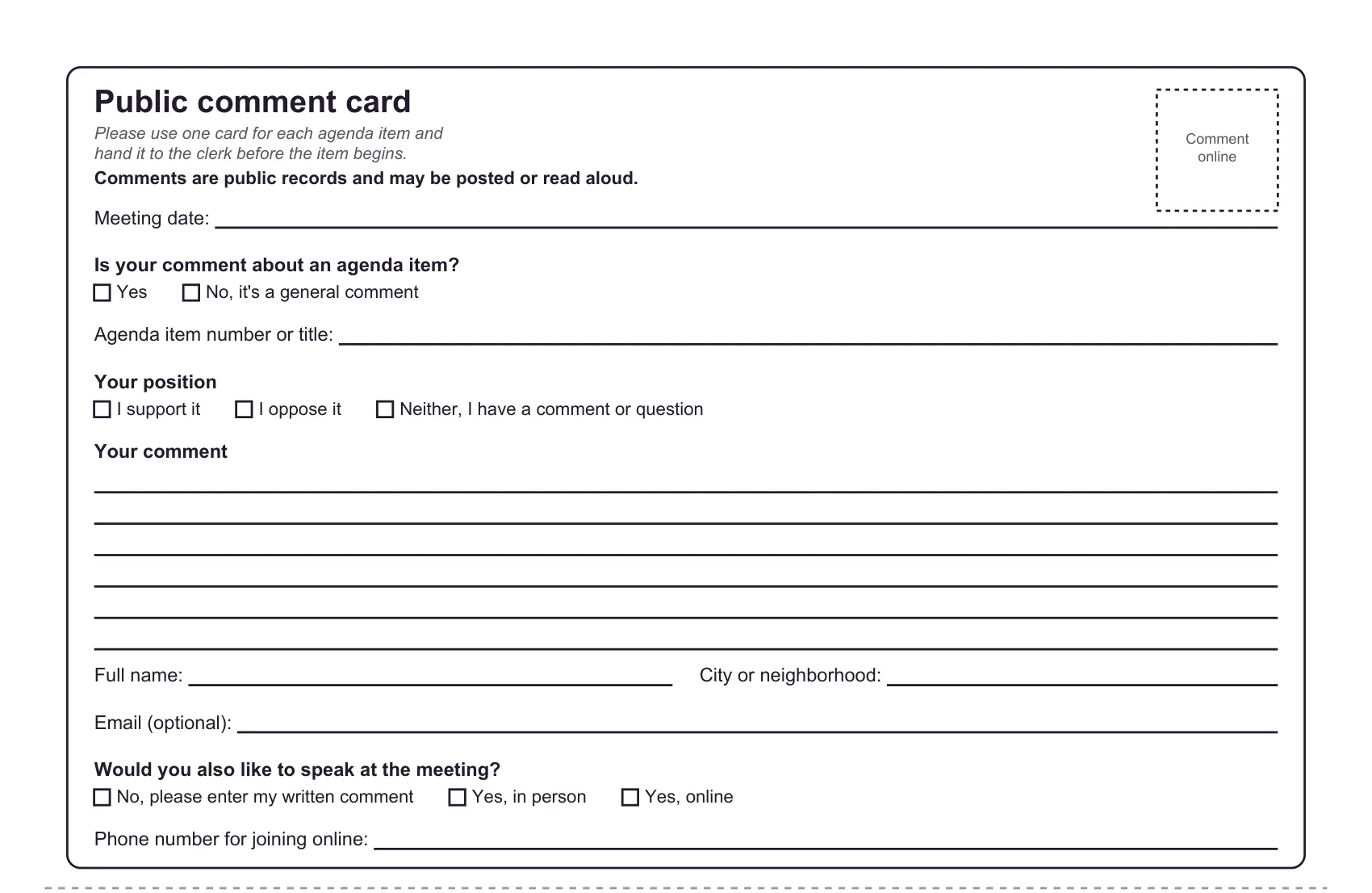
One of the two cards on each printed page.
Download the cards as a PDF, US Letter, a PDF, A4 or Word (DOCX) to add your logo and your rules. The full form also comes as a printable copy, in PDF, US Letter, PDF, A4 and Word (DOCX).
Free public comment form template#
The online public comment form template has three short pages: The meeting and item, Your comment and About you. Each page opens with a short "why we ask" line, so people know why you want each answer. Two show-and-hide rules keep it short: the item box appears only for agenda comments, and the phone number only for online speakers. The thank-you message says: "Your comment is in. The clerk will add it to the record for this meeting."
To use it, open the template page at forms.hornetforms.com/templates/public-comment and press Use this template. It takes you through sign-up and opens your own copy. Already have an account? It's in the template gallery under Feedback, as "Public comment". Replace [deadline], [council or board] and [three] with your own, set the close date, and share the link. See everything else a form can do on the features page.
Open comments for your next meeting#
Copy the public comment form template and write your deadline and time limit at the top. Then set the close date and print a QR code on the agenda. The Free plan is free forever, with unlimited forms and responses. Sign up for free and open comments for your next meeting.