
On this page
Your new client said yes. The first session sits on your calendar, and you know their name, their email and not much else. So half of session one goes on the basics: what they do, what they want and how they like to work. A coaching intake form moves those basics to before you meet, so the first session starts on the real work.
This guide covers the questions to ask and why each one earns its place. It also shows how one form can serve life, business and career coaching. At the end there's a free template, a printable version and a client tracker sheet.
What a coaching intake form is for#
An intake form comes after the yes. Screening happens earlier, on a discovery call or an application. For that step, see our discovery call questions. The intake form is for someone who has already decided to work with you, so you can ask more and explain less.
Good intake answers help you make four decisions before session one:
- Where to start: what made them reach out now
- What success means: the change they want and how you'll both spot it
- How they like to work: direct or gentle, and what helps between sessions
- What to skip: what they've already tried, with a coach or on their own
That first impression matters in a busy field. The International Coaching Federation's 2025 Global Coaching Study counted a record 122,974 coach practitioners worldwide, up 15% from 2023 (executive summary published September 15, 2025). A first session that already feels personal is one way to stand out. A useful free guide is another, and these lead magnet ideas for coaches can get you started.
Coaching intake form questions to ask#
The best coaching intake form questions change what you do in session one. If an answer wouldn't change your plan, cut the question. Here's the set in our free template:
| Question | Type | Why it's there |
|---|---|---|
| The name you'd like me to use | Short text | Your first email sounds like you know them |
| Time zone | Short text, required | Session times that work for you both |
| What would you like coaching on? | Multiple choice, required | Picks the follow-up questions |
| What's happening right now that made you want a coach? | Long text, required | The real starting point |
| How satisfied are you with this part of your life today? | Linear scale, 1 to 10 | A baseline to look back on later |
| What would you like to be different in three months? | Long text, required | What success means to them |
| How will you know it's working? | Long text | Signs you can both check |
| Put these in order of what matters most to you | Ranking | Shows their priorities at a glance |
| Have you worked with a coach before? | Multiple choice | Opens a follow-up when the answer is yes |
| Which coaching style suits you best? | Multiple choice | Tells you how hard to push |
| When are sessions easiest for you? | Checkboxes, required | Fewer emails to find a time |
The basics#
Ask for their name, then the name they'd like you to use. "Jonathan" on a form is often "Jon" in person. Add email, phone and time zone, plus the best way to reach them between sessions: email, a text message or a phone call.
Where they are now#
Start with the question that tells you the most: "What's happening right now that made you want a coach?" Then ask them to rate how satisfied they are with that part of their life on a scale from 1 to 10. In three months you can ask the same question again and compare.
Where they want to be#
Ask what they'd like to be different in three months, and how they'll know it's working. Then ask what might get in the way. People usually know their own obstacles, and naming them early saves a session later. A ranking question finishes the page: clarity, confidence, accountability, new skills and balance, in their order.
What they've tried#
Ask whether they've worked with a coach before. If they have, ask what worked well and what didn't. Then ask what they've already tried on their own. This is how you avoid suggesting the journaling habit they dropped twice last year.
How they like to work#
Some clients want a coach who challenges them, and others want calm support. Ask which style suits them, what helps between sessions (a short email check-in, a task list, something to read or watch) and when sessions are easiest. Finish with an open "Anything else I should know before we start?"
Good to know: keep medical and mental-health history out of a general coaching intake form. If your kind of coaching needs that information, follow the guidance from your insurer or professional body.
One form for life, business and career coaching#
Most coaches don't need three intake forms. They need one coaching intake form that asks the right follow-up for each client. Conditional logic does that, on every plan.
The template's "What would you like coaching on?" question has five answers: Career or work, Leadership, My business, Life and relationships, and Something else. Three logic rules then show the questions that fit:
- Career or work, or Leadership: shows "Your role and where you work"
- My business: shows "Tell me about your business", with a hint to cover what it does, how long it's been running and who it serves
- Have you worked with a coach before? is Yes: shows "What worked well, and what didn't?"
A life coaching client never sees a question about their business, and a business client skips the job title. So the same form works as a life coach intake form, an executive coaching intake form or a career coaching intake form. If you coach one niche only, delete the answers you don't need and the follow-ups go with them.
You can build the same pattern for your own niche. Our logic, piping and calculations guide walks through show rules step by step.
Let clients share files without a login#
A CV, a business plan or last year's performance review can tell you more than a page of answers. The template ends with an optional upload: "Anything you'd like me to read first (optional)".
Clients never need an account or a sign-in to answer the form or upload a file. Uploads can be up to 10 MB per file on the Free plan, with no plan cap on Pro and Business. A PDF or a photo of a printed page both work.
Not sure which question type fits a question of your own? Here's a guide to which question type to pick.
Book the first session in the same form#
The last question in the template is "Book your first session". It's a scheduling question that shows your Calendly or Cal.com booking page inside the form, so the client picks a time without leaving. Bookings appear in the response, next to the answers.
The template ships with a sample booking link. Paste your own Calendly or Cal.com link before you publish. The editor reminds you if the sample is still there.
Charging for your program up front? Take the booking question out and add a Payment block in the editor instead. Clients pay once on Stripe's hosted Checkout page, and the money goes straight to your own Stripe account. Payments work on every plan, Free included. HornetForms adds no fee of its own, and Stripe's processing fees apply. Then set the form's redirect URL to your booking page, so clients choose a time after they've paid.
Have the answers ready for session one#
An intake form only helps if you read it before you meet. Send the answers somewhere you'll see them:
- An email for every intake, on every plan. You can also write your own confirmation email to the client, with your own subject line and message.
- A response PDF of any intake, on every plan, to keep in the client's file. Pro and Business can attach the PDF to the notification email.
- Google Sheets or Notion, built in on every plan, if you keep client notes there.
Run several programs? Add the hidden field program to the form and give each program its own link:
https://forms.hornetforms.com/f/<your-slug>?program=leadership
The value arrives with the answers, and in Google Sheets it gets its own column, so you can tell your programs apart at a glance. Every plan has unlimited responses, so a busy month never closes the form. Here's our take on what response caps really cost.
One plain point on access: anyone with access to your workspace can read the answers. Keep client forms in a workspace that only you, or people who should see client answers, can open. For setup steps, see how to send form responses to Google Sheets, Slack or Notion, or browse the integrations page.
A free coaching intake form template#
Our coaching intake form template is a five-page HornetForms form:
- About you: name, the name they'd like you to use, email, phone, time zone and the best way to reach them, plus the
programhidden field - Where you are now: what they want coaching on, the follow-ups for career, leadership or business clients, and the satisfaction scale
- Where you want to be: the three-month picture, signs of progress, what might get in the way and the ranking
- What you've tried: past coaching and their own attempts
- How you like to work: coaching style, support between sessions, session times, the optional upload and the booking question
You'll find it in the template gallery under Operations, or on its own page at forms.hornetforms.com/templates/coaching-intake. Click Use this template, sign up if you're new, and your own copy opens ready to edit. The features page shows what else you can add.
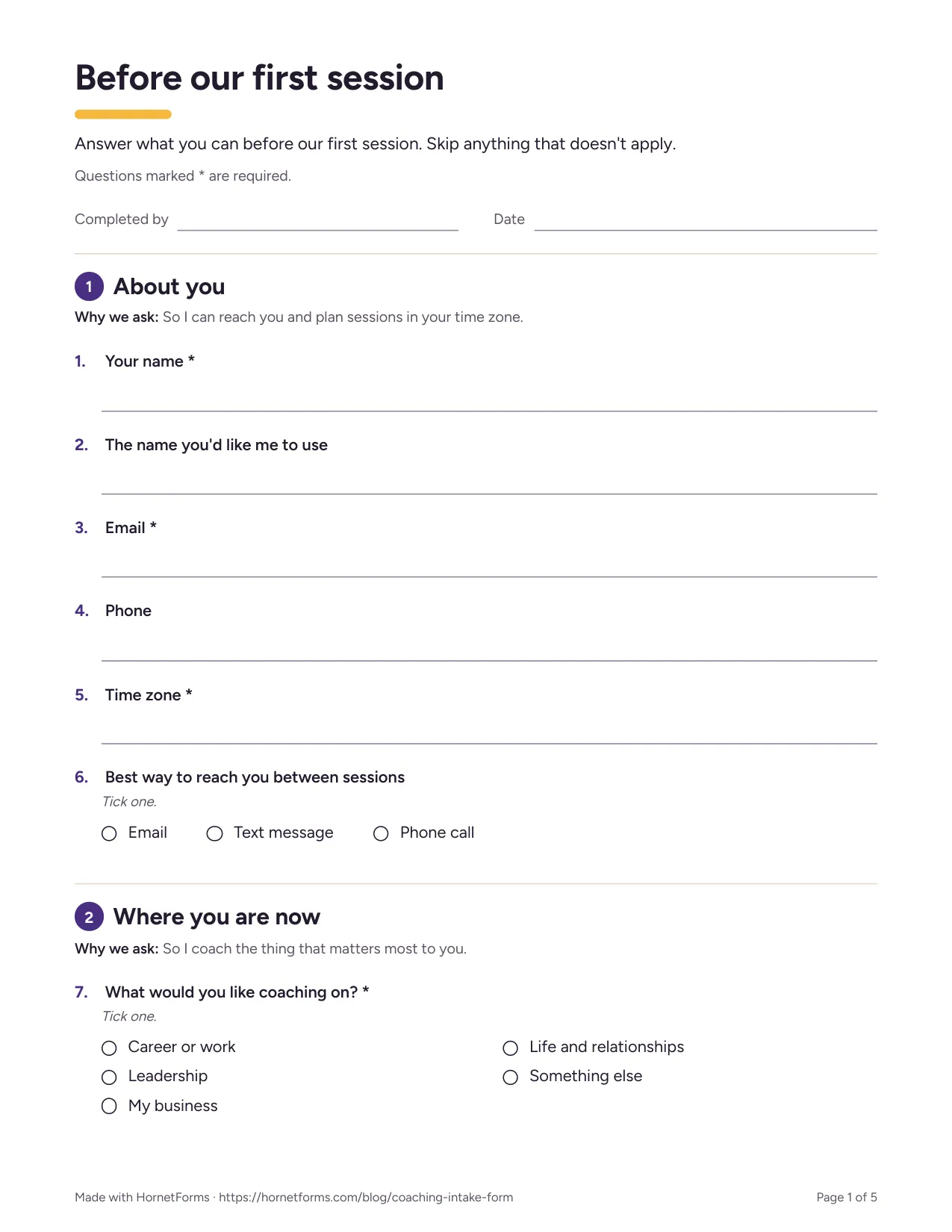
The first page of the printable version.
There are two downloads to go with it:
- A printable coaching intake form for clients who'd rather write by hand: PDF, US Letter, PDF, A4 or Word (DOCX) to add your own logo and wording.
- A coaching client tracker to keep every client in one place: coaching client tracker (Excel), which opens in Excel and Google Sheets. Paste your CSV export into the Intake tab. The Clients tab then shows each client's status, focus, start date, a review date 90 days later, sessions done and the next session. Log each session on the Sessions tab. A CSV with the export's column headers is there too.
The tracker holds names, emails and goals, so keep it where only you can open it.
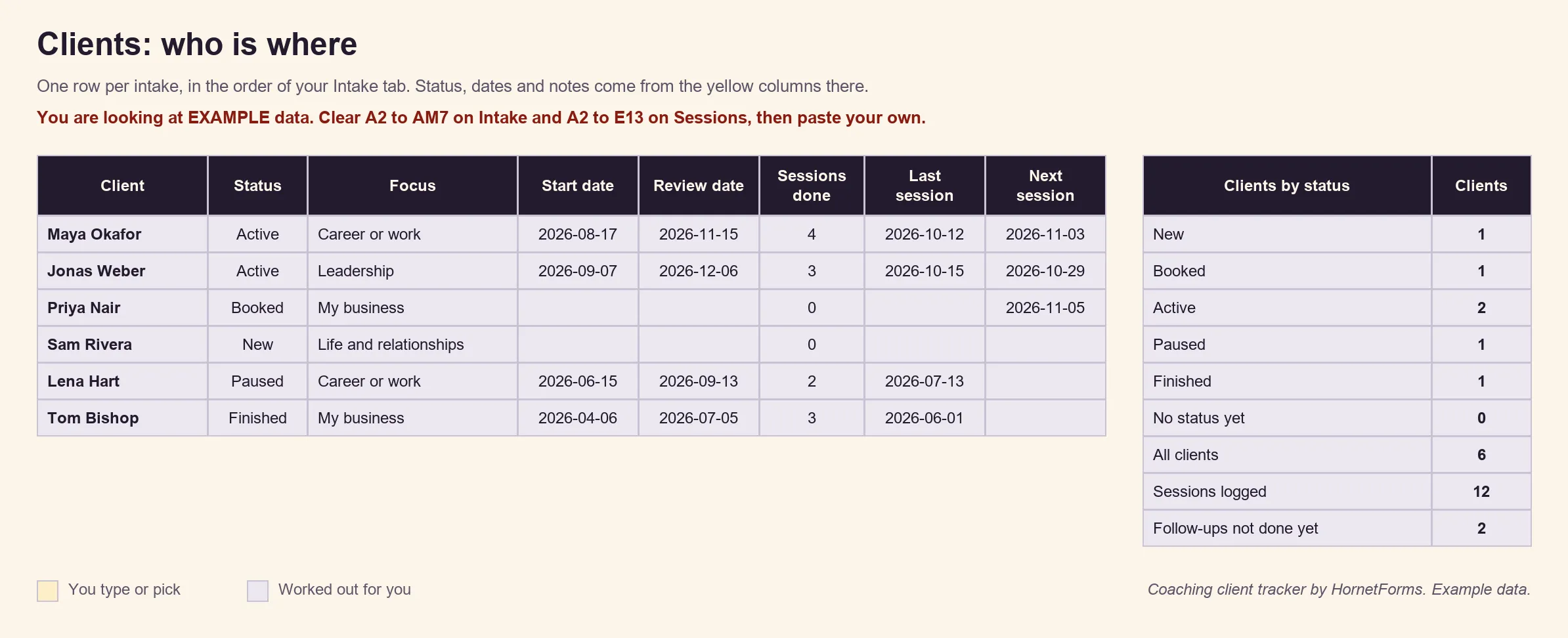
Example data only: we invented these clients. Clear the example rows before you paste your own.
Send it before your next first session#
Pick your next new client. Copy the template, cut the questions you won't use, paste your booking link and send it a few days before you meet. Then read the answers with a coffee before the session starts. Sign up for free and send your next client a coaching intake form before you meet.