
On this page
The first week of school comes with a stack of paper. Every family gets the same sheet in a backpack, and not all of them come back. Some return with a phone number nobody can read. A few turn up in October, folded into a lunchbox.
A student information sheet for parents is the form most teachers, school offices and after-school programs send at the start of the year. This guide covers what to ask on each page and why parents get stuck on school Google Forms. It also shows how to turn the answers into a class list you can actually use. At the end you'll find a free online template, a printable copy for families who prefer paper and a class roster sheet.
What a student information sheet is for#
Every question on a student information sheet for parents should help you make a decision later. Four decisions matter most:
- Who do I call? A parent, a second guardian or an emergency contact.
- Who may collect this child? And is there anyone who must not?
- What should staff know to look after this child during the day? Allergies, medicines and anything that helps them settle.
- How does this family like to hear from me? A call, a text or an email, and in which language.
The last part is easy to skip, and it's often the most useful. Elena Aguilar, writing on Edutopia about the questions to ask parents, put it this way: "In retrospect, I wish I'd asked more questions about their child and then listened more to what they had to say." (Edutopia, 7 questions to ask parents at the beginning of the year, August 18, 2014). Her list starts with "What do you see as your child's greatest strengths or skills?"
So a good sheet does two jobs. It gets the contact details right, and it opens a conversation with the family.
Questions for a student information sheet for parents#
Here's what goes on each page of our student information sheet for parents. The labels are the exact ones in the template, so you can match them to your export later.
| Page | Questions | Why you ask |
|---|---|---|
| About your child | Child's full name, the name they like to be called, date of birth, class or grade, languages spoken at home | So you use the right name on day one |
| Parents and guardians | Name, relationship, phone, email, best way to reach you, language for messages, an optional second guardian | So messages reach the right adult, the way they prefer |
| Emergency contacts and pickup | Emergency contact and phone, who else may pick up, anyone who must not, an optional document | So you can reach someone fast and know who may collect the child |
| Health and learning | Allergies (required), medical conditions or medicines, anything that helps the child learn or feel settled | So staff know what the family wants them to know |
| Getting to know your child | What they're great at, what they love outside school, hopes or worries for the year, anything else | So you start the year with the child, not the paperwork |
The student#
Keep the first page short. Ask for the child's full name, then "Name your child likes to be called". It costs one line, and it spares a child a year of "Jonathan" when everyone at home says "Jojo". Ask for languages spoken at home here too, because it tells you more than a tick box ever will.
Parents, guardians and the best way to reach them#
Ask one parent or guardian for a name, phone and email. Then ask "Best way to reach you" with three choices: phone call, text message or email. Add "Language you'd like us to use when we contact you" as a short text box.
Then ask "Is there a second parent or guardian we should have on file?" The second guardian's name, phone and email only show when the family answers Yes. Families with one contact never see three empty boxes.
Emergency contacts and pickup#
The emergency contact needs a name and a phone number, both required. Then ask "Who else may pick up your child?" as a free text box, so families can write names and how each person is related.
The next question is the delicate one: "Is there anyone who must not pick up your child?" When a family answers Yes, two more fields appear. One asks them to tell you who, and anything you should know. The other is an optional upload for a court order or other document, where a photo or a PDF works. Keep the wording neutral and let the family decide what to share. What happens next is up to your school's own pickup policy.
Health and anything that helps your child learn#
This page is about what staff need to know to look after a child during the day, in the family's own words. "Does your child have any allergies?" is required, with No or Yes. A Yes opens a required box: "What is your child allergic to, and what should we do?" The family writes the plan, and the form makes sure nobody skips it.
Two optional boxes follow: medical conditions or medicines, and "Anything that helps your child learn or feel settled". The placeholder suggests glasses, a quiet corner or a support plan.
Getting to know your child#
End the student information sheet for parents with four open questions. Ask what the child is great at and what they love doing outside school. Then ask what the family hopes for or worries about this year, and anything else they'd like you to know. None are required. Parents who have something to say will say it here. For a check-in later in the year, use our parent survey questions instead.
Good to know: ask only what you'll use, and follow your school's or program's own rules on health and custody details. If your office already collects some of this, drop those questions rather than asking twice.
Not sure whether a question should be multiple choice or a text box? Here's a guide to which question type to pick.
Why parents get stuck on a school Google Form#
Plenty of teachers build a student information sheet for parents in Google Forms on their school account. Then a parent writes back to say the form won't open.
That's Google's default. Its help page, Get permission to open a Google Form, says: "Unless the creator changes the settings, forms created through work or school accounts are only accessible to people within the organization." Parents on a personal Gmail account sit outside that organization, so they hit a "You need access" page until the teacher finds the setting.
File uploads add a second hurdle. Google's page Choose a type of question for your form says of the file upload question: "To answer this question, responders need to sign in to a Google Account." That matters for a custody document or a support plan. (Both pages accessed October 27, 2026.)
To be fair, if every family can open your form and nobody needs to send a file, Google Forms does this job fine. If not, it's worth a look at where Google Forms starts to pinch or the side-by-side on our Google Forms comparison page. In HornetForms, families never need an account or a sign-in to answer a form or upload a file.
A free student information sheet template#
We built this student information sheet for parents as a five-page HornetForms form with a progress bar. The pages follow the table above, and a short thank-you closes it: "That's everything we need. See you on the first day." Three logic rules keep it short:
- Second guardian: Yes shows the name, phone and email fields.
- Must not pick up: Yes shows the "tell us who" box (required) and the optional document upload.
- Allergies: Yes shows the allergy box and makes it required.
Each uploaded file can be up to 10 MB on Free, with no plan cap on Pro and Business. Our logic, piping and calculations guide shows how rules like these work if you want to add your own.
One link for every class#
The template has a hidden field called class. Add it to the link you send each class, and every response records which class it came from, even when a parent types "Mrs. Lee's room" in the grade box:
https://forms.hornetforms.com/f/<your-slug>?class=3b
https://forms.hornetforms.com/f/<your-slug>?class=4a
For the note that goes home on the first day, make a QR code for each link. QR codes and custom slugs work on every plan, so a parent can scan the note and fill in the form on their phone.
Where to find it#
The template sits in the template gallery under Education, and on its own page at forms.hornetforms.com/templates/student-information-sheet. Click Use this template, sign up if you're new, and your own copy opens ready to edit. Change "Grade 3, Room 12" to match how your school names classes, and remove any page you don't need.
Print it for families who prefer paper#
Some families will always want paper, and some fill in forms at the front desk. The printable student information sheet for parents has the same questions in the same order, with numbered questions, tick boxes and a "Completed by" and date line at the top. Each section starts with a short "Why we ask" line, so families see why you want each answer. Questions that depend on an earlier answer say so, like "If you chose 'Yes' in question 12."
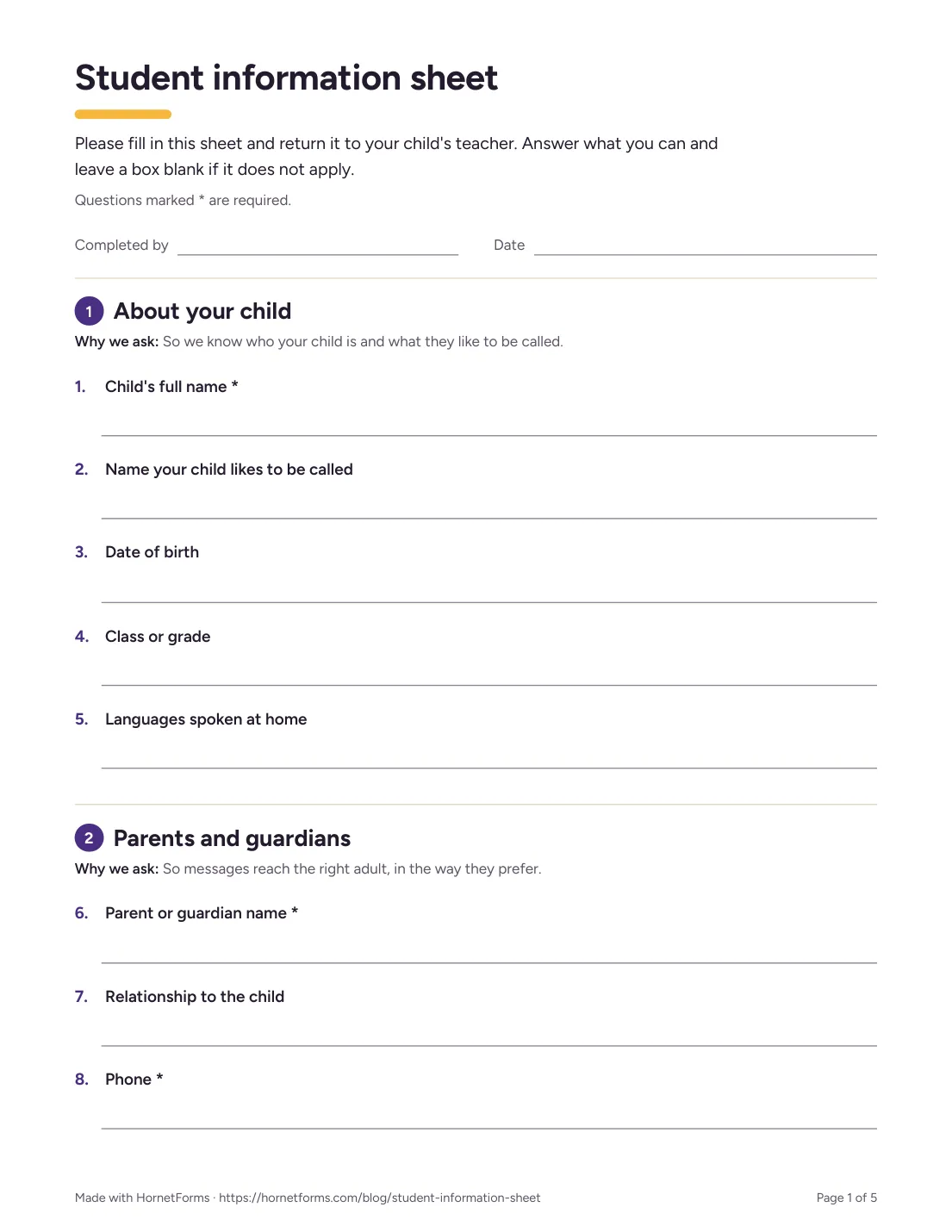
The first page of the printable version, for families who'd rather fill it in by hand.
Download the PDF, US Letter, the PDF, A4 or the Word (DOCX) version if you want to add your school's logo. Want families to type into the Word copy instead? Here's how to make a fillable form. When paper copies come back, type them into the online form yourself, so every answer ends up in one place. Moving other school forms online too? Here's how to convert paper forms to digital.
Keep the answers where you can find them#
Answers to a student information sheet for parents only help if you can find a child's emergency number in 10 seconds. HornetForms gives you a few ways to do that:
- The responses table has search and filters on every plan, so you can find one child or one class fast.
- A PDF of any response downloads on every plan, for the child's paper file.
- CSV export is on every plan; Excel export comes with Pro and Business.
- Google Sheets gets each new response as a row, built in on every plan. Here's how to send form responses to Google Sheets, Slack or Notion.
- Owner email notifications tell you when a family sends their sheet, on every plan.
Every plan has unlimited responses, so a whole school's worth of sheets never closes the form.
The free class roster sheet#
The class roster sheet turns your export into lists you can use on day one. It opens in Excel and Google Sheets:
- Download your CSV from the form's Responses page.
- Clear the example rows, then paste the CSV at cell A1 of the Responses tab, headers included. The sheet finds columns by their names, so the order doesn't matter.
- Open the Roster tab. You get one row per child with the preferred name, class, main contact, best way to reach them and the emergency contact. Use the filter arrows to pick one class.
- Check Notes for staff and Pickup. These tabs list only the children whose families answered Yes or wrote something, in the family's own words.
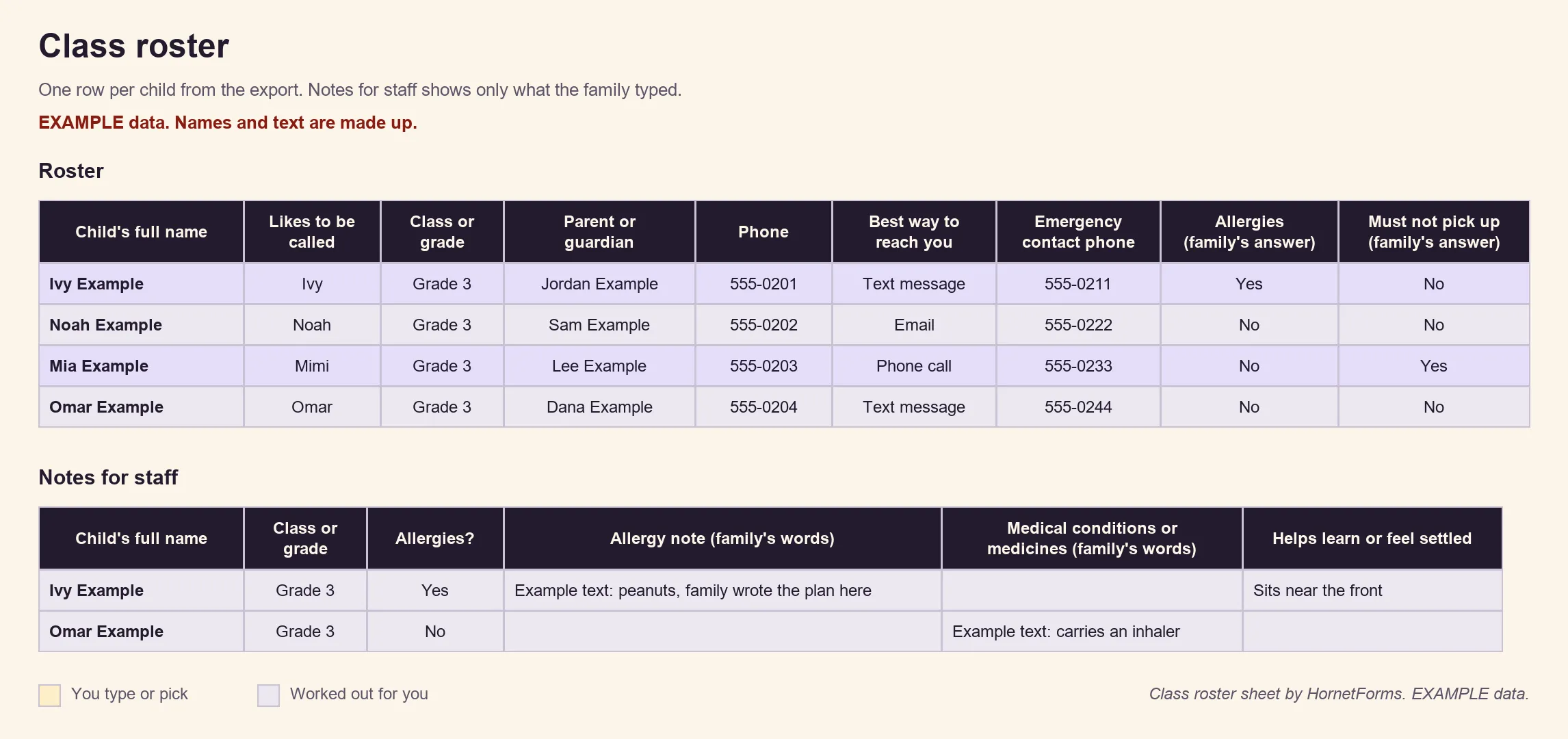
EXAMPLE data only: the children, families, phone numbers and notes are all made up. Clear the example rows before you paste your own.
The sheet copies what families typed and never rates, sorts or explains it. It holds contact, pickup and health answers, so keep it where only the staff who need it can open it. On Pro and Business you can also give the office its own workspace and invite colleagues with a role such as viewer. There's a CSV with just the column headers too, if you'd rather start a sheet of your own.
For families who read another language#
Our student information sheet for parents asks which language each family wants you to use, and the form itself can meet them halfway. On every HornetForms form, the buttons and messages respondents see come in 12 languages. With Pro and Business, you can translate your own questions into up to 10 languages, with AI or a CSV file. Here's how to run one form in several languages, and the pricing page lists what each plan includes.
Send it before the first day#
A good student information sheet for parents asks who to call, who may collect the child, what staff should know and what the child loves. Families open it on a phone without a sign-in, and every answer lands in one list you can search. The printable copy covers families who prefer paper, and the roster sheet turns the answers into class lists. Running awards later in the year? Our scholarship application form guide comes with a scoring rubric. Sign up for free and send your student information sheet before the first day.