
On this page
A seat opens on the planning commission, the library board or a youth advisory committee. The application is a PDF on the website, three people print it, and one of them forgets to sign page four. A month later you still don't know who wants which seat.
A good board and commission application fixes most of that in one link. This guide covers what to ask and why each question is there, plus interview questions for six kinds of boards. It also shows how to tell applicants what becomes public. At the end you'll find a free template, printable copies for drop-offs and a tracker for seats and applicants.
It works for anyone who fills a board seat: a town or village, a library, a homeowners' association, a neighborhood group or a community center. Change a few words and it fits yours.
What a board and commission application should ask#
Every question on a board and commission application should help someone decide. Is this person eligible? Which seat do they want? What would they bring? Is there a conflict to talk through? Here's the full set from our free template, page by page:
| Question | Type | Why it's there |
|---|---|---|
| Full name, email, phone, home address | Short text, email, phone | So you can reach them, and check residency if your rules need it |
| Do you live in [town]? How many years have you lived here? | Multiple choice, number | Only if your charter or bylaws set a residency rule |
| Which boards or commissions are you applying for? | Checkboxes | One form covers every open seat |
| Would you consider another board if this one is full? | Multiple choice | Gives you a second pool when one board gets lots of interest |
| Can you attend [monthly evening] meetings? | Multiple choice | A member who misses most meetings can't do the job |
| Why do you want to serve? What would you bring? What issue matters most to you? | Long text | The answers the appointing body actually reads |
| Upload a résumé or short bio (optional) | File upload | Useful, never required |
| Business with the town, other public service | Multiple choice, with a follow-up | Spots possible conflicts early |
| Signature and date | Signature, date | The applicant confirms the answers are true |
Contact details and eligibility#
Ask for a name, an email and a phone number. Ask about residency only if a rule says members must live in town, and ask how long only if a rule sets a minimum. An HOA can swap the question for "Do you own a home in the community?" The template asks for a home address so you can check residency. If your rules don't need it, delete the question.
Which seat, and when they can meet#
Use checkboxes for the boards, so one person can apply for two seats in one go. A follow-up box appears only when someone ticks "Other". Then ask whether they can make your meeting schedule. Write the real one in the question, like "the second Tuesday of each month at 7 p.m."
Why they want to serve, and what they bring#
Three open questions do most of the work: why they want to serve, what experience or community ties they bring, and which local issue matters most to them. Keep the résumé optional. Plenty of good members don't have one ready, and you don't want to lose them at the upload step. Our guide on how to make an application form people finish has more ways to keep people going.
Conflicts and other service#
Ask whether the applicant, a family member or their employer does business with your town or group. Then ask whether they already serve on another public board. A "Yes" shows a box to explain. Say on the page that a yes doesn't rule anyone out. It just lets the appointing body talk it through early.
A signed statement#
End with one line: "By signing, you confirm your answers are true and complete to the best of your knowledge." Then add a signature question and the date. The applicant signs on screen. Not sure how a question type behaves? Here's which question type to pick.
Questions to ask for each board#
The board and commission application tells you who's interested. The interview tells you who fits. Our free interview question bank has five general questions for every board, plus four for each kind of board. Here's a sample:
| Board | Two questions to start with |
|---|---|
| Planning or zoning | In your own words, what does a planning commissioner do? How would you handle an application that you have a personal opinion about? |
| Parks and recreation | Which of our parks or programs do you know best, and what would you change? How would you hear from residents who rarely come to meetings? |
| Library | What is your vision for the library in five years? How would you handle a request to remove a book? |
| Youth advisory | What is one thing you would change for young people in our town, and why? How would you gather views from classmates and friends who are not on the committee? |
| Historic preservation | Which building or place in our town matters most to you, and why? How could the town help owners care for older buildings? |
| Arts | What arts or cultural event in our town would you like to see grow? How would you measure whether an arts program worked? |
Ask every applicant for the same seat the same questions, in the same order. Write one line of notes per answer, and score everyone the same way. Keep every question about the seat, not the person. Skip anything about age, health, family, religion or where someone grew up. Your charter or bylaws may also list questions you have to ask, so check them first.
The question bank also comes as a PDF, US Letter and a PDF, A4. Want a scoring sheet to go with it? The rubric in our grant application questions guide adapts well to interviews.
Tell applicants what becomes public#
If you're a public body, a board and commission application is usually a public record. Some cities say so right on the page. The City of Vancouver, Washington, tells applicants that "applications submitted for these appointments are public records and may be subject to public disclosure" (City of Vancouver, Boards and Commissions Application, accessed 27 October 2026). Tacoma adds that "Your application and any attachments you send are subject to public disclosure" (City of Tacoma, How to Apply for Committees, Boards, and Commissions, accessed 27 October 2026). The résumé counts too.
So put a plain line at the top of your form. Our template says: "Please note: applications may be public records. Anything you write here may be shared with the council and the public." Then ask only what you're happy to see published.
Good to know: the rules differ from state to state, and for private groups like an HOA. Ask your clerk, records officer or attorney for the exact wording, and how long you have to keep applications.
A free board application template#
Our template has five short pages: About you, The seat, Why you, why now, Conflicts and other service and Sign your application. Each page opens with a short "why we ask" line, so applicants know why you want each answer. Three show-and-hide rules keep it short: the "Other board" box, the conflict explanation and the name of the other board they serve on appear only when needed.
One link per vacancy#
One board and commission application can serve every vacancy. The template has a hidden field called board. Put the board's name in the link, and every response records which vacancy notice the person came from:
https://forms.hornetforms.com/f/<your-slug>?board=planning
https://forms.hornetforms.com/f/<your-slug>?board=library
The person never sees the hidden field, but it shows up in your responses and your export. Every plan includes QR codes, so you can print one on the vacancy notice at the library or town hall. The logic, piping and calculations guide covers hidden fields and show and hide rules in more depth.
Collect a résumé without a sign-in#
Free form tools make the résumé step harder than it needs to be. Google's help page says this about the file upload question in Google Forms: "To answer this question, responders need to sign in to a Google Account" (Google Docs Editors Help, accessed 27 October 2026). Microsoft's help page says: "File upload is only available when 'Only people in my organization can respond' or 'Specific people in my organization can respond' is the selected setting" (Microsoft Support, accessed 27 October 2026). A resident applying for your library board isn't in your organization.
On HornetForms, respondents never need an account or a sign-in to answer a form or upload a file. Free allows files up to 10 MB each, and Pro and Business have no plan cap. For the wider picture, here's a fair comparison with Google Forms, plus our side-by-side pages for Google Forms and Microsoft Forms.
From applications to the council packet#
A form collects applications. You still decide who gets the seat. Here's how each board and commission application reaches you, on every plan unless it says otherwise:
- An email for every new application, plus a confirmation email to the applicant. Say in it when you'll be in touch.
- A PDF of any response to download for the meeting packet or your file. Pro and Business can also attach a PDF copy to the notification email.
- A Google Sheets row or a Slack message per application. The hidden
boardfield gets its own column in Sheets. Here's how to send form responses to Google Sheets, Slack or Notion. - A CSV export of every response, ready for the tracker below.
- Spam protection with a honeypot, a time check and rate limits, so bots don't pad your applicant list.
The free board vacancy tracker opens in Excel and Google Sheets. Paste your CSV export into the Applications tab and list your boards on the Lists tab. The Applicants tab shows one row per person, with the boards they ticked, residency and the conflict answers as given. You pick a status, the board you're considering them for and an interview date. On the Seats tab, add each seat and when its term ends. The tracker flags terms ending within 90 days (change that number to your own lead time). The Summary tab counts applicants per board and flags any vacant seat with no applicants. The tracker never reads or shows the home address column. A CSV with just the column headers is there too.
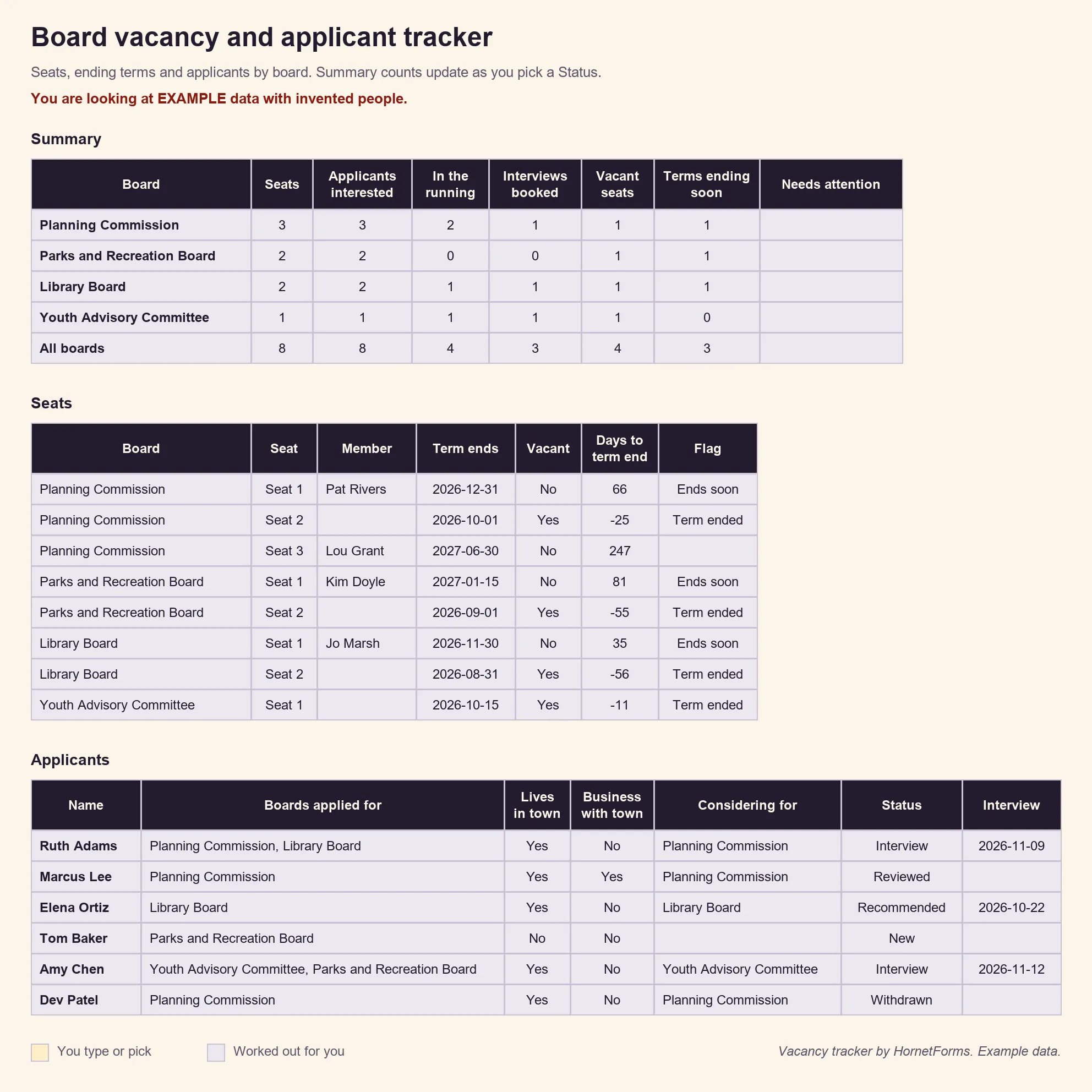
EXAMPLE data: we made up the people, seats and dates. Delete the example rows and add your own.
The template's thank-you message says "We keep applications on file for [two years]." Change that to match your own records schedule. Pro has auto-delete rules, but if you're a public body, check with your records officer before you turn one on. Your schedule may require you to keep applications for a set time.
Print a copy for drop-offs#
Some people would rather apply on paper, and that's fine. Download the board and commission application as a PDF, US Letter, a PDF, A4 or Word (DOCX) to add your logo and your boards. The printed copy keeps the public records line at the top.
To use the online version, the template page at forms.hornetforms.com/templates/board-commission-application has a Use this template button that takes you through sign-up and opens your own copy. Already have an account? It's in the template gallery under Other, as "Board and commission application". Replace [town], [the town], [monthly evening] and [two years] with your own before you share it.
Fill your next seat#
Copy the board and commission application template, add your boards and meeting schedule, and put a QR code on the vacancy notice. The pricing page shows what each plan includes, and the Free plan is free forever with unlimited forms and responses. Sign up for free and post your next vacancy with a link.