
On this page
Three people interviewed the same candidate on Tuesday. One says "strong yes." One says "good energy, not sure." The third wrote nothing down and now remembers a different person. The debrief turns into a debate about vibes, and the loudest voice wins.
An interview evaluation form fixes that. Every interviewer scores the same competencies on the same scale, writes down the evidence and hands in a score before the panel talks. This guide covers what to rate, how to write a 1 to 5 scale and how to build an online version that averages each scorecard. You also get a free printable scorecard, a CSV file that builds the questions and a panel summary sheet.
What an interview evaluation form rates#
A good interview evaluation form has four parts:
- Competencies. Three to six skills or behaviors the job needs, taken from the job ad and the work itself. Not "culture fit" and not "seemed nice."
- A rating scale with written anchors. A 1 to 5 score, with a sentence that says what a 1, a 3 and a 5 look like for each competency.
- Evidence notes. What the candidate said or did that earned the score. This is what the panel talks about later.
- A recommendation. One choice, such as Move forward, Hold or Do not move forward, plus the main reason.
Here are the five example competencies our scorecard uses. Swap in the ones your role needs:
| Competency | What it means | Sample lead question |
|---|---|---|
| Role skills | Knows the tools, methods and facts the job uses every day | "Walk me through a piece of work from your last role that shows how you do [the main task of this job]." |
| Problem solving | Works out what is going wrong and finds a fix that holds | "Tell me about a problem at work that had no clear answer. What did you do?" |
| Communication | Explains things clearly and listens | "Describe a time you had to explain something complicated to someone outside your team." |
| Working with others | Builds good working relationships and handles disagreement well | "Tell me about a time you disagreed with a coworker. What happened next?" |
| Ownership | Follows through, and says so early when things slip | "Tell me about a time something you were responsible for went wrong. What did you do?" |
After each lead question, use the same follow-ups for everyone: "What did you do? What happened next? What would you change?"
Build your interview evaluation form in HornetForms#
Paper works for one interviewer and one candidate. Once a panel of three sees eight candidates, you want 24 scorecards in one table, not 24 sheets of paper.
- Import the questions. Download the scorecard questions CSV and import it. The free CSV import turns each column into a question and guesses the type from the example rows. The five "rating" columns become rating questions and the "notes" columns become long text. Interview round and Recommendation become multiple choice. The example rows never become responses. The form takes its title from the file name, so rename it.
- Make the ratings required. Questions start optional. Open each rating and switch on "Required", so every scorecard has all five scores. Rating questions take 3 to 10 steps, and 5 is the default. If you'd rather label the ends of the scale ("Well below the bar" and "Well above the bar"), use a linear scale question instead.
- Add a hidden field named
candidate. Put it at the top of the form. Its settings show the URL parameter and a "Copy parameter" button, so each candidate gets their own link (more on that below). - Add a calculated field named
avg_score. Put it after the last rating, because a calculated field only sees answers that come before it. Interviewers never see it. - Add the averaging rules. Add a logic rule for each rating with the action Calculate
avg_score, Add, and that rating picked as the field. Then add one last rule that dividesavg_scoreby 5. Rules run in the order you add them, so add the divide rule last. - Share it. Interviewers don't need an account to fill in the form. You can also add a password to the form on every plan.
The import brings in the questions only, so the hidden field, the calculated field, the rules and the Required switches come from you. HornetForms works out calculated values again on its server when a scorecard is sent, so the stored average always matches the scores. Our guide to conditional logic, answer piping and calculations covers calculated fields in more depth, and if you're picking types for extra questions, here's every question type and when to use it.
One link per candidate#
The hidden candidate field keeps 24 scorecards apart. Copy the parameter and add a value for each person:
https://forms.hornetforms.com/f/<your-slug>?candidate=Priya-Example
https://forms.hornetforms.com/f/<your-slug>?candidate=Tom-Example
Send each interviewer the interview evaluation form link for the person they're about to meet. The candidate value arrives with every scorecard, and in the export it gets its own column headed candidate. Use the same value for every interviewer, so the panel summary sheet counts them together.
Write a 1 to 5 scale with written anchors#
A bare "rate 1 to 5" means a different thing to every interviewer. One person's 3 is "fine," another's is "weak." Written anchors fix that. They describe what a score looks like for this competency, so two interviewers who saw the same answer land on the same number.
The US Office of Personnel Management (OPM) publishes an example structured interview question and rating scale. It runs from "1- Low" through "3-Average" to "5-Outstanding", with benchmark definitions at 1, 3 and 5 and a behavioral example for each level (checked 2 November 2026). Our scorecard uses the same shape:
| Score | What it means |
|---|---|
| 1 | Well below what the role needs |
| 2 | Below what the role needs |
| 3 | Meets what the role needs |
| 4 | Above what the role needs |
| 5 | Well above what the role needs |
Then each competency gets its own anchors for 1, 3 and 5. For Communication, a 1 is "Hard to follow, or the example shows the message didn't land." A 3 is "Clear answer with a real example; adjusted the message for the listener." A 5 is "Clear, short and well ordered; checked that the other person understood." Scores of 2 and 4 sit between them.
Two rules keep the scale honest:
- No evidence, no score. If the conversation never touched a competency, leave it blank on paper and say why. On the online form, where ratings are required, give the score your notes support and write "little evidence" in the notes.
- Score the answer, not the person. The anchors describe what the candidate said or did, so the evidence notes should too.
Ask every candidate the same questions#
A scorecard only compares people fairly if everyone faced the same test. That's the idea behind a structured interview. OPM's page on structured interviews lists its benefits, including "All candidates are asked the same predetermined questions in the same order" and "All responses are evaluated using the same rating scale and standards for acceptable answers" (checked 2 November 2026).
OPM's overview of structured interviews says the research shows structured interviews "increase interviewers' agreement on their overall evaluations by limiting the amount of discretion an interviewer is allowed." So write the lead questions down and put them on the interview evaluation form in the same order.
Keep every question job-related#
The US Equal Employment Opportunity Commission (EEOC) says that "As a general rule, the information obtained and requested through the pre-employment process should be limited to those essential for determining if a person is qualified for the job; whereas, information regarding race, sex, national origin, age, and religion are irrelevant in such determinations." It also says "Employers are explicitly prohibited from making pre-offer inquiries about disability." (EEOC, Prohibited Employment Policies/Practices, checked 2 November 2026.)
In practice, that means no questions about age, family plans, religion, health or where someone's accent comes from, and no competency like "fits in with us." If a question doesn't link to a competency on the scorecard, cut it. The same rule shapes the questions to leave off a job application form.
Good to know: this is general guidance, not legal advice. Rules differ by country, state and city, so check what applies to you, or ask a qualified adviser.
Score on your own, then compare as a panel#
The order matters. OPM describes how structured interviews are usually scored: "by a panel in which each member rates applicant responses individually and then participates in a group discussion to resolve significant scoring discrepancies" (OPM, structured interviews overview, checked 2 November 2026).
So ask each interviewer to submit their interview evaluation form before the debrief. Then start the meeting with the competencies where scores sit far apart, such as a 2 and a 4, and ask each person for their evidence.
In HornetForms, you can see one candidate's scorecards on their own. Response filters work on hidden fields, so filter the responses table by candidate is Priya-Example, and the CSV export follows the same filter. On Pro and Business, you can invite the hiring manager to the workspace with the viewer role. Viewers can read, filter and export responses, but they can't edit the form or the scorecards. You can also turn on an email to yourself for each new response, so you know when the last scorecard is in.
Good to know: every role in a HornetForms workspace can read every response in it, scorecards included. Anyone you add can see every interviewer's scores for every candidate. Interviewers only need the form link, not a seat in the workspace, so add only the people who should read all the scorecards.
Turn the panel's scores into one table#
The free panel score summary sheet opens in Excel and Google Sheets. Export the responses to your interview evaluation form as a CSV, which works on every plan. Paste the export into the Form responses tab, and the sheet does the rest:
- Scores shows one row per scorecard: the candidate, the interviewer, the round, the five scores, the sheet's own average and the form's
avg_score. A Check column flags a missing score or an average that doesn't match. - Panel summary shows one row per candidate: how many scorecards came in, the average for each competency, the overall average and how many interviewers picked each recommendation. Its Talk through column lists the competencies where one interviewer scored 1 or 2 and another scored 4 or 5. That's your debrief agenda.
The sheet finds columns by their header names, so a reordered export still works. If you rename a question or a competency, change its name on the Lists tab. There's also a CSV with just the column headers in the export format.
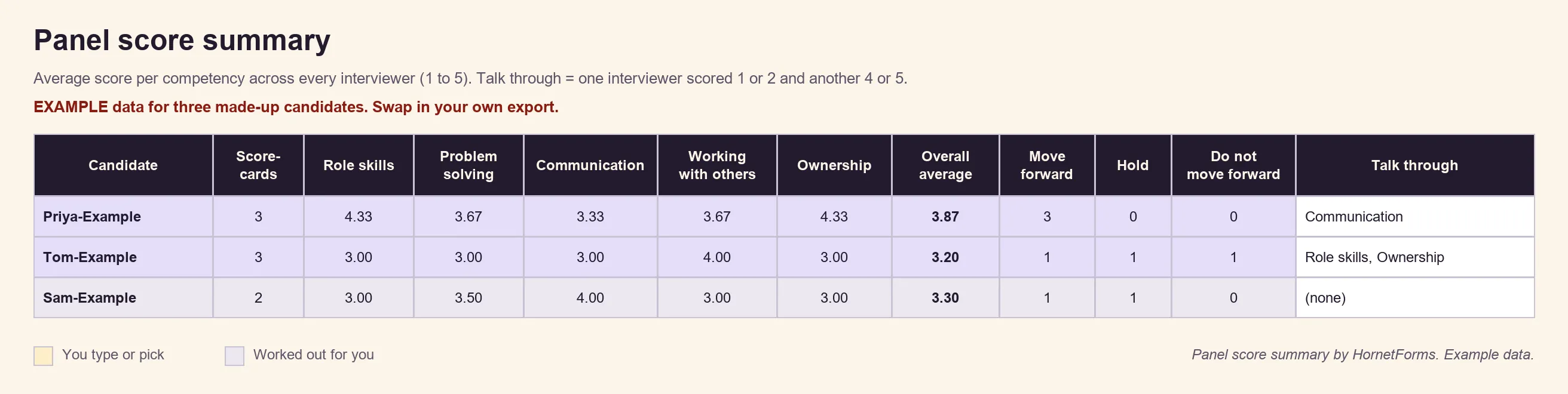
Example data only. Clear the eight EXAMPLE rows before you paste your own export.
A score helps the panel compare. People still make the decision. An overall average of 3.87 against 3.20 starts a conversation, and the evidence notes finish it.
The printable interview scorecard#
For interviews with no laptop in sight, the printable interview evaluation form runs to four pages:
- Lines for the candidate, role, interviewer, and round and date.
- The 1 to 5 scale.
- One section per competency: the lead question, the follow-ups, written anchors for 1, 3 and 5, a score to circle and lines for evidence.
- An overall table with each score and the average, a recommendation to tick and a line for the main reason.
- A "Before the panel meets" box and a "Keep it job-related" box with the EEOC and OPM quotes.
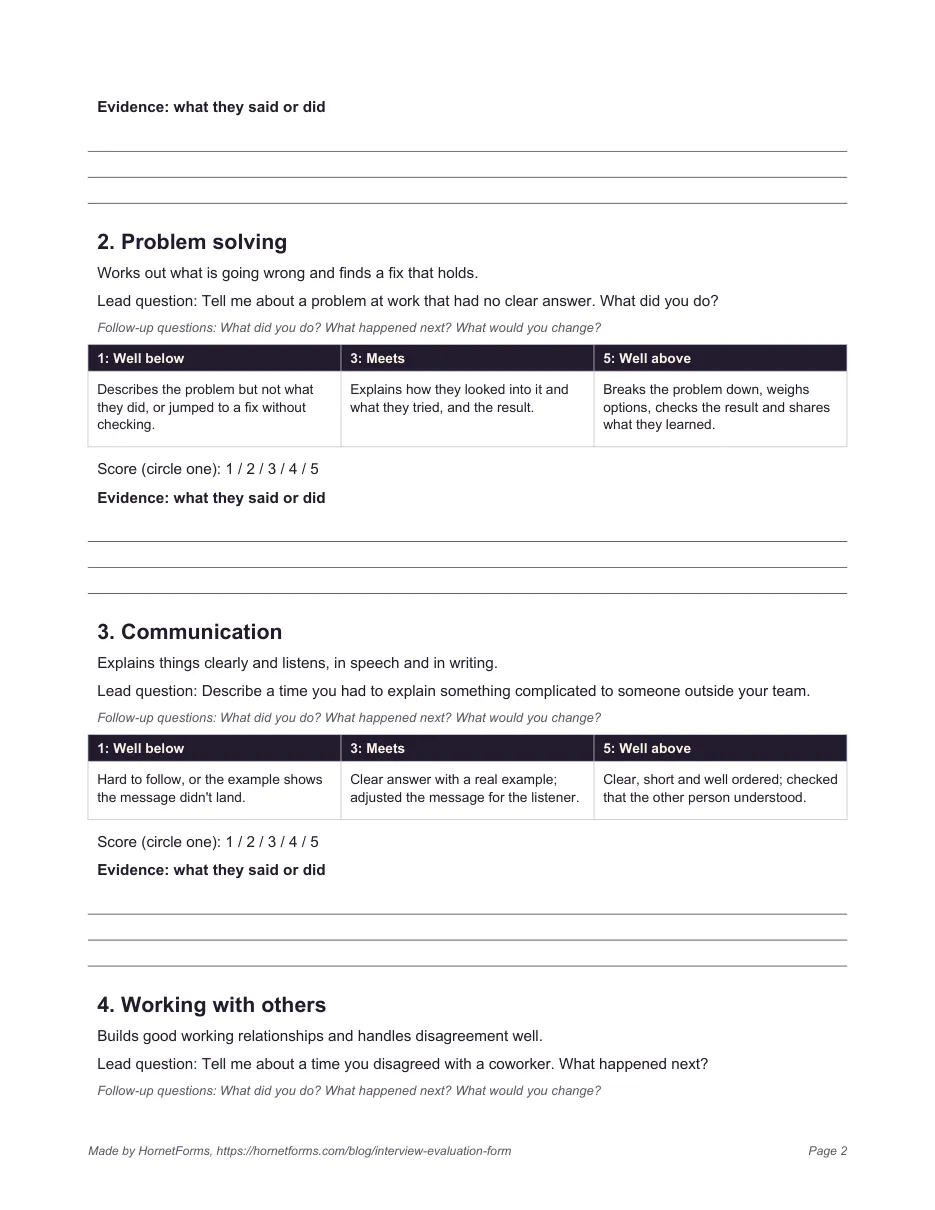
Type paper scores into the online form afterwards (open the candidate's link and fill it in for the interviewer), and they land in the same table as everyone else's.
Download the interview scorecard files#
- Printable scorecard: PDF, US Letter, PDF, A4 or Word (DOCX) to swap in your own competencies.
- Scorecard questions for import: the CSV import file with 14 questions: interviewer name, round, five ratings with a notes box each, recommendation and overall notes.
- Panel score summary: the Excel workbook and the header-only CSV.
Still collecting applicants? Start with how to make an application form. When the panel agrees on a finalist, our reference check questions and the reference check form template cover the last step.
Run your next interview loop with one scorecard#
Pick your competencies, write the anchors, import the questions and send each interviewer a link per candidate. Every scorecard then lands in one place, averaged and ready for the debrief. Calculated fields, hidden fields and logic work on every plan, responses are unlimited within fair use, and the pricing page shows what Pro and Business add, such as the viewer role and Excel export. The features page has the wider tour. Sign up for free and build your interview evaluation form before the next panel.