
On this page
"Can I take Friday off?" lands in Slack at 4:55 on a Tuesday. Someone reacts with a thumbs up. By Thursday, nobody remembers who said yes, two people are out at once and the client call has no cover. A time off request form fixes this in a boring, reliable way. Every request arrives in the same shape, goes to the same place and gets a clear answer.
This guide covers what to put on the form, the rules to set before the first request, and what should happen after someone hits Submit. At the end you'll find a free template, printable copies and a tracker sheet that shows balances and who's off when.
What a time off request form is for#
A time off request form is how someone asks for days away from work in writing. It records the dates, the type of leave and who covers the work, so a manager can say yes or no with the facts in front of them. For when people can usually work, use an employee availability form.
The name changes with the country:
- PTO request form or vacation request form in the US, where "paid time off" is the usual term.
- Holiday request form or annual leave request form in the UK, where "holiday" means time off, not a trip.
- Leave request form in most other places, and for things like parental or unpaid leave.
They all do the same job. In this guide, "time off" covers every kind.
What to include on a time off request form#
Short beats thorough here. People fill this in between other tasks, so ask only what a manager needs to decide. Here's the full list, page by page:
| Field | Why it's there |
|---|---|
| Name, work email, team, manager's name | So the request reaches the right manager and the answer reaches the right person |
| Type of time off | So you can count leave types apart (vacation, sick leave, unpaid and so on) |
| First day off, last day off | The dates the manager checks against the calendar |
| Full days or part of a day, plus times for a few hours | So a half day or a dentist visit doesn't count as a full day |
| Working days in total | The number that comes off the person's balance |
| Who covers, and can people reach you | So nothing urgent gets stuck while they're away |
| Anything your manager should know | Handover notes, deadlines or dates they could move |
Who's asking#
Ask for a name, a work email, the team and the manager's name. The email matters most, because that's where the answer goes. If you send each team its own link, the team can fill itself in (more on that below).
Dates, type and part days#
Use date questions for the first and last day, not a text box. "Next Fri" and "the 14th" are hard to sort. A dropdown for the type of leave keeps the labels the same every time, which your tracker will thank you for.
Part days need their own question. Some workers take part leave days. GOV.UK says "How a part day should be taken is up to the employer" (GOV.UK, booking time off, accessed 26 October 2026). So offer full days, a morning, an afternoon or a few hours, and show the From and Until times only when someone picks "A few hours". Then ask for the total in working days, with a half day as 0.5.
Cover and reachability#
"Who will cover for you?" is the question managers care about most. A name, or "not needed", is enough. Add a simple choice for whether people can reach the person while they're away: offline, emergencies only, or email and chat.
What not to ask: reasons and medical detail#
Leave out "Why do you need this time off?" for vacation days. The type of leave already tells the manager what they need. For sick leave or a medical appointment, never ask for a diagnosis or symptoms on the form. If your policy needs a doctor's note, handle that separately and privately. Not sure which question type fits a field? Here's which question type to pick.
Set the rules before the first request#
A time off request form without rules just moves the confusion somewhere tidier. Decide four things first, and write them down where people can see them. Add them to your new hire onboarding process too, so every new starter knows them from week one:
- Notice. How far ahead people should ask.
- Who decides. One named person, plus a back-up for when they're away.
- How people hear back. One channel and a deadline, like "by email within two working days".
- Overlap. How many people from one team can be off on the same day, and who wins when too many ask.
Laws set some defaults, and contracts can change them. In the UK, GOV.UK says "The general notice period for taking leave is at least twice as long as the amount of leave a worker wants to take, plus 1 day." It also says "An employer can refuse a leave request or cancel leave but they must give as much notice as the amount of leave requested, plus 1 day." If the contract says something different, the contract applies (GOV.UK, booking time off, accessed 26 October 2026, no page date).
In the US, the Department of Labor says the Fair Labor Standards Act "does not require payment for time not worked, such as vacations, sick leave or federal or other holidays." Those benefits are a matter of agreement between employer and employee (US Department of Labor, vacation leave, accessed 26 October 2026). Most private-sector workers get paid vacation anyway. The Bureau of Labor Statistics found that "Paid vacation leave was available to 80 percent of private industry workers" in March 2026 (BLS, Employee Benefits in the United States, March 2026, released 25 September 2026, accessed 27 October 2026).
Good to know: rules differ by country, state and contract. This is general guidance, not legal advice, so check what applies to your team. The free process one-pager below has blanks for all four rules plus carry-over and part days.
Build the time off form in HornetForms#
The template does most of the setup for your time off request form. Here's what's inside and how to adjust it.
Questions. HornetForms has 20+ question types, so each field above gets the right one. Use date questions for the days off, time questions for "A few hours", a dropdown for the leave type and a number question for the total.
Logic. Conditional logic works on every plan. In the template, picking "Other" as the leave type shows and requires a "What kind of time off?" box. Picking "A few hours" shows and requires the From and Until times. And if the last day comes before the first day, a warning appears and the submit button hides until the dates make sense. Our logic, piping and calculations guide walks through rules like these.
Personal links. The template has a hidden employee_id field, and its team question reads a team value from the link. Send each person or team a link like this:
https://forms.hornetforms.com/f/<your-slug>?employee_id=E042&team=Support
https://forms.hornetforms.com/f/<your-slug>?employee_id=E043&team=Sales
The person never sees employee_id, but it arrives with every response. That keeps two people called Sam apart in your tracker.
Who can open it. Employees never need an account or a sign-in. To keep the form inside the team, add a password, which works on every plan. Email verification with a six-digit code (Pro and Business) checks that people own the email address they type.
What happens after someone hits submit#
The time off request form collects the request. A person decides. Here's how the request reaches that person and how the answer gets back:
- An email to the HR or manager inbox for each new request, once you turn it on, on every plan.
- A confirmation email to the employee, with your own subject and text, on every plan. Echo the form's thank-you screen: the dates stay pending until the manager replies.
- A Slack message in #time-off, so the team sees requests as they arrive, on every plan.
- A Google Sheets row per request, on every plan. Hidden fields like
employee_idget their own column. Here's how to send form responses to Google Sheets, Slack or Notion, and the integrations page has the full list. - A PDF of any response to download for the person's file, on every plan. Pro and Business can also attach a PDF copy to the notification email.
- Managers as viewers (Pro and Business): invite them to the workspace with the viewer role, so they can read requests without editing the form.
The manager then replies to the employee and logs the decision in the tracker. Keep that reply in one channel, the one your rules named, so nobody has to dig through three apps to find out if Friday is a yes.
You won't run out of room either. HornetForms has unlimited responses on every plan, so a busy summer doesn't hit a response cap halfway through the year.
Track balances and who's off in a free sheet#
The free time off tracker opens in Excel and Google Sheets. Its columns match the CSV export of the time off request form, and there's a CSV with just the column headers too.
Paste your export into the Requests tab. Then fill in the yellow columns for each request: a status (Pending, Approved, Declined or Changed), who decided, the date and a note. The sheet does the rest:
- Balances shows each person's yearly allowance, approved days, pending days and days left. You type in the allowances.
- Who's off shows one month as a grid, with a count of people off each day. Set an overlap limit and it flags the days that go over.
Only Approved rows count, so a pending request never shows as booked.
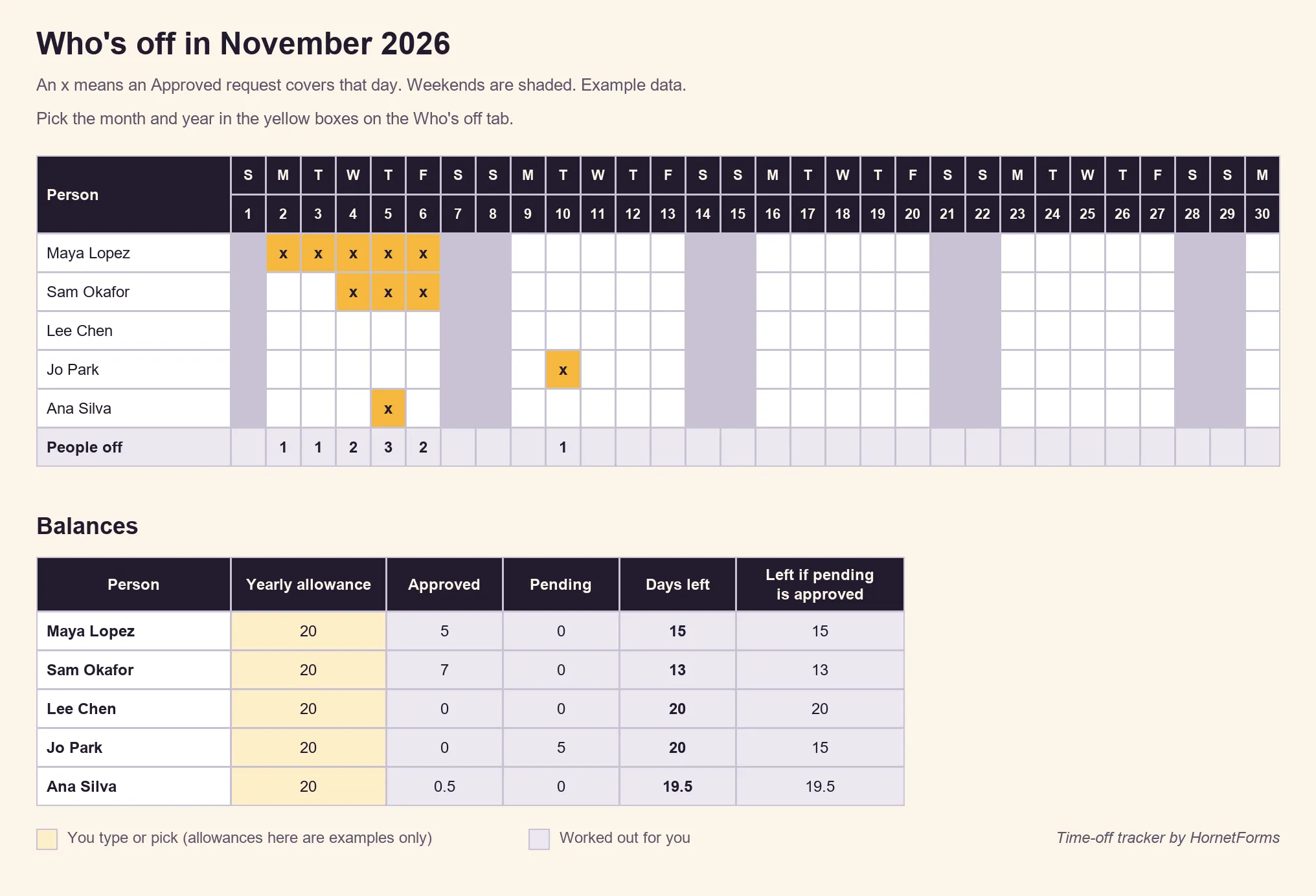
Example data only. The allowance of 20 days is an example too, so clear the example rows and swap in your own numbers.
Free time off request form template#
Our time off request form template in HornetForms has three short pages: Request time off, Your time off and Before you go. Each page has a short "why we ask" line, so people see why you want each answer. It has the logic and the hidden employee_id field described above.
Three ways to use it:
- Open it in HornetForms. The template page at
forms.hornetforms.com/templates/time-off-requesthas a Use this template button that takes you through sign-up and opens your own copy. Already have an account? It's in the template gallery under HR & recruiting, next to the job application template if you're hiring too. - Print it. The paper version adds a For your manager box with a decision, comments, the manager's name and a line to sign and date. Download the PDF, US Letter, the PDF, A4 or the Word (DOCX) version if you want to add your logo.
- Write down your rules. The time off process one-pager (DOCX) has blanks for notice, who decides, how people hear back, overlap, carry-over and part days.
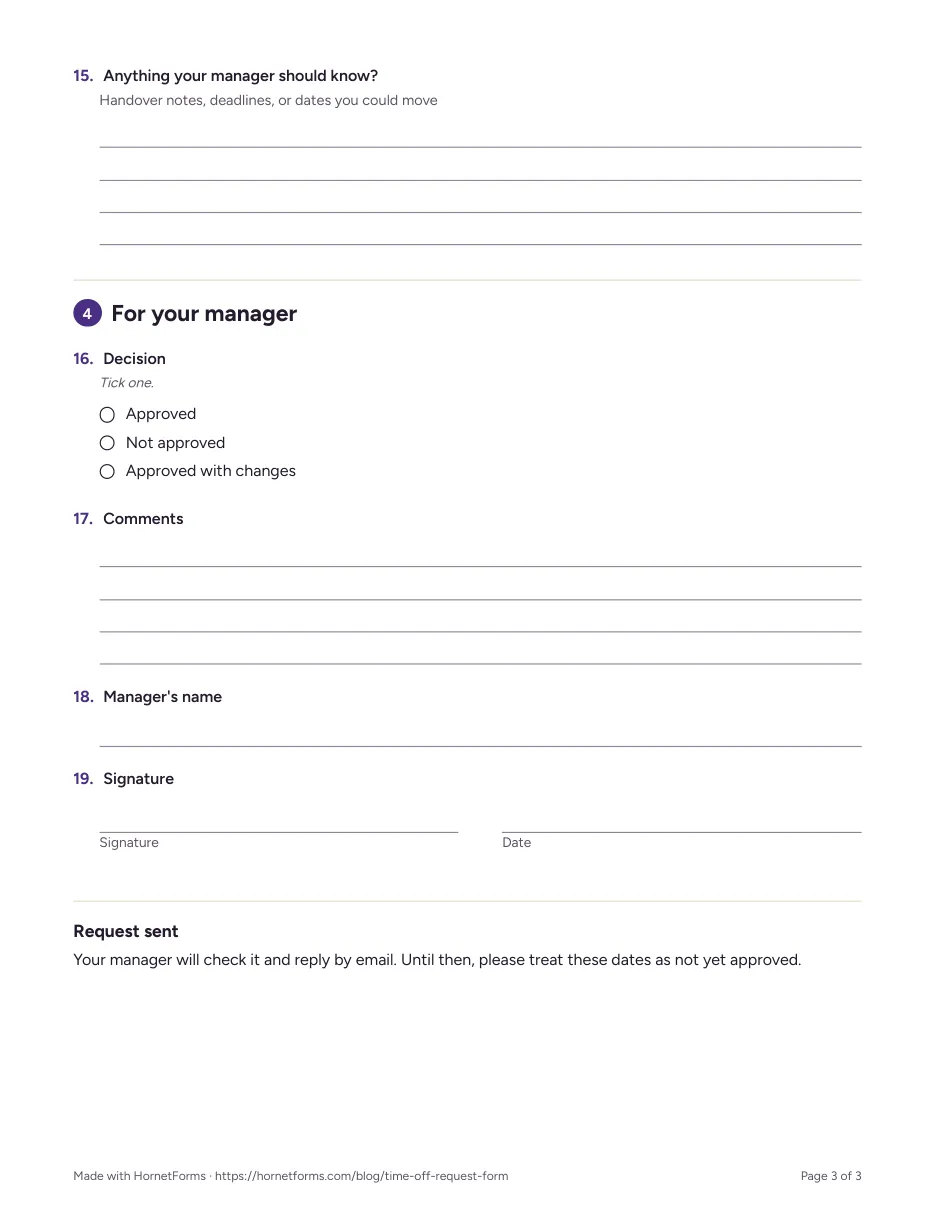
The For your manager box on the printable version.
Try it with your team#
Copy the time off request form template, fill in the one-pager and send each team its own link. The Free plan is free forever, with unlimited forms and responses, and the features page has the wider tour. Sign up for free and send your team the time off form today.