Job application form template with CV upload
A free job application form with CV upload, screening questions and a job board tracker. Candidates apply from any phone, with no account needed.
17 questions on 4 pages
Launch week: 50% off Pro and Business with code LAUNCH50, while spots last. See pricing
People ask for time off in a dozen ways: a hallway chat, a text, a sticky note on the fridge. Then someone forgets. This time off request form template gives every request the same shape. Employees pick the type of leave, the first and last day, and whether they need full days, a half day or a few hours. They also say who covers for them and whether they can be reached. You get each request by email the moment it's sent, and every request stays in one list instead of five inboxes. It works for PTO, vacation, annual leave, sick days and holiday requests, so you need one link, not five forms. Sign up for free, open the template in your workspace and rename anything to match your policy.
Free plan, free forever. Sign up and the template opens in your workspace.
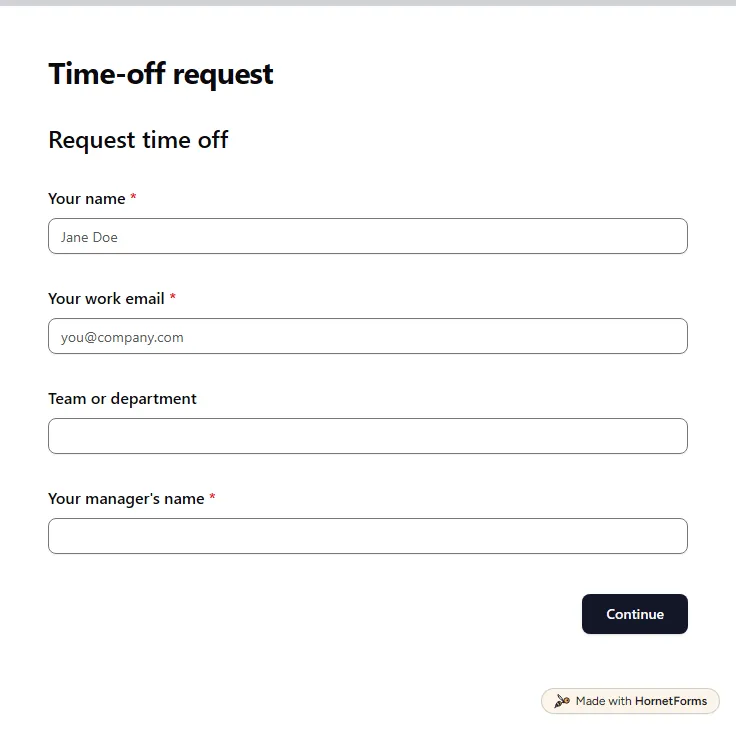
15 questions on 3 pages. Every question, in order:
Why we ask: So the request reaches the right manager and the answer reaches you.
| No. | Question | Answer type | Required? |
|---|---|---|---|
| 1 | Your nameShort answer, Required | Short answer | Required |
| 2 | Your work emailEmail, Required | Required | |
| 3 | Team or departmentShort answer, Optional | Short answer | Optional |
| 4 | Your manager's nameShort answer, Required | Short answer | Required |
Why we ask: So your manager can check cover and your remaining days before saying yes.
| No. | Question | Answer type | Required? |
|---|---|---|---|
| 5 | Type of time offDropdown, RequiredChoices: Vacation or annual leave, Sick leave, Personal day, Medical appointment, Bereavement, Jury duty or public service, Parental leave, Unpaid leave, Other | Dropdown | Required |
| 6 | What kind of time off?Short answer, Optional | Short answer | Optional |
| 7 | First day offDate, Required | Date | Required |
| 8 | Last day offDate, Required | Date | Required |
| 9 | Full days or part of a day?Multiple choice, RequiredChoices: Full days, Half day (morning), Half day (afternoon), A few hours | Multiple choice | Required |
| 10 | FromTime, Optional | Time | Optional |
| 11 | UntilTime, Optional | Time | Optional |
| 12 | How many working days in total?Number, RequiredCount working days only. A half day is 0.5. | Number | Required |
Why we ask: So nothing urgent gets stuck while you're away.
| No. | Question | Answer type | Required? |
|---|---|---|---|
| 13 | Who will cover for you?Short answer, Optional | Short answer | Optional |
| 14 | Can people reach you while you're away?Multiple choice, OptionalChoices: No, I'll be offline, Only for emergencies, Yes, by email or chat | Multiple choice | Optional |
| 15 | Anything your manager should know?Long answer, Optional | Long answer | Optional |
Request sent
Your manager will check it and reply by email. Until then, these dates are pending.
Hidden fields it reads from the link: employee_id
The same questions, ready to print or edit.
Every response lands in your HornetForms inbox. From there, send it wherever your team already works.
Yes. PTO, vacation, annual leave and holiday requests all ask the same things: what kind of leave, which days and who covers. The template lists vacation, sick leave, personal days and more in one dropdown, so one form handles them all. If your company says PTO, rename the first choice and you're done.
Yes. The form asks whether they need full days, a morning, an afternoon or a few hours. Pick a few hours and two time questions appear, From and Until, and both become required. For full days, those questions stay hidden.
You do, once you turn on an email to yourself for each new response. It works on every plan. You can also send the employee a confirmation email, because the form asks for their work email. To keep a log, connect Google Sheets and each request becomes a new row.
No. Anyone with the link can fill it in on a phone or laptop without signing in. Share it in your team chat, add it to your handbook or print its QR code for the staff room.
The form asks for working days only, with a half day as 0.5. Asking people to count keeps weekends and public holidays out of the total, and you can check the number against the dates before you approve.
A free job application form with CV upload, screening questions and a job board tracker. Candidates apply from any phone, with no account needed.
17 questions on 4 pages
A free time off request form template for small teams, with half days, cover plans and a tracker sheet that shows balances and who's off when.
Sign up for free, pick a template and change anything you like: questions, logic and design. The Free plan stays free forever, with unlimited responses.