
On this page
Monday, 9:00. The new hire is at the front desk. Their laptop is still in a box somewhere, nobody told the team they were starting, and their manager is in back-to-back calls until lunch. Nobody meant for it to go this way. There just wasn't a process, so everyone assumed someone else had it covered.
A new hire onboarding process fixes that with a list of who does what and when. It starts the day the new hire accepts the offer and runs for about 90 days. This guide walks through each stage, says who owns each part, and ends with a free checklist sheet that works out every due date from the start date.
What onboarding covers and who owns each part#
Onboarding is everything that turns a new hire into a settled, useful member of the team. It is more than the first-day welcome. A good new hire onboarding process covers four kinds of work:
- Admin: contracts, payroll setup and the details you need from the new hire.
- Kit and access: a laptop, a desk or a home setup, accounts and logins.
- People: introductions, a buddy, regular check-ins with the manager.
- The work itself: goals, training and real tasks that grow over time.
Onboarding falls apart when every task belongs to "us". Give each one a single owner:
| Owner | What they own |
|---|---|
| HR (or whoever hires, in a small team) | The offer details, the new hire details form, payroll setup, the handbook basics |
| Manager | The schedule, the goals, introductions and every check-in |
| IT (or the office manager) | The laptop, desk kit, work email and the accounts the role needs |
| Buddy | Day-to-day questions, lunch on day one, shadowing in the first month |
| New hire | Training, reading the guides, meeting people outside the team |
Britain's workplace adviser Acas puts it well in its induction checklist guidance: "the induction should not be about just ticking boxes" (Acas, induction checklist template, accessed 28 October 2026). The checklist keeps you honest about the basics. The people part still takes real time.
Before day one: details, kit and access#
The best new hire onboarding process starts before the new hire arrives. Aim to start about two weeks out.
Collect their details. You need a legal name for payroll, a personal email (their work email doesn't exist yet), a mobile number, a home address, the start date and an emergency contact. Send one form with the welcome email instead of a chain of "quick questions". The same form can ask about kit: laptop preference, desk equipment, dietary needs for the first-week lunch, and any workplace adjustments that would help. Hiring for shift work? Add an employee availability form so you know which shifts they can take.
Handle official paperwork through official channels. Tax, payroll and work-eligibility paperwork has its own forms and rules. Keep it in your payroll provider or HR system, not in a general form. In the US, for example, the Office of Child Support Services says "Federal law requires employers to report basic information on new and rehired employees within 20 days of hire to the state where the new employees work" (OCSS, new hire reporting, accessed 28 October 2026). That report includes the Social Security number, which is exactly the kind of data that belongs in payroll, not in an onboarding form. In the UK, GOV.UK says "The employer must provide the principal statement on the first day of employment" (GOV.UK, written statement of employment particulars, accessed 28 October 2026).
Good to know: rules differ by country, state and contract. This guide is general, not legal advice, so check what applies to your team or ask a qualified adviser.
Get the kit and access ready. Order the laptop as soon as you know the preference. Create the work email and the accounts the role needs a few days before the start, then test the logins.
Plan the first week. The manager writes a simple schedule and three to five goals for the first 90 days. Pick a buddy and tell the team who is starting and when. Two days before, send a short welcome note: what time to arrive, who to ask for, what to bring and the first-week schedule.
Day one and week one#
Day one has one job in any new hire onboarding process: make the new hire feel expected. The manager meets them at the door, or opens the first video call themselves. The laptop works, the logins work, and the schedule is already in their calendar.
A good day one looks like this:
- A welcome from the manager and a walk through the week and the 90-day goals
- Introductions to the team, and a tour of the building or the main tools
- Handbook basics: hours, pay dates, how to ask for time off, safety
- Lunch or a coffee with the buddy and the team
- A short end-of-day check-in: "What's unclear so far?"
Week one is about small wins. Give the new hire one small, real task they can finish by Friday. Keep a 10-minute check-in each day. Let them meet the key people outside the team and read the guides for the main tools. End the week with a chat about what went well and what is still confusing. If your team uses a time off request form, show it to them now, not the first time they need a day off.
The first 30, 60 and 90 days#
After week one, the new hire onboarding process moves from welcome to work. Split it into three blocks of about a month, each ending with a check-in. To write the goals for each block, use our 30-60-90 day onboarding plan.
| Phase | Focus | Ends with |
|---|---|---|
| Days 1 to 30 | Learn the role. Weekly one-to-ones, shadowing a teammate, finishing the training the role needs | A 30-day check-in on the goals, plus "How is onboarding going for you?" |
| Days 31 to 60 | Contribute. Take over one piece of regular work and ask two teammates for feedback | A 60-day check-in on progress and the support they need |
| Days 61 to 90 | Own it. Lead one small piece of work from start to finish | A 90-day review: goals met, and goals for the next six months |
Write the 30, 60 and 90-day dates in the calendar on day one, so the check-ins don't slip when things get busy. At around day 80, send a short feedback form asking the new hire what helped and what you should change for the next person. That's how the process gets better each time you hire.
How long a new hire onboarding process should take#
Most small teams can run a solid new hire onboarding process in 90 days, which is why the checklist below stops at day 90. Admin and kit take the first week or two. Feeling confident in the role usually takes longer, and complex or senior jobs may need a longer runway.
If you use a probation period, line the two up. Acas notes that "There's no legal requirement to have a probation period. And they can be any length of time" (Acas, probation periods, last updated 7 October 2026). It also says probations of six months or less "might not be appropriate for all roles", and gives technical or specialist jobs as an example. So pick the length that fits the job, write it down, and make the 90-day review the place where you talk about it.
The manager's part#
HR can send forms and order laptops. Only the manager can make someone feel part of the team, so most of the new hire onboarding process sits with them. If you manage the new hire, your list is short but it matters:
- Write the goals before day one. Three to five, in plain words. "Answer 20 support tickets a day by week six" beats "get up to speed".
- Show up on day one. Clear your morning. Nothing tells someone they matter like their manager being there.
- Hold every check-in. Daily in week one, weekly in the first month, then at 30, 60 and 90 days. Moving one is fine. Skipping one tells them onboarding is over.
- Ask, don't just tell. "What's confusing?" and "What would have helped last week?" surface problems while they're still small.
- Close the loop. At day 90, agree on the goals for the next six months, so the review feels like a start, not a finish line.
Collect new hire details with one form#
The first task on the checklist is getting the new hire's details. You can do that with a new employee information form in HornetForms. The template has two short pages:
- Your details: full legal name, preferred name, personal email, mobile number, home address, start date, and an emergency contact with their relationship and number.
- Kit and practicalities: T-shirt size, laptop preference, desk equipment, dietary requirements, workplace adjustments, and anything else you should know before day one.
Two pieces of logic keep it short. Pick Linux as the laptop and a question about the distribution and admin rights appears. Answer "Yes" to adjustments and a box appears to describe what would help. "I'd rather discuss it privately" is an option too, which tells you to book a short call before the start date. The form asks for no tax, bank or ID numbers, so it stays focused on getting ready.
New hires never need an account or a sign-in, which matters when their work account doesn't exist yet. Each response can go wherever your team already works, on every plan:
- An email to you for every new starter, once you switch on notifications for the form.
- A Google Sheets row per new hire, so HR and IT share one list.
- A Slack message in your IT channel, so the laptop order goes in the same day.
The integrations page has the full list, and our guide to where your form responses can go shows how to set each one up. There are no response caps on any plan either, so a busy hiring season never hits a response limit halfway through.
Three ways to use it:
- Open it in HornetForms. The template page at
forms.hornetforms.com/templates/new-hire-onboardinghas a Use this template button that takes you through sign-up and opens your own copy. - Print it. Download the PDF, US Letter, the PDF, A4 or the Word (DOCX) version.
- Ask your own questions. Swap or add questions with any of the 20+ question types, from dropdowns to file uploads.
Still hiring? Our job application form template covers the step before this one.
Free 90-day onboarding checklist#
The free onboarding checklist (Excel) has every task in this guide, 33 in all, each with a phase, an owner and a number of days from the start date. Type the start date and the sheet works out every due date, from two weeks before day one to the 90-day review.
Pick Yes in the Done? column as you go. Each task shows Done, Overdue, Due this week or Upcoming, and the Summary tab shows progress by phase and open and overdue tasks by owner. There are blank rows for your own tasks. Prefer another tool? The checklist as a CSV has the same tasks, owners and days from start, ready to import.
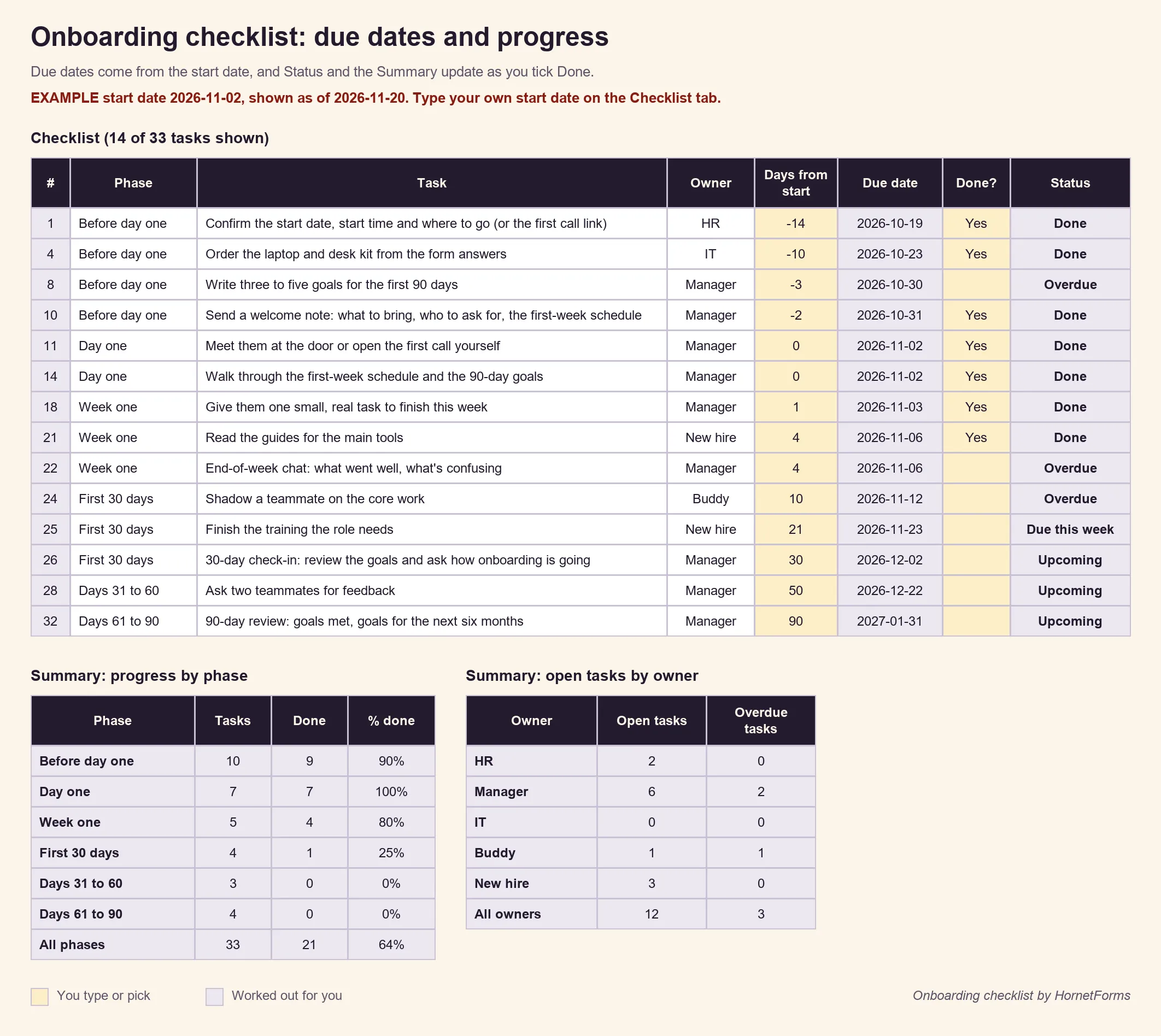
Example data only. Swap in your own start date, tasks and owners.
For the manager and the new hire, the 90-day onboarding plan one-pager fits the whole plan on one sheet: names, the six phases with a Done column to tick, space for goals and the three check-in dates. It also comes as an A4 PDF and a Word file you can edit.
Get your next new hire ready#
Copy the checklist, fill in the one-pager and send the details form with your next offer email. That's a full new hire onboarding process, ready to reuse for every hire. HornetForms is free forever on the Free plan, with unlimited forms and responses, and the features page has the wider tour. Sign up for free and have the laptop waiting before your next new hire walks in.