
On this page
You posted the job, and applications arrive in three shapes. A CV lands in your inbox, a LinkedIn message comes with no CV, and an old form makes someone retype their whole work history. A good job application form template fixes that before the first person applies. It asks for the CV once, asks only what the CV can't tell you, and notes which job board sent each applicant.
This guide covers the questions to ask, the ones to leave off, and how to collect CVs without making anyone create an account. At the end you'll find a free job application form template for HornetForms. It comes with Word and PDF copies and a screening sheet for sorting the pile.
What a job application form template should do#
A job application form has two readers. The applicant wants to finish fast and feel taken seriously. You want enough to decide who gets a call, and nothing you'd have to explain later. So a good job application form template does three things:
- Collect the CV or resume once. The CV already lists jobs, dates and schools. Asking people to type it all again wastes their time.
- Ask what the CV can't show. Which role, the right to work, a start date and why this job.
- Record where each applicant came from, so you know which job board earns its fee.
Applicants notice when you skip the first one. One Hacker News commenter wrote: "Some application processes ask me to upload my resume and then want me to manually enter it again in a series of web forms. I'm not interested in spending 30+ minutes manually copying and pasting the resume I just uploaded." (innocentoldguy on Hacker News, October 2022)
What to ask on a job application form#
Four short pages cover everything you need before a first call. For the build steps behind any kind of application, see how to make an application form. Here's how our job application form template splits them:
| Page | Questions | Why they're there |
|---|---|---|
| About you | Full name, email, phone, where they're based, LinkedIn or portfolio | So you can reach them and see their work |
| The role | Which role, right to work, earliest start date | So you read each application against the right job |
| Your CV | CV or resume upload, optional cover letter or samples, why this role, what the CV doesn't show | One upload instead of retyping, plus two answers a CV can't give |
| Last few questions | How they heard about the job, who referred them, interview adjustments, an accuracy check | For your source counts and a smoother interview |
About you#
Beyond name, email and phone, ask "Where are you based?" as a city and country, not a home address. You only need to know if the commute or time zone works. A LinkedIn or portfolio link tells you more than three paragraphs of description.
The role, start date and right to work#
If you hire for more than one job, a dropdown of open roles sorts applications from day one. An "Other" option opens a box for anything else.
Ask about the right to work as plain multiple choice: Yes, No, I would need sponsorship, Not sure. It saves both sides a wasted interview. An earliest start date helps you plan.
The CV, once#
Make the CV or resume the one required file, and accept PDF and Word, since those open anywhere. Add a second, optional upload for a cover letter or work samples.
Screening questions that save a phone call#
Two open questions earn their place. "Why does this role interest you?" shows whether someone read the ad. "What's something your CV doesn't show?" gives room for a career change, a gap or a side project.
If a role has real must-haves, like a driving licence or a night shift, ask about each one as a yes or no question. Keep it to the few that would end an application on their own.
How they found you#
A dropdown asking "How did you hear about this job?" tells you which channels work. When someone picks "Someone who works here", the template shows a "Who referred you?" box, so the referral credit goes to the right person. Paying a bonus for hires? Here's how to run an employee referral program.
Questions to leave off your application form#
Some questions feel routine because old paper forms had them. On a first application they invite bias, and some laws limit them. Leave these off any job application form template you use:
- Date of birth or age. The US Equal Employment Opportunity Commission (EEOC) says information about "race, sex, national origin, age, and religion are irrelevant" to whether someone can do the job. That's on its page about prohibited employment policies and practices (checked October 2026). If the law sets a minimum age for the job, ask only whether the applicant meets it.
- Health and disability before an offer. In Great Britain, section 60 of the Equality Act 2010 says an employer "must not ask about the health of the applicant" before offering work. It has a few narrow exceptions (checked October 2026). The same EEOC page says: "Employers are explicitly prohibited from making pre-offer inquiries about disability."
- Photos. The EEOC page also says "employers should not ask for a photograph of an applicant."
- Marital status and family plans. They say nothing about whether someone can do the job.
- Pay history. Ask what pay they're looking for instead.
One question near health does belong: "Is there anything we can do to make the interview process easier for you?" Acas, the UK's workplace advice service, makes an exception for exactly this. You may ask "if you need to make reasonable adjustments to the assessment process", says its guide to following discrimination law when recruiting (updated 30 June 2026). Ask about the process, never the condition.
Good to know: this is general guidance from UK and US sources, not legal advice. Rules differ by country and state, so check the rules where you hire before you publish the form. Equality monitoring is a separate form: Acas says to keep that information "separate from the application form and CV".
Collect CVs without making applicants sign in#
Lots of small teams start with Google Forms, which has a file upload question. Google's help page on how to upload files to a form says: "To answer this question, responders need to sign in to a Google Account." The files go to "a new folder on Google Drive" in the form owner's account (checked October 2026).
On a job form, that sign-in lands at the worst moment, and some applicants have no Google account at all. Another Hacker News commenter listed this among the habits he met on his last job hunt: "requiring me to generate an account (with an overwrought password complexity requirement), validate my email, log in, and then I can finally upload my resume" (trentnix on Hacker News, October 2022).
The usual workaround, a text box for a link to the CV, leaves you chasing sharing settings.
In HornetForms, a file upload is just a question. Applicants open the link, attach the CV and send, with no account and no sign-in. You choose how many files a question takes (up to 10), which file types you accept and the size limit. Each file can be up to 10 MB on the Free plan, and Pro and Business have no plan cap on file size.
For a side-by-side view, read a fair comparison with Google Forms or the Google Forms comparison page. If you're unsure whether a question should be an upload, a link or a text box, here's which question type to pick.
Know which job board sent each applicant#
"How did you hear about this job?" relies on memory. A link does better. The template has a hidden field called source, and its role dropdown reads a role value from the link. Post a slightly different link on each board:
https://forms.hornetforms.com/f/<your-slug>?source=linkedin&role=Product%20designer
https://forms.hornetforms.com/f/<your-slug>?source=indeed&role=Product%20designer
https://forms.hornetforms.com/f/<your-slug>?source=our-website&role=Software%20engineer
The applicant never sees the source value, but it arrives with the response, and the role comes already picked. Keep source values lower case with hyphens, so "LinkedIn" and "linkedin" don't count as two boards.
Keep the dropdown too. Someone who gets the link from a friend arrives with no source, and the dropdown catches them. Our logic, piping and calculations guide covers hidden fields and links that fill in answers.
What happens after someone applies#
The real work starts after Submit, so send each application where you'll see it:
- Email notifications you can turn on, to you or a hiring inbox, for each new application, on every plan.
- Slack or Google Sheets: a message in a #hiring channel, or one row per applicant, on every plan. Here's how to send form responses to Google Sheets, Slack or Notion.
- A confirmation email to each applicant, with your own subject and text. The thank-you screen promises a reply "whether or not we move forward", so keep that promise.
- Interview booking: send shortlisted people a short second form with a Calendly or Cal.com question, so they pick a slot themselves. Bookings appear in the response. To score each interview the same way, use an interview evaluation form.
- Hiring managers as viewers (Pro and Business): invite them to the workspace with the viewer role, so they can read applications without editing the form.
- Auto-delete rules (Pro and Business): delete old responses after a set time. Check your own records rules before you choose.
Once you have a favourite, call their referees with these reference check questions before you make the offer.
When they say yes, an onboarding plan template covers the next step after the offer.
A busy role won't run out of room either. HornetForms has unlimited responses on every plan. I once hit a response cap in the middle of a hiring round, which is a big part of why response caps bite.
Sort applicants in a free screening sheet#
The free applicant screening sheet opens in Excel and Google Sheets, and its columns match the CSV export of the job application form template. There's also a CSV with just the column headers.
Paste your export into the Applicants tab. Then fill in the yellow columns: a stage, a Yes or No for up to three must-haves, and the date you replied. Stages run from New to Hired or Not moving forward. The sheet counts everyone by stage, role and source, and the Replies tab drafts three short emails with each applicant's name and role filled in.
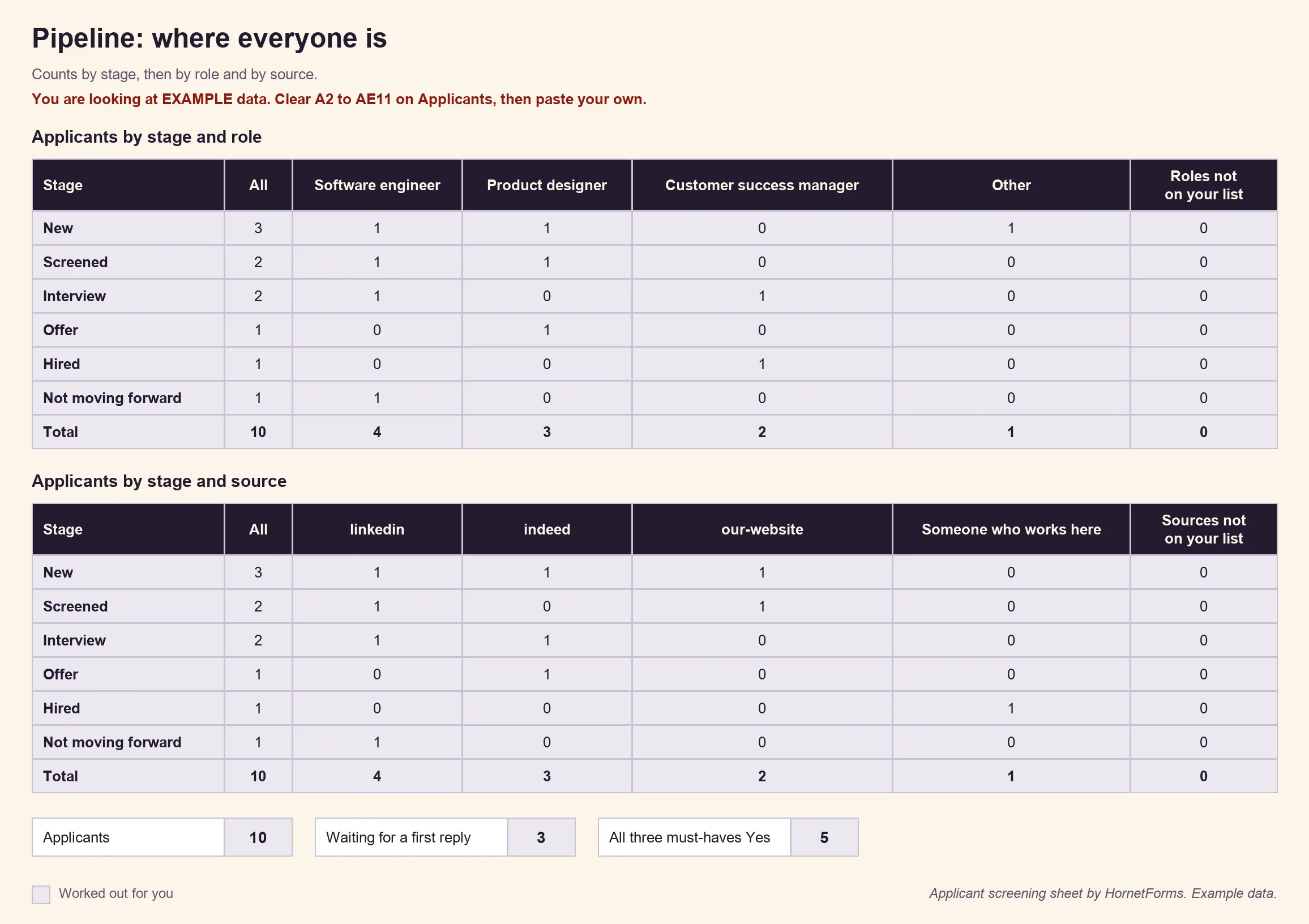
Example data only. Clear the example rows and swap in your own applicants.
A free job application form template#
Our job application form template in HornetForms has the four pages from the table above, with the questions in that order. The CV upload takes one PDF or Word file of up to 10 MB, and the optional samples upload takes up to three files. Each page carries a short "why we ask" line, so applicants see why you want each answer. The template has no date of birth, photo, marital status or health question.
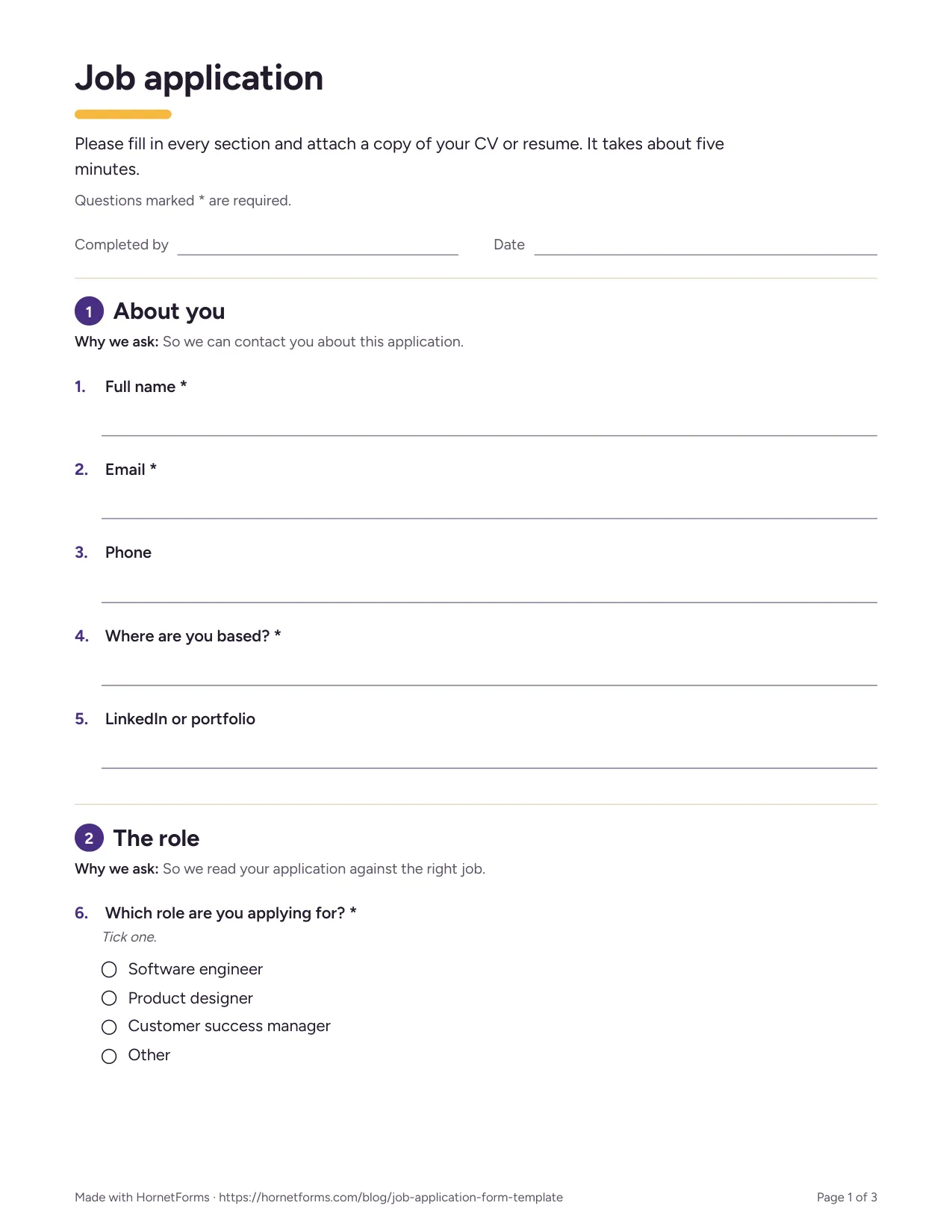
The first page of the printable version.
Two ways to use it:
- Open it in HornetForms. The template page at
forms.hornetforms.com/templates/job-applicationhas a Use this template button that takes you through sign-up and opens your own copy. Already have an account? It's in the template gallery under HR & recruiting. - Download a printable copy for walk-in applicants or a front desk: PDF, US Letter, PDF, A4 or Word (DOCX) if you want to add your logo.
Publish your next job application today#
Copy the job application form template, swap in your roles, and post one tagged link per job board. The Free plan is free forever, with unlimited forms and responses, and the features page has the wider tour. Sign up for free and publish your first job application.