
On this page
Home care agencies never really stop hiring. The US Bureau of Labor Statistics says home health and personal care aides "held about 4.7 million jobs in 2025". It adds: "About 760,500 openings for home health and personal care aides are projected each year, on average, over the decade." That's from its Occupational Outlook Handbook page on these jobs (last modified August 27, 2026, checked October 27, 2026).
That means a steady pile of applications, so your caregiver job application form has to do real work. It should ask what decides a match: shifts, areas, driving and the care someone has given. And it should leave out everything that belongs after an offer.
This guide walks through each question, the ones to skip, and how to get each application to the right person fast. At the end you'll find a free template, printable copies for walk-in applicants and an applicant tracker.
What a caregiver job application form is for#
A caregiver job application form has one job: get the right people to a phone screen quickly. It isn't onboarding. Before you meet someone, you want to know four things:
- Can they work the shifts you need to fill? Mornings, overnights, weekends or live-in.
- Can they reach your clients' homes? The areas they cover, a license, a car and how far they'll travel.
- What care have they given? Their experience and any certificates.
- How do you reach them? A phone number, an email and the way they prefer.
Tax forms, ID and any checks the role needs come after an offer, through your own hiring process. Keeping them out of the first form makes it shorter, and plenty of people apply from a phone.
You might call it a home care job application form or a home health aide job application form. The questions below work for all three, and the template lets applicants pick their role on page one. Hiring for something else? See how to make an application form for any role or program.
Caregiver job application form questions that match people to clients#
Here's what our template asks and what each answer does for you:
| Question | Why you ask | How you use it |
|---|---|---|
| Which role are you applying for? | Caregiver, home health aide (HHA), certified nursing assistant (CNA) and companion roles need different things | Read each application against the right job |
| Which shifts can you work? How many hours a week? | Clients need care at set times | Match people to open shifts, from mornings to live-in |
| Earliest start date | A great applicant who starts in two months fills a different gap | Plan who covers what, and when |
| Which areas can you work in? | Travel time eats into every visit | Send people to homes near them |
| Driver's license, a reliable car, how far they'll travel | Some clients need errands and rides | Match drivers to the clients who need them |
| What kinds of care have you given? Which certifications? | Bathing, transfers and memory care take experience | Match skills to what each client needs |
| Which languages do you speak? | A shared language puts a client at ease | Pair people who can talk to each other |
| Are you comfortable in homes with pets? | Many clients live with a cat or a dog | Avoid a bad first visit |
Shifts, hours and start date#
Use checkboxes for shifts, because most people can work more than one: weekday mornings, weekday afternoons, evenings, overnights, weekends and live-in. Then ask how many hours a week they'd like, in a few ranges. Someone after 20 hours fills a different gap than someone after 40. Once someone is hired, a shift availability form keeps their week up to date.
Where they can work and how they get there#
Give applicants your own areas as checkboxes, with an "Other" box for anything you missed. Counties or neighbourhoods work better than a radius, because people know where they're willing to drive. Then ask three plain questions: a valid driver's license, a reliable car for work, and how far they'll travel, with "Public transport only" as an honest answer.
Care experience and certifications#
Ask how long they've worked as a caregiver, from "New to caregiving" up to five years or more. A checklist of care tasks (bathing and dressing, moving and transfers, meals, medication reminders, memory care, companionship, light housekeeping, errands) shows their range in one glance. A second checklist covers certificates like CNA, HHA, CPR and first aid.
One open question earns its place: "Tell us about someone you enjoyed caring for." It shows how a person talks about the work. The hint under it says "Leave out names and any health details", which keeps the stories general and keeps details you don't need out of your inbox.
Languages and homes with pets#
A checklist of languages helps you match people to clients who speak them. And ask about comfort with pets, not allergies. "Yes", "Cats only", "Dogs only" or "I'd rather not" is all you need to plan visits.
Questions to leave off a caregiver application#
Older paper forms for care jobs often ask for a date of birth, a Social Security number and even medical restrictions. Leave all of that off your caregiver job application form:
- Health and medical questions. The US Equal Employment Opportunity Commission (EEOC) says on its page about prohibited employment policies and practices: "Employers are explicitly prohibited from making pre-offer inquiries about disability." (Checked October 27, 2026.) Questions about health, restrictions or allergies drift toward that line, so the template asks none. It sticks to the work: shifts, areas, driving and experience.
- Date of birth. If you hire only adults, one yes or no question does the job. The template asks "Are you 18 or older?" Check which minimum age applies to your roles.
- Social Security number. You'll need it for payroll once you hire someone, not to decide who gets a call.
- Background check consent. The Federal Trade Commission (FTC) explains how employers use background reports in Using Consumer Reports: What Employers Need to Know (October 2016, checked October 27, 2026). About the notice you give applicants, it says: "This notice must be in writing and in a stand-alone format." It also says: "The notice cannot be in an employment application." And: "Get written permission from the applicant or employee."
- Criminal history. The rules on when you may ask differ by state and city, so the template leaves it out. Check your local rules before you add anything.
Instead of a consent box, the template ends with one plain line: "If we offer you a job, we'll walk you through the next steps, like any checks your role needs, separately."
Good to know: this is general information, not legal advice. Treat the application as the first screen only. Run any checks your roles need later, with the applicant's separate written consent and through a proper process, and check the rules where you hire before you publish the form.
Keep it short enough to finish on a phone#
Many applicants will open your caregiver job application form on a phone, maybe on a break between visits. So the template splits the questions into four short pages with a progress bar, and most of them are taps rather than typing. The printable copy also puts a "why we ask" line at the top of each section.
A resume is welcome but optional. Not every good caregiver keeps one up to date, and you'll learn more on a phone call anyway. In HornetForms, applicants open the link and attach a resume or up to three certificates, with no account and no sign-in. Each file can be up to 10 MB on the Free plan, and Pro and Business have no plan cap on file size.
If you're weighing this against Google Forms for file uploads, read a fair comparison with Google Forms or see the Google Forms comparison page.
Your applicants may not all read English first. On every plan, the buttons and messages people see on a form can show in 12 languages. To translate your own questions too, form translations into up to 10 languages come with Pro and Business.
Show each applicant only the questions that fit#
A caregiver job application form for several roles gets long fast if everyone sees everything. Two logic rules in the template keep it tight:
- Certifications become required for HHA and CNA roles. If someone applies for one of those roles, they must answer "Which certifications do you hold?" before they move on. Companions and new caregivers can skip it.
- No license, no car question. If someone answers No to "Do you have a valid driver's license?", the car question disappears.
You can add your own rules the same way. For example, show a follow-up about live-in work only to people who tick Live-in. Show, hide and require rules work on every plan, and our logic, piping and calculations guide explains how they fit together. Not sure whether a question should be a checklist, a dropdown or a short answer? Here's which question type to pick.
Get applications to the right person fast#
A quick reply matters when someone may be weighing more than one job, so send each application where you'll see it:
- An email for every new application to you or your hiring inbox, and a confirmation email to the applicant with your own subject and text, on every plan.
- A Google Sheets row or a Slack message per application, built in on every plan. Here's how to send form responses to Google Sheets, Slack or Notion.
- A Calendly or Cal.com question for the phone screen, so shortlisted people pick a slot themselves. Bookings appear in the response.
- Viewer access for coordinators (Pro and Business): invite them to the workspace with the viewer role, so they can read applications without editing the form.
- Auto-delete rules (Pro and Business): delete old responses after a set time. Check your own records rules before you choose one.
To see which job board sends the best people, the template has a hidden field called source. Post a slightly different link in each place:
https://forms.hornetforms.com/f/<your-slug>?source=indeed
https://forms.hornetforms.com/f/<your-slug>?source=facebook
https://forms.hornetforms.com/f/<your-slug>?source=job-fair
Applicants never see the source value, but it arrives with each response and as its own column in Google Sheets. Every plan includes QR codes too, so you can print the job fair link on a flyer. And a busy month won't run into a wall: HornetForms has unlimited responses on every plan. Here's why response caps bite on other tools.
Track applicants in a free spreadsheet#
The free caregiver applicant tracker opens in Excel and Google Sheets. Download the CSV of your caregiver job application form responses from HornetForms and paste it into the Applicants tab. The tracker finds each column by its header name, so a reordered export still works.
Then fill in the yellow columns as you go:
- Stage: New, Phone screen, Interview, Offer, Hired or Not now.
- Reply date: the day you first got back to them.
- Four must-haves of your own: shifts fit, area fits, can reach clients, spoke to references. Pick Yes or No once you've checked each one.
The Pipeline tab counts people by stage and role, flags anyone waiting too long for a first reply (you set the number of days) and counts applicants by source. On the Shift match tab, pick a shift and an area to list everyone still in the running who ticked both. Your shift and area names live on the Lists tab, so rename them to match your form.
The tracker has no columns for date of birth, age, Social Security number, health or background checks, and nothing in it scores or ranks a person. There's also a CSV with just the column headers.
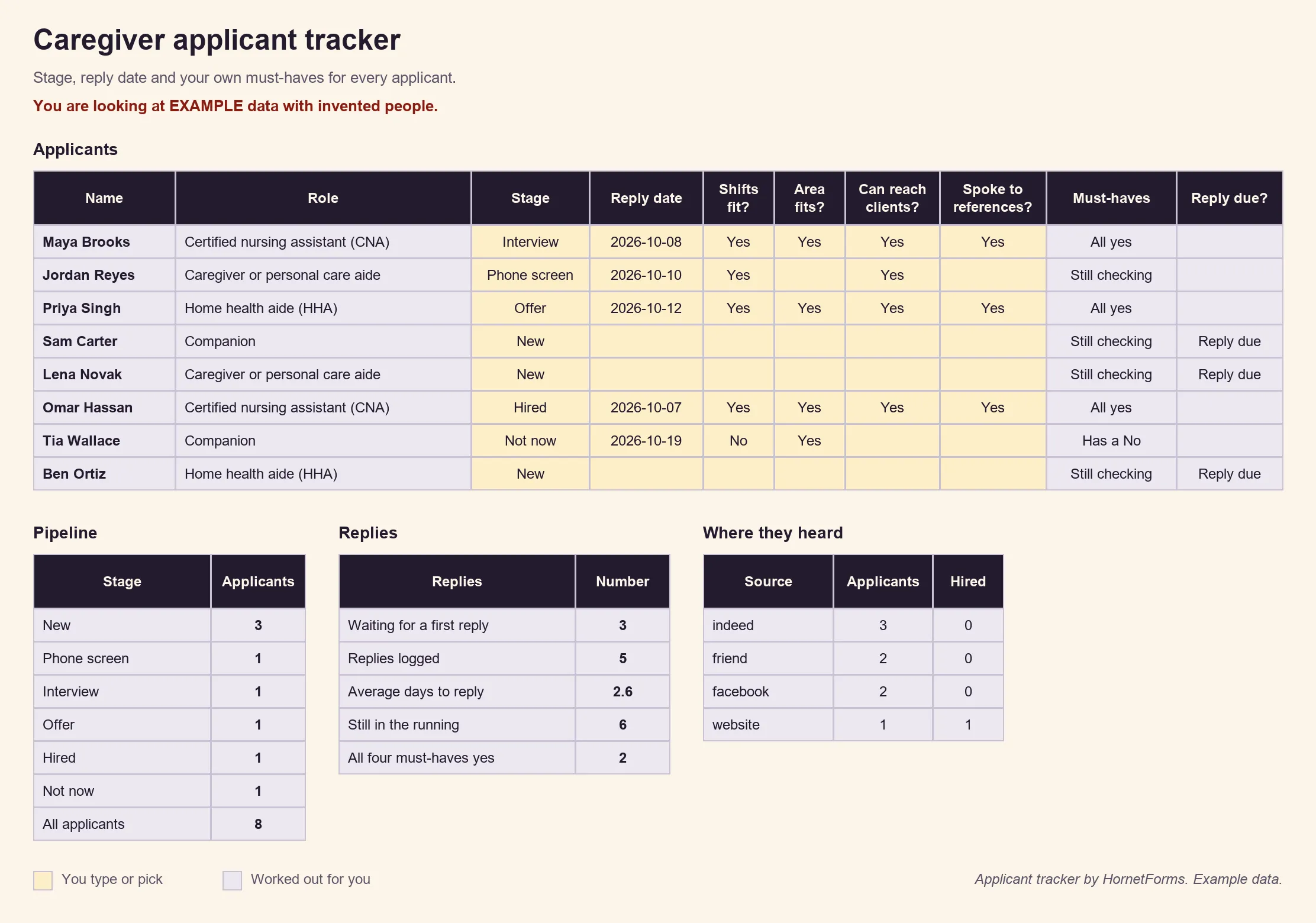
EXAMPLE data with invented people. Clear the example rows before you paste your own applicants.
A free caregiver job application template#
Our caregiver job application form template has the four pages from this guide: About you, Shifts and areas, Experience and skills, and Resume and references. It includes the two logic rules above, the hidden source field, and a thank-you screen that says you'll get back to applicants within a few days. It has no date of birth, Social Security number, health question or background check consent.
Three ways to use it:
- Open it in HornetForms. The template page at
forms.hornetforms.com/templates/caregiver-job-applicationhas a Use this template button that takes you through sign-up and opens your own copy. Rename the North, South, East and West areas to your own counties before you share it. - Print it for walk-in applicants and job fairs. Download the caregiver employment application form as a PDF, US Letter, a PDF, A4 or a Word (DOCX) file to add your logo.
- Track it with the caregiver applicant tracker from the section above.
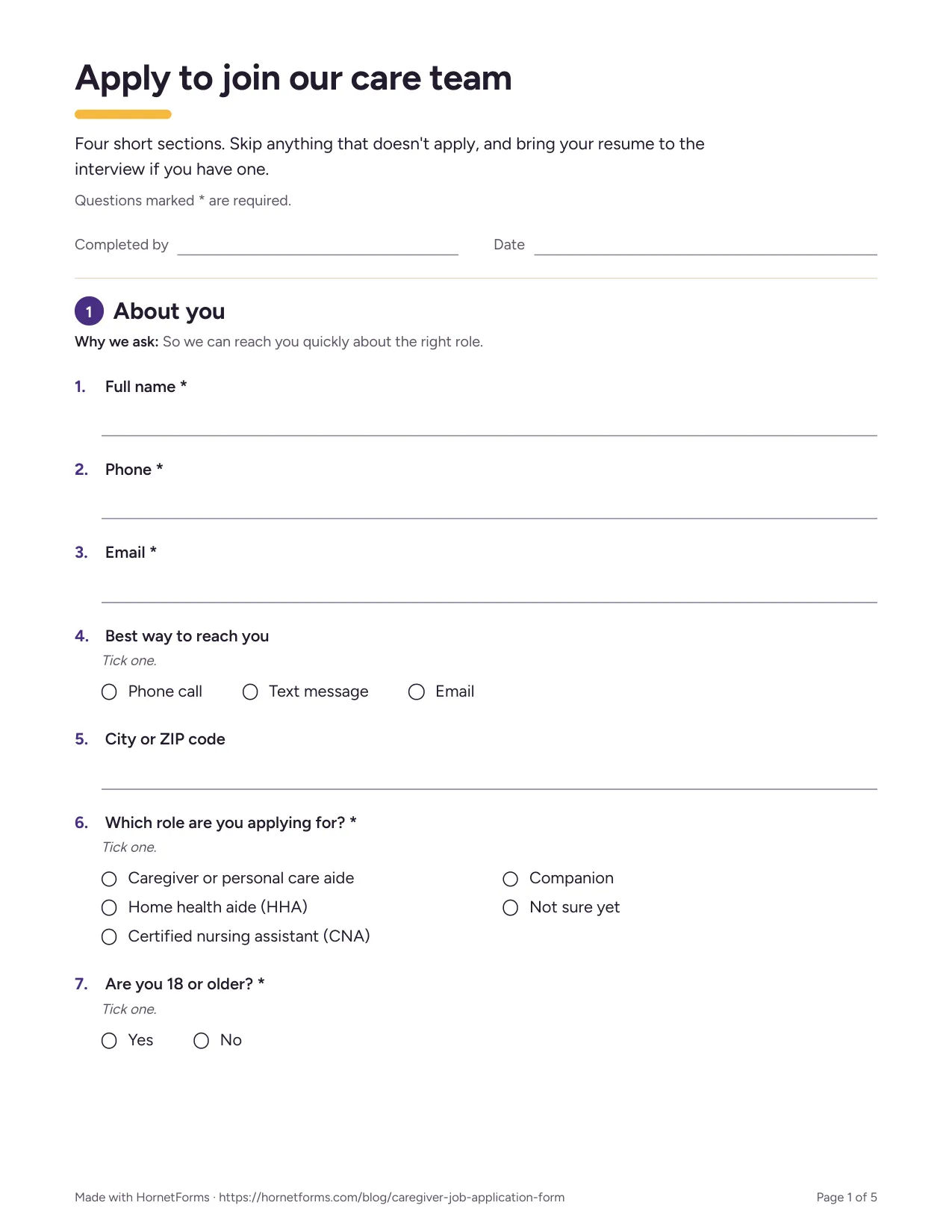
The first page of the printable version.
Post it with your next job ad#
Copy the template, rename the areas, and post one tagged link per job board. The Free plan is free forever with unlimited forms and responses. The features page has the wider tour, and the pricing page shows what Pro and Business add. Sign up for free and publish your caregiver job application form today.