
On this page
"Which coffee are you?" "What kind of traveler are you?" People click on these because the answer is about them. Then they share it, because the answer is about them. A good personality quiz is one of the few forms people fill in for fun.
This guide shows how to make a personality quiz that works the way people expect. Every answer counts, the highest total wins and each person lands on their own result page. There's a free planner (Excel) that checks your scoring and writes out every logic rule, plus a sample quiz you can import.
How to make a personality quiz in five steps#
Here's the whole job on one screen. The rest of the guide takes each step in turn.
- Pick your results. Three to six, each with a short name.
- Write the questions. Six to 10, with one answer per result on every question.
- Add up the points. One calculated field per result, plus one logic rule per answer.
- Pick the winner. One lead field per result and one jump rule per result, each sending people to a named ending.
- Share it. A link, a QR code or an embed, with an email question if you want to grow a list.
You don't need a separate personality quiz maker. A form builder with calculated fields, endings and logic does the job, and HornetForms has all three on the Free plan.
What a personality quiz is (and what it isn't)#
A personality quiz sorts people into one of a few results based on what they pick. Nobody gets anything wrong. Every answer simply leans towards one result: "Sleeping in" leans Relaxer, "Hiking a trail I've never tried" leans Adventurer. Add up the leanings and the biggest pile is the result.
A trivia test checks what you know. A personality quiz asks "Which of these sounds like you?". You only need a clear map from answers to results. (Building a trivia test or a knowledge check instead? HornetForms' quiz mode marks the right answers, scores each response and applies a pass mark for you, on every plan. See the features page, or our guide to building a graded quiz.)
It also isn't a psychological test, and it's worth saying so. Research scales measure traits on a sliding scale and avoid boxing people in. The International Personality Item Pool is a public set of research items. Its team puts it plainly: "we caution against interpreting IPIP scale scores in terms of categories or sorting respondents into groups based on their scores" (IPIP, Interpreting individual IPIP scale scores, accessed 28 October 2026). Sorting people into groups is exactly what a fun quiz does. So keep it light, and add a line like "Just for fun" on the result page.
Pick 3 to 6 results first#
When people ask how to make a personality quiz, they usually start with the questions. Start at the end instead. Decide on your results before you write a single question, because every question has to offer a path to each one.
Three to six results is the comfortable range:
- Two feels like a coin toss.
- Three to four is easy to balance, and each person's result feels earned.
- Five or six works if your audience loves detail, but every question needs five or six answers.
Give each result a short name (one or two words) and a one-line description. The name becomes an ending name and part of two calculated field names, so "Planner" beats "The meticulous trip planner".
Our sample quiz, "What kind of traveler are you?", has four:
| Result | One-line description |
|---|---|
| Planner | You like a plan and you love a list. Your trips run smoothly because you did the homework. |
| Adventurer | You say yes first and work out the rest on the way. |
| Relaxer | A trip is a chance to slow down. Your best travel days start without an alarm. |
| Connector | People make the trip for you. You come home with new friends and a full camera roll. |
Write each description as something the reader would be happy to post. Nobody shares "You never finish anything". Running a business? Tie each result to something you offer; our lead magnet ideas for coaches post has quiz ideas like that.
Write 6 to 10 questions where each answer points to a result#
Now the questions. Six to 10 is plenty: enough for a result to feel earned, short enough to finish on a phone.
The rule that makes scoring simple: every question gets one answer per result. With four results, each question has four answers, and each answer points to exactly one result.
| Question | Planner | Adventurer | Relaxer | Connector |
|---|---|---|---|---|
| It's Saturday morning on a trip. What are you doing? | Checking off my list | Hiking a trail I've never tried | Sleeping in | Brunch with the whole group |
| Pick a travel motto | A plan is a gift to future me | Say yes first | Rest is part of the trip | The more the merrier |
A few tips:
- Mix the order of answers. If the Planner answer always comes first, people spot the pattern.
- Make every answer appealing. If one option sounds dull, nobody picks it and that result never wins.
- Use multiple choice. One answer per question keeps the maths clean. Picture choice works too: each option can carry an image, which suits "Pick a beach" questions. Keep the text label clear. The W3C notes that "Images must have text alternatives that describe the information or function represented by them" (W3C WAI, Images Tutorial, accessed 28 October 2026).
Want a head start? Download the sample quiz import file (CSV). It holds all eight travel questions with their four answers, plus a First name and an Email question. In HornetForms, the free CSV import turns each column into a question and spots the answer choices from the example rows. It brings in the questions and choices only. The calculated fields, endings and logic rules come next, and you add those in the editor. The import also names the form after the file, so rename it to your quiz title.
New to building forms from scratch? Our guide on how to create an online form covers the basics, and every question type and when to use it explains multiple choice and picture choice.
Score it with calculated fields (one per result)#
This is the step most guides on how to make a personality quiz skip. In HornetForms, a calculated field holds a number that respondents never see. You'll add one per result.
- Add the points fields. At the end of your last question page, below the last question, type
/Calculated field. Name itPlanner_points. A calculated field's name can use letters, numbers,_and-, but no spaces, or the form won't publish. In its settings, keep the type as Number and the initial value as 0. Repeat for every result. - Add a scoring rule for each answer. Open the first question's settings, go to Logic and press Add rule. Set the condition to "is" and pick the answer "Checking off my list". Then set the action to Calculate, pick
Planner_points, choose Add and type 1. - Repeat for every answer. Four results times eight questions means 32 short rules. Each says "When this question is this answer, add 1 to that result's points."
Why at the end of the last page? A calculated field only counts answers that come before it in the form. Put it at the bottom and it sees every answer. Get this one detail right and you've solved the hardest part of how to make a personality quiz that adds up.
For more on formulas and calculations, see our guide to conditional logic, answer piping and calculations.
Send people to their result with named endings#
Each result needs its own result page. In HornetForms that's a named ending, and a form can have up to 20 of them.
First, add a thank-you page with /Thank-you page. Then type /Ending page once per result and give each one its result's name in the Ending name box. Write a heading and a short paragraph on each.
Now the important part: picking the winner. The form needs to know which result has the most points. To do that, add one more calculated field per result, a lead field:
- Add a calculated field called
Planner_leadbelow all the points fields. - In its Formula box, use Insert field to build:
@Planner_points - max(@Adventurer_points, @Relaxer_points, @Connector_points). - Do the same for each result, each time subtracting the highest of the others.
A lead of 0 or more means that result is on top, or tied for the top. Then add one jump rule per result. Open Planner_lead, go to Logic and add a rule: "When Planner_lead is at least 0". Set the action to Jump to, with the Planner ending as the destination. Repeat for each result.
Good to know: the form checks jump rules in the order you added them and follows the first one that matches. So a tie goes to the result whose rule you added first. Add the ending rules in the order you want ties broken.
That tie rule matters more than you'd think. We ran all 65,536 ways to answer the sample quiz through the same logic. With people answering at random, Planner (first in line) came out top about 33% of the time and Connector (last) about 19%, because ties keep going to the first rule. Two ways to soften it:
- Put the result you'd most like as a default first. It wins every tie it's part of.
- Make one question worth 1.5 points. Add 1.5 instead of 1 on every answer to one question. In the sample quiz that cut ties from 25% of answer paths to about 5%, and evened out the results to between 24% and 26% each. An odd number of questions doesn't help much on its own: with four results, 3, 3, 1 and 0 is still a tie.
The free planner's Test run tab shows this for your own quiz. Pick an answer for each question and it works out each result's points, its lead and the ending the form would show.
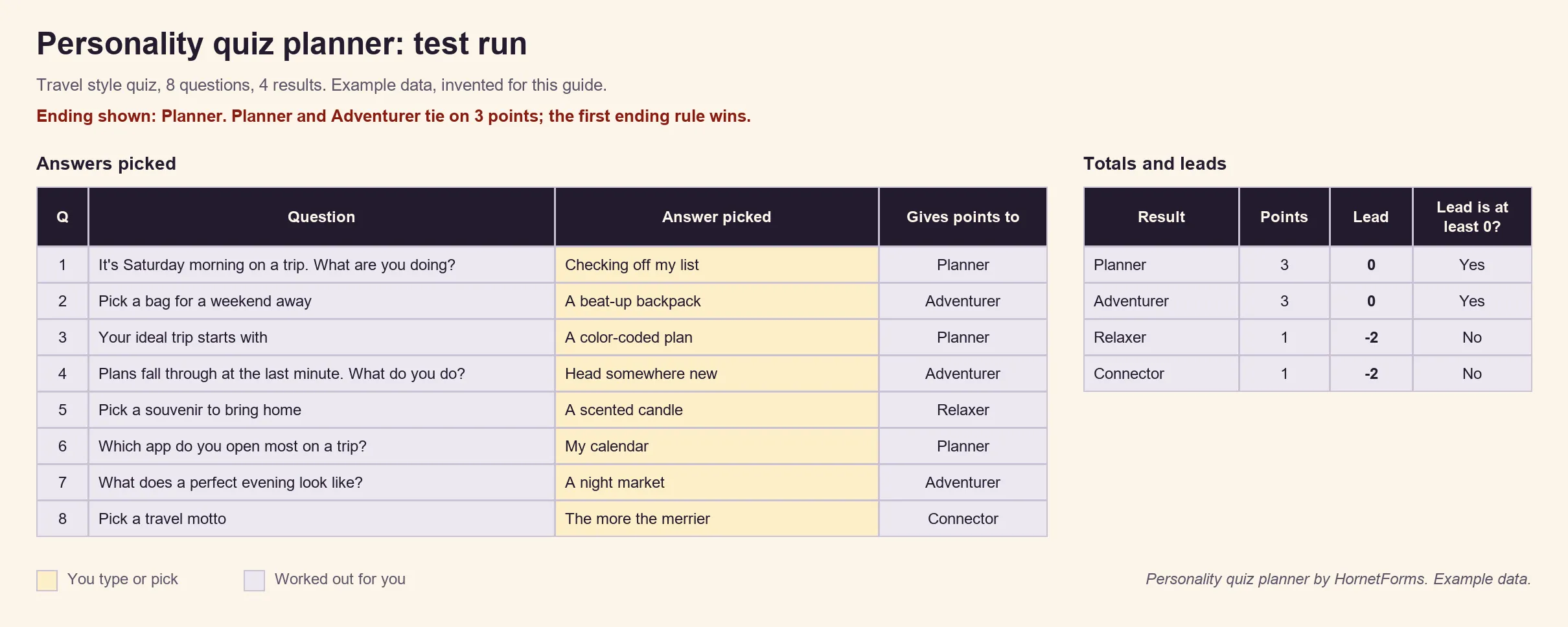
Example data only, invented for this guide.
Make the result page worth sharing#
The result page is the whole reward, so make it feel personal. Anyone searching for how to make a personality quiz that people share is really asking how to make this page good.
- Pipe in the score. Type
@in the ending text and pick a calculated field to show its value. "Your result: Planner. You scored @Planner_points out of 8." You can pipe calculated values into a named ending, so each person sees their own number. - Lead with the name. Put the result name in the heading, then the one-line description and one fun detail.
- Give a next step. A tip, a related post, or a link to what you offer.
- Say it's for fun. One short line keeps expectations honest.
Want the whole thing to feel like a quiz? The One question at a time layout and nine theme presets work on every plan. A logo and cover image come with Pro and Business (see the pricing page).
Share your personality quiz: link, QR code or embed#
Once you've tested it (take the quiz yourself and aim for each result at least once), share it. Making a personality quiz for free is the easy part. Getting it in front of people is the work:
- A link. Paste it in a newsletter, a bio or a group chat. Respondents never need an account to answer.
- A QR code. The Share tab gives you one as a PNG or an SVG for posters, menus or event slides. Hosting a trivia night too? See how to run a trivia night from people's phones.
- An embed. Put the quiz on your site inline, as a popup, as a slider or full page.
Tracking where your quiz traffic comes from? Our post on how to capture UTM parameters in forms shows how.
Use it to grow a list (email question, confirmation email you switch on)#
A personality quiz is a natural lead magnet. People want their result, and many will leave an email to get more.
Add an email question near the end of the quiz (the sample import file already has one). Questions are optional by default, and you can switch on Required for each one.
Then send each person something after they finish. In the notification settings, switch on the confirmation email to respondents and pick your email question as the address. HornetForms sends nothing until you pick one. Write your own subject and body. You can add a link to your download or guide as [text](url), and it arrives clickable. You can also turn on an email to yourself for each new response.
The CSV export of your responses works on every plan, and Excel comes with Pro and Business. HornetForms gives you unlimited responses within fair use, so a quiz that takes off won't hit a cap. If you've run into caps elsewhere, here's what happens when your form hits the response limit on other tools.
Download the personality quiz planner#
The free personality quiz planner (Excel) does the planning and the checking:
- Results tab. Name up to six results in tie-breaking order. It writes the name of each points field, each lead field and the exact lead formula to type.
- Scoring grid. Up to 10 questions with up to six answers each. Pick the result each answer points to, and it writes the logic rule to add for every answer.
- Totals check. It flags any question that skips a result and any result no answer can reach, and warns when one result has fewer possible points than the others.
- Test run. Pick answers and see the points, the leads and the ending shown, ties included.
- Logic rules. Everything to add in the editor, in order: points fields, lead fields, scoring rules, ending pages and ending rules.
If you're working out how to make a personality quiz for a class, a launch or a lead magnet, start here. It comes filled with the travel quiz as example data. There's also a scoring grid CSV and the sample quiz import file from earlier.
Make your first personality quiz this week#
That's how to make a personality quiz from start to finish. Results first, then one answer per result on every question. Add a points field and a lead field per result, and a jump to each named ending. Test every result, then share the link.
HornetForms is free forever on the Free plan, and calculated fields, endings and logic work on every plan. There's more on the features page, and if you're coming from Google Forms, here's how HornetForms compares. Sign up for free and make your own personality quiz today.