
On this page
Someone just filled in your form and pressed Submit. What they see next decides whether they feel looked after or left hanging. A plain "Thanks!" works, but it doesn't say if the form went through, what happens now or when.
This post gives you 12 thank you page examples by form type: contact, quote, registration, application, donation, download, survey and RSVP. Each one comes with wording you can copy. Then we cover different endings for different answers, redirects to your own page, and eight confirmation email templates. Everything is in a free swipe file (Word and PDF) at the end.
What a thank you page must do#
Two public design standards agree on the basics. The US Environmental Protection Agency's web standard for thank-you pages says: "For every form, there should be a follow-up page thanking the reader for submitting the information and offering links to continue browsing." It adds: "At a minimum, in the main body of the page, offer a link back to the form or to the web area’s homepage." (EPA, Web Standard: Thank You Page, accessed 28 October 2026)
The UK government's design system calls the same thing a confirmation page. In its words: "Confirmation pages reassure users that they have completed a transaction and helps them understand what to expect next." Its checklist includes "details of what happens next and when", "contact details for the service" and "links to information or services that users are likely to need next" (GOV.UK Design System, Confirmation pages, accessed 28 October 2026).
Put together, a good thank you page after form submission does four jobs:
- Confirms it worked. A heading like "Application received" beats a lone "Thanks!".
- Says what happens next, and when. A day, a date or a number of working days.
- Gives a way to reach you. An email address or a phone number.
- Offers one useful next step. A link, a video, a map or a calendar to book a call.
Each of the thank you page examples below does all four.
12 thank you page examples by form type#
Here are the thank you page examples, one per common form. Swap the parts in curly braces for your own details. Where you see @First name, that's an earlier answer piped into the text (more on that further down).
| Form | Heading | Body and next step |
|---|---|---|
| 1. Contact form | Thanks, @First name. We've got your message. | We reply to every message within one working day, and usually sooner. If it can't wait, call us on {phone number}. Link: "Read the answers to common questions". |
| 2. Quote request | Your quote request is in | Based on your answers, a rough estimate is $@Estimate. This isn't a final price. We'll email you a written quote within two working days. |
| 3. Event registration | You're registered for {event name} | See you on {date} at {time}, at {venue}. Link: "Add it to your calendar". A map of the venue sits below. |
| 4. Call or consultation request | One more step: pick a time | Thanks, @First name. Choose a time below for your free 15-minute call. A booking calendar sits below. |
| 5. Job application | Application received | Three numbered steps: we read every application by {date}; if we'd like to talk, we'll email you; either way, we'll let you know by {date}. |
| 6. Volunteer application | Thanks for offering your time | {Coordinator name} will get in touch within {number} days. Link: "what a first shift looks like". |
| 7. Donation | Thank you for your gift | Your support helps {one concrete thing}. We'll send a written acknowledgment for your records by {date}. A one-minute thank-you video sits below. |
| 8. Download or lead magnet | Your {guide name} is ready | Link: "Download {guide name} (PDF)", plus the guide's cover image linked to the same file. |
| 9. Customer survey | Thanks for the feedback | We read every answer. Each month we pick one thing to fix and post what changed on our updates page. |
| 10. Survey, low score | Sorry we let you down | {Name}, our {job title}, reads every low score. If you'd like a reply, email {address} and mention the date of your visit. |
| 11. RSVP yes | Great, see you there! | We've got you down for @Guests guests. {Event name}, {date}, {time}, {address}. A map sits below. |
| 12. RSVP no | Sorry you can't make it | Thanks for letting us know. We'll share photos after the event on {page name}. |
A few patterns run through all 12 thank you page examples:
- The heading does the confirming. "Application received" and "You're registered" answer "did it work?" before anyone reads a word more.
- Every promise has a time. "Within two working days" sets an expectation you can meet. "Soon" sets one you can't.
- One next step, not five. Each example offers a single link, video, map or calendar.
- Rough numbers say they're rough. Example 2 shows an estimate and says plainly that it isn't the final price.
If you're building the form these pages sit behind, our lead capture form template already ends with a thank-you screen that points people to their inbox. For what to offer in the first place, see lead magnet ideas for coaches.
Thank you message after form submission: lines to copy#
Not every form needs a full page. Sometimes you need one good line. Mix and match these:
To confirm it worked
- "Got it. Your request is in."
- "You're on the list for {event name}."
- "Your application is with us."
To say what happens next
- "We'll reply by email within one working day."
- "{Name} will call you on {day} to talk it through."
- "We'll let everyone know by {date}, whatever the answer."
To offer a next step
- "While you wait, read how we work: {link}"
- "Want to skip the wait? Book a call below."
- "Know someone else who'd like this? Send them this form: {link}"
Keep the tone the same as the form. A playful quiz can end with a joke. A job application or a donation should sound warm and plain.
Different endings for different answers#
One thank-you message rarely fits everyone. Someone who RSVPs "No" doesn't need the venue map. Someone who gives you one star out of five doesn't want a cheery "Glad you enjoyed it!". So write a separate ending for each path that needs its own words.
In HornetForms, a form can have up to 20 endings, on every plan. A logic jump can go to a named ending: the person skips the rest of the form and sees that ending. Two of the thank you page examples above, 11 and 12, are really two endings of one RSVP form. A logic rule sends everyone who answers "No" straight to the "Sorry you can't make it" ending, so they never see the guest count or meal questions. Example 10 works the same way for low survey scores.
You can also make one ending say different things to different people:
- Pipe an earlier answer. Type @ in the thank-you text and pick a question, so "Thanks, @First name" shows the person's own name.
- Pipe a calculated value. You can pipe a calculated value into the thank-you screen or a named ending, the same way. That's how the quote example shows a rough estimate. A logic condition can also test a calculated field, so you can send people to a different ending based on their score.
Our guide to conditional logic, answer piping and calculations shows how to set up the rules and the sums.
What to put on the thank you page after form submission#
In HornetForms, the thank-you screen and each named ending are built from content blocks. You add them with the "Thank-you page" and "Ending page" entries in the / menu, then fill the screen with blocks. You can use:
- Headings and text, with bold, italic, underline, colors and links
- Bulleted and numbered lists, like the three steps in the job application example
- Images, with alt text, an optional caption and an optional link
- Dividers, to separate the confirmation from the extras
- Embeds from YouTube, Vimeo, Loom, Calendly and Google Maps
Every one of the thank you page examples in this post uses only these blocks.
Your call to action is a text link or a linked image. For a download, link the words "Download the guide (PDF)" and link the cover image to the same file. Write alt text that says where the image goes. The W3C's guidance on images inside links says: "The text alternative for the image should convey the action that will be initiated (the purpose of the image), rather than a description of the image." (W3C WAI, Functional Images, accessed 28 October 2026) So "Download the pricing guide (PDF)" beats "Book cover, blue". Our accessible forms checklist has more on alt text and links.
A thank-you screen left empty shows a default thank-you message, so you're never stuck with a blank page. But the default can't say what happens next for your form. That's your job.
Thank you page ideas beyond "thanks"#
Stuck for what to add? These all use the blocks above:
- A booking calendar. A Calendly embed turns a contact form into a booked call.
- A short video. A 60-second Loom or YouTube clip from the founder, the coach or the charity's director.
- A map. A Google Maps embed under an event registration or RSVP.
- A link to share. "Know someone who'd like this? Send them this form," with the words linked to your form.
Redirect to your own page instead#
The message doesn't have to live inside the form. Sometimes you want people to land on your own website: a fuller thank-you page, a download page or a booking page. Set the form's redirect URL and everyone who finishes the form goes there. That includes people who end on a named ending.
Logic can redirect too, and a logic redirect wins over the form-wide redirect URL. So you can send people who chose "Business" to one page and everyone else to another.
If your form takes a payment, set the form's redirect URL. When people pay on your form's own page, Stripe returns them through HornetForms and then on to your page.
Which should you pick? Keep the thank-you screen, and any of the thank you page examples above, when one short message does the job, or when you want a different message per ending without building pages on your site. Redirect when your site's page does more, like a page your analytics already track.
Confirmation email templates#
A thank-you screen disappears when someone closes the tab. A form confirmation email stays in their inbox. Send one whenever people will need the details later: event dates, a download link, or proof that an application arrived.
In HornetForms, the confirmation email to respondents starts switched off. To send it:
- Add an email question to the form.
- In the form's notification settings, turn on the email to respondents and pick that email question as the address. With no question chosen, nothing is sent.
- Write your own subject (up to 200 characters) and body (up to 5,000 characters).
The body supports simple formatting: **bold**, *italic*, blank lines between paragraphs, and links written as [text](url). Links that start with http, https or mailto arrive clickable. So you can add a link to your download in the confirmation email, or a map link for an event.
The email can also insert the form title, the Submission ID and number calculations from the insert menu. With a verified email (email verification is on Pro and Business), it can also insert their answers. These templates don't assume that, so they open with "Hi there" rather than a name. If people may write to you about an application, include the submission ID in the confirmation email, so you can match it to the Response ID in your export.
Here's one confirmation email template written out in full, for an event:
Subject: You're registered: {event name} on {date}

Hi there,

You're registered for **{event name}**.

When: {date}, {start time} to {end time}

Where: {venue and address}. [Get directions]({map link})

[Add it to your calendar]({calendar link})

Can't come after all? Email [{email address}](mailto:{email address}) so we can give your place to someone else.

See you there,
{Your name}
The swipe file has all eight, with these subject lines:
| Form | Subject line |
|---|---|
| Contact form | We got your message |
| Quote request | Your quote request and a rough estimate |
| Event registration | You're registered: {event name} on {date} |
| Application | We received your application |
| Donation | Thank you for your gift to {organization name} |
| Download or lead magnet | Here's your {guide name} |
| Survey | Thanks for your feedback |
| RSVP | Your RSVP for {event name} |
Good to know: the confirmation email goes to the person who answered. To hear about new responses yourself, turn on an email to yourself for each new response in the same settings. It starts switched off too.
If you send surveys out by email in the first place, our guide to sending an email survey covers the invitation side.
Free thank you page swipe file#
The free thank you page and confirmation email swipe file (Word) holds all 12 thank you page examples from this post and all eight emails in one place. It's six pages:
- A checklist for every thank you page, with the EPA and GOV.UK quotes
- A box on what a HornetForms thank-you screen can hold, so you know which blocks to use
- 12 thank-you messages, each with a heading, body lines and a note on what to add (a map, a calendar, a video or a linked image)
- Eight confirmation emails, with subject lines, body text and the formatting already in place
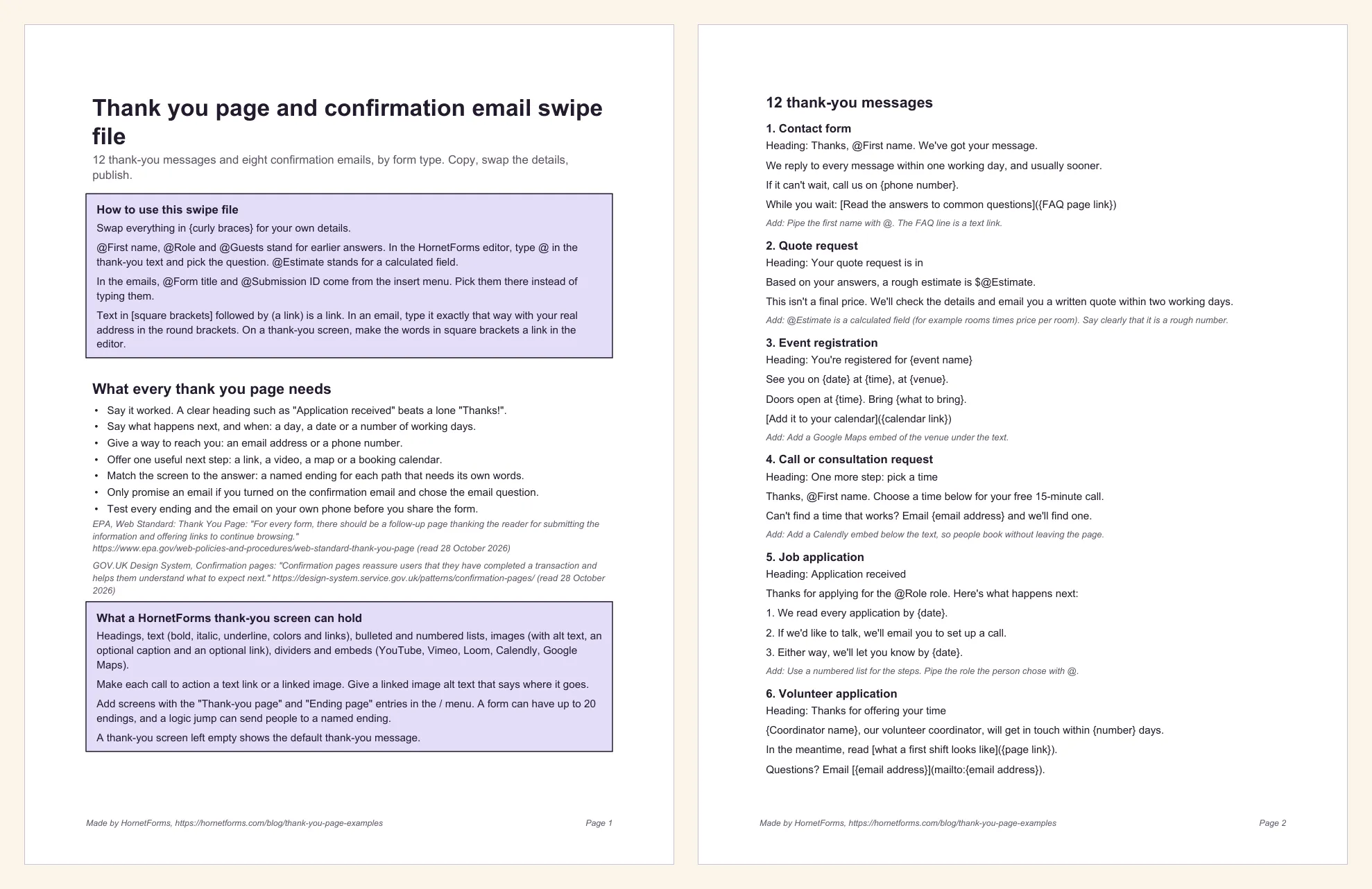
Prefer to print it? Get the swipe file as a PDF (US Letter) or the A4 PDF.
Write your thank you page today#
Open your busiest form and read its thank-you screen as if you'd just filled it in. Does it say it worked, what happens next and when, and how to reach you? If not, pick the closest of these thank you page examples and swap in your details. It takes five minutes.
If you're still planning the form itself, start with how to create an online form and our form design best practices. Then pick the question type for each answer you need.
HornetForms gives you thank-you screens, up to 20 named endings, redirects and confirmation emails on the Free plan, which is free forever, with unlimited responses within fair use. The pricing page shows what Pro and Business add. Sign up for free and give your next form a thank you page worth reading.